



The first thing you notice inside OpenAI's Ads Manager is how much it looks like something you've already used. Campaign, ad group, ad. Objective, location, daily budget. If you've spent any time in Google Ads, your hands know where to go before your brain catches up.
That familiarity is the most misleading thing about it.
We built our first ChatGPT Ads campaign this summer for a B2B SaaS client in the SMS marketing space. It was an awareness push across ten industry segments, running to the US and Canada. The build itself went quickly, because the keyword research was already sitting there waiting to be used. It's everything after the build that turned out to be the hard part.
You can construct a ChatGPT Ads campaign using almost everything you know about paid search. You just can't optimize one that way yet.
Here's where that plays out.
Campaigns hold ad groups. Ad groups hold ads. So far, so Google.
The difference lives at the ad group level. Instead of keywords, you write context hints: plain-language descriptions of the conversations where your product would genuinely be useful. OpenAI's documentation is refreshingly blunt about what they are and aren't. Hints describe the conversations, topics, or keywords where their products or services may be relevant, and they are not exact-match keywords and do not guarantee delivery in specific conversations.
Read that second half again. There's no match type. There's no negative list. You are describing a situation and asking a model to decide when your ad is helpful.
We started from keyword research. One segment alone carried nine near-identical variations of mass texting for nonprofits. In ChatGPT Ads, all nine of them collapsed into a single hint that read something like this:
Organizations comparing nonprofit text messaging platforms and SMS marketing tools. Users looking for affordable, easy-to-use software to improve donor engagement, increase event attendance, boost fundraising efforts, automate communications, and measure campaign performance.
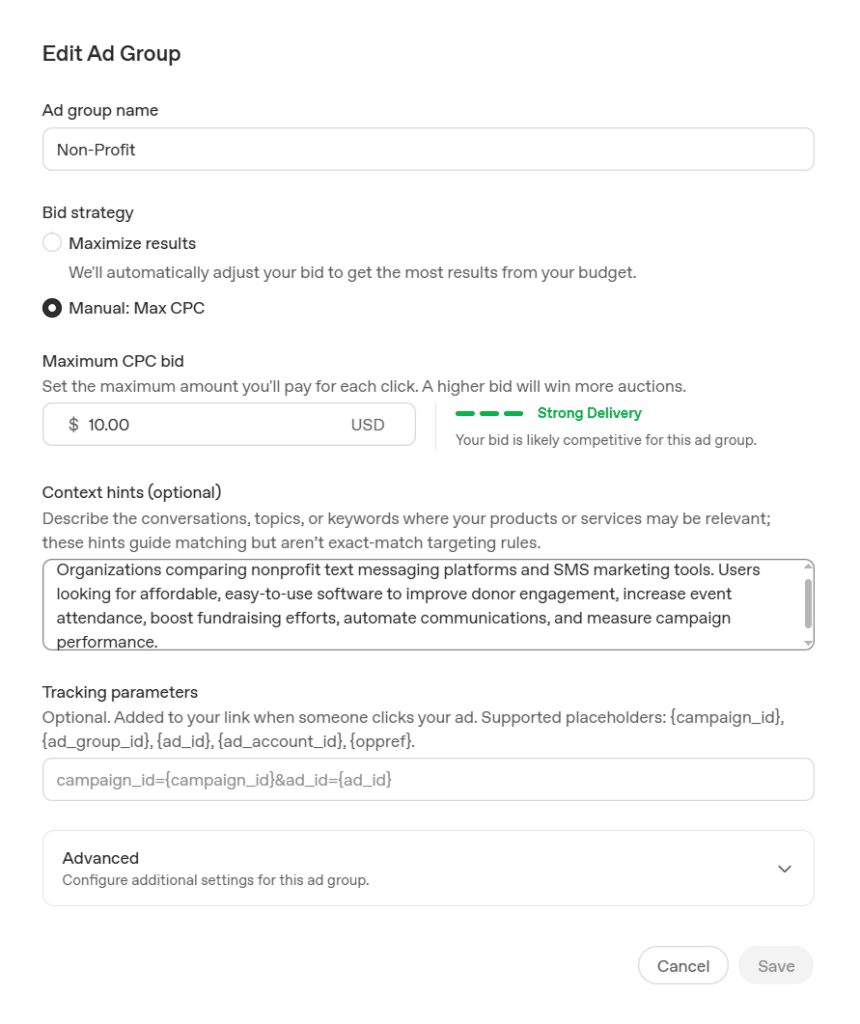
Same research, completely different output. The keywords stopped being used for direct targeting and became source material. That's the reframe, and it's most of the job: your keyword list still tells you what people want, it just no longer tells the platform anything.
The mental shift that actually helped: stop asking what words do I want to match and start asking what is someone working on right before my product becomes relevant? A nonprofit director doesn't type "mass texting for nonprofits" into ChatGPT. She says her donor emails aren't getting opened and asks what to do about it.
Buyers are discovering, evaluating, and comparing brands through AI. 97th Floor CEO, Paxton Gray, is joining WordPress VIP CMO, Jodi Cerretani, for a three-part series on what that means for enterprise brands.
Ads in ChatGPT aren't shown to Plus, Pro, or Business subscribers, or to accounts the system identifies as under 18. Your reach is the free and Go tiers.
For consumer brands, that's a large and perfectly good audience. For B2B, it deserves a second look. A meaningful chunk of the buying committee you're trying to reach is sitting on a company-provisioned Business seat, which means they are structurally unable to see your ad. That doesn't make ChatGPT Ads a bad B2B channel. Plenty of decision-makers are on personal free accounts, and plenty of research happens before procurement gets involved. It does mean the total addressable audience is not "everyone who uses ChatGPT," and pretending otherwise will make your forecasts wrong.
Fifty characters for the headline. One hundred for the description. A square image, minimum 256 x 256. That's the whole ad.
It's tighter than it sounds, because ads can truncate well before those caps depending on placement. In practice, we wrote to about half the limit and treated anything past that as a bonus. The ads that felt best were the ones that stated a specific tension in plain words, like School Emails? Only 1 in 5 Parents Opens Them, rather than the ones that tried to describe a product.
A few things we'd repeat:
This is the real gap, and it's worth being direct about.
You can segment reporting by device and country. You cannot see performance by context hint.
Think about what that removes. In Google Ads, the search terms report is how you close the loop. You learn what actually triggered your ad, you prune, you expand, you get smarter every week. In ChatGPT Ads, you write eight descriptions of eight conversations, the campaign spends, and the platform tells you how many clicks you got in aggregate. Which description earned them is, right now, your guess.
The metrics themselves are reasonable for a beta: impressions, clicks, spend, CTR, average CPC, average CPM, and conversions, available at campaign, ad group, and ad level. Pixel and Conversions API measurement both exist. But there's lag to plan around. Attributed conversions can take 24 to 48 hours to appear, and the view-through window is fixed at one day.
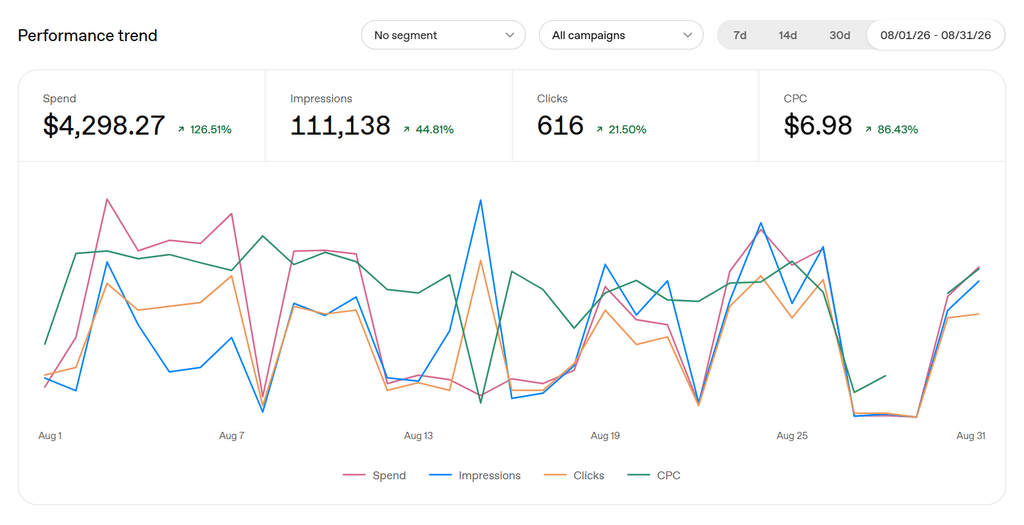
There's also no published guidance on the questions you most want answered. OpenAI hasn't documented a maximum number of context hints, a character ceiling for them, or whether narrower hints outperform broader ones. There's plenty of advice circulating. Three to eight hints per ad group, one to three sentences each, is the rule of thumb we've been working from. But that's practitioner consensus, not official guidance, and I'd rather label it honestly than dress it up as documented best practice.
Since the platform can't tell us which hint worked, we built the campaign so our own analytics could.
One intent per ad group, strictly. Not one industry. One need. If "appointment reminders" and "flash promotions" both live in a healthcare ad group, no result from that ad group means anything.
Every ad group gets its own landing page and its own UTM. The part that matters is pushing the ad group's theme into utm_content, so every click lands already labeled with the intent it came from. That one parameter does more heavy lifting than anything the platform reports back. Your site analytics becomes the segmentation layer, because the platform isn't there yet.
Hints are hypotheses, and you write them down as such. Before launch, we noted what we expected each hint to reach. When behavior on the landing page didn't match, that was a signal. Not clean attribution, but directionally useful, which is what a beta gives you.
Budget it like a test, not a channel. This is money spent to learn how a new surface behaves. We'd rather find out now, at a small scale, than in a year when the auction is crowded and everyone's figured it out.
We've been running these for weeks, not quarters. I'm not going to tell you what ChatGPT Ads CPCs "should" be, or hand you a conversion rate benchmark, because I don't have enough of my own data to add a better number to the pile. We’ll have that answer in a few months.
What I'm reasonably confident about is the shape of the platform. The creative constraints are real. The audience exclusions are real. The reporting gap is real, and it's the one that will decide whether this becomes a channel you can scale or a line item you defend every quarter.
What I'm not confident about is any of it staying true. Conversion bidding, geo exclusions, and bulk tools have all landed since the self-serve beta opened in May. The list of things we can't see is shorter than it was four months ago, and it'll be shorter again by the time you read this.
So: build it with a paid search mindset. Measure it like an analytics pro. And write everything down, because the version of this platform you're learning today isn't the one you'll be running next year.
That's not a reason to sit it out. It's just the price of being early.
One of my favorite Chrome extensions is the Ahrefs SEO Toolbar. Click it on any page and you get a quick read on how that page is doing in search — domain rating, backlinks, keywords, traffic, the works. It's been a staple for a long time.
But here's where it starts to fall short: we're now optimizing pages for the prompts people are actually typing into AI tools, and a lot of those prompts simply aren't in Ahrefs' keyword database yet. That's especially true for pages we've just published or just re-optimized. So the tool that used to be the fastest gut-check on "how's this page doing" gets a lot less reliable right when we need it most — on our newest, most AI-focused work.
So Claude and I built something to fill that gap.
GSC Metrics Sidebar is a Chrome extension that shows you real Google Search Console data for whatever page you're on, right in your browser — no tabs to Search Console, no exporting, no digging through property lists. If it's a domain you have GSC access to, you get the numbers instantly.
View it in the Chrome Web Store →
Open the sidebar on any page and it pulls up:
Because this is pulled straight from Search Console, it doesn't matter whether the page went live yesterday or five years ago, or whether the queries it's ranking for are obscure, brand-new, or prompt-style phrasing Ahrefs hasn't indexed yet. If Google has data on it, you'll see it.
That's it. No extra setup, no config.
Watch my full walkthrough of the install and a live demo of the sidebar in action!
Grab it, install it, and start clicking around on client pages you're already working on. If anything looks off or you think of a feature that would make this more useful, send it my way — happy to keep improving it.
One more thing: this is exactly the kind of gap tools like Ahrefs can't close on their own right now — real performance data on the AI-driven queries our AI Search Services are built around. If you're needing a clearer read on how your content is actually showing up in AI search, reach out.
There's a version of the AI search conversation that treats all of this as a future problem. Someday buyers will research in ChatGPT. Someday AI answers will shape deals. Someday you'll need a strategy for it.
G2's research on B2B software buying says the someday already happened.
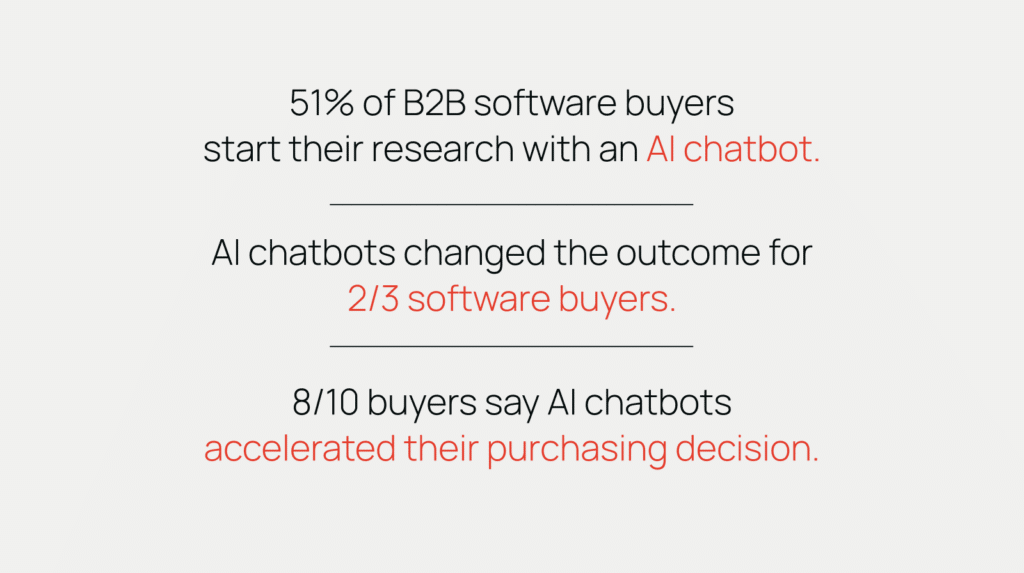
Per G2's report, The Answer Economy: How AI Search is Rewiring B2B Software Buying, 51% of B2B software buyers now start their research with an AI chatbot. Not "have tried one." Not "consult one at some point." Start there. The first touchpoint of the modern software deal — the moment a buyer goes from feeling a problem to naming it — is now, for the majority of buyers, a conversation with an AI.
We put this data in front of our entire company at our monthly meeting, because it reframes everything about how we think content earns pipeline. Here's why it stopped us in our tracks — and what we think it demands of every B2B marketing team.
The adoption number gets the headlines, but it's actually the least interesting of G2's findings. Buyers moving to a new research channel is a distribution story — marketers have navigated those before. The next two stats are a different kind of story.
AI chatbots changed the outcome for two-thirds of software buyers.
Read that again. Not "informed their thinking." Changed the outcome. Two out of three buyers who used AI in their research ended up somewhere different than where they were headed — a different vendor, a different category of solution, a different shortlist entirely.
This is the part that should reorganize your marketing priorities. A traditional search engine handed your buyer ten links and let them assemble their own conclusion. An AI assistant hands them the conclusion — a synthesized recommendation, a comparison table, a "for a team your size, I'd look at these three." The AI isn't a new place buyers gather information. It's a new participant in the decision. It has opinions, and buyers are taking them.
Buyers are discovering, evaluating, and comparing brands through AI. 97th Floor CEO, Paxton Gray, is joining WordPress VIP CMO, Jodi Cerretani, for a three-part series on what that means for enterprise brands.
And 8 out of 10 buyers say AI chatbots accelerated their purchasing decision.
Faster deals sound like good news, and for the vendors in the answer, they are. But think about what acceleration means mechanically: the research phase compresses. The weeks a buyer used to spend reading blog posts, downloading comparison guides, and sitting in your retargeting audience — the entire window where marketing traditionally worked on them — shrinks to a handful of AI conversations. Buyers are arriving at shortlists before most vendors' funnels even register that a deal exists.
Put the three numbers together and the picture is stark: the majority of buyers start in an AI, most of them are redirected by what it says, and nearly all of them move faster because of it. The buyer's journey didn't add a new step. It got a new gatekeeper.
Here's the mechanism underneath the "changed the outcome" stat, and it's worth understanding because it's genuinely different from how search shaped decisions.
In traditional search, the buyer did the synthesis. They'd search "best project management software," open six tabs, weigh the review sites against the vendor pages, and form a consideration set themselves. Your job was to be present at enough of those touchpoints that you made the list. Imperfect, but the buyer was the editor.
In AI-era research, the model is the editor. When a buyer asks, "We're a 40-person agency with clients in healthcare — what project management tools handle HIPAA compliance well?", the AI composes an answer from everything it knows and everything it retrieves — and the vendors named in that answer are the consideration set. There's no page two. There are no ten blue links to scroll past the answer. For a growing share of buyers, if you're not in the response, you were never in the deal.
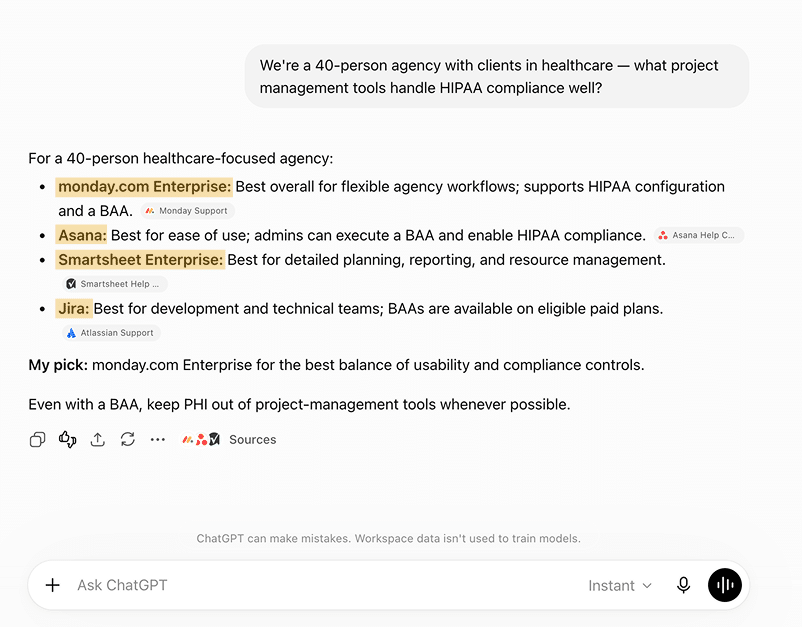
That's why buying outcomes are changing. The AI doesn't just reorder the same shortlist buyers would have built anyway — it builds a different one, weighted toward whichever brands are most legible to it: clearly explained, widely referenced, credibly reviewed, easy to cite. Brands that dominated the old game of rankings can be invisible in this one, and challengers with clearer, more citable material are showing up in answers next to incumbents ten times their size.
If your analytics look fine, that's not evidence this isn't happening to you. It's the nature of the shift.
Those AI research sessions happen off your properties, generate no impressions you can count, and mostly resolve without a click. The buyer who asked an AI four questions about your category, got steered toward a competitor, and never visited your site doesn't show up anywhere in your reporting. Neither does the one who was steered toward you — they arrive later as "direct" traffic, unusually educated, unusually far down the funnel, and your attribution model shrugs.
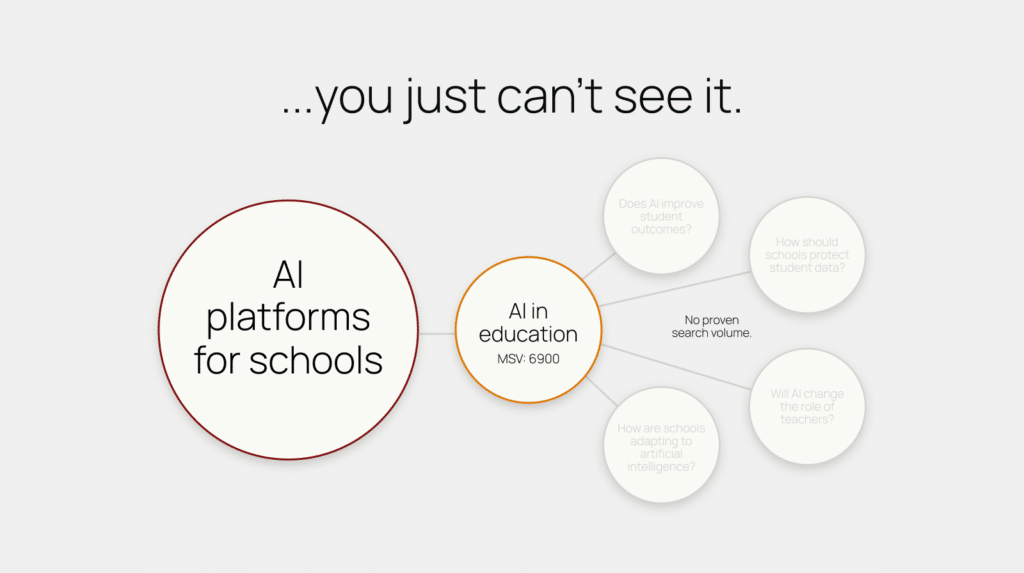
This is the same visibility problem we've written about across this series: the most important buyer activity in your category no longer produces trackable data. When we ran a keyword-free content exercise across our whole company, roughly 40% of the ideas our teams generated — the real questions real buyers ask — weren't covered anywhere on existing content calendars, because nothing in the keyword data ever pointed to them. The G2 numbers are the demand-side confirmation of the same story: the buyer conversation moved somewhere your dashboards can't follow.
Just because you can't see it doesn't mean it isn't happening.
The question every CMO should be asking isn't "should we respond to this?" The buyer already moved; that decision was made for you. The question is whether your brand is in the answers — and there's a concrete way to work on that.
Start by auditing your presence where buyers actually start. Ask the major AI assistants the questions your buyers ask — not your keywords, their questions. "What should a company like X consider when solving Y?" "Compare the top options for Z." Note who gets named, who gets recommended, what's said about you, and what sources the answers cite. This is the new SERP audit, and most teams have never run it. (If you want a head start, we run a free AI audit that measures exactly this.)
Then build for the questions, not the keywords. The prompts steering these deals — "I have $50,000 and a mandate; where's the highest-impact place to put it?" — have no trackable search volume and never will. They come from understanding your buyer: their fears, frustrations, objections, comparisons, and buying concerns at each stage of the journey. That's why we've stopped treating keyword research as step one and started from the audience instead, with keyword data brought back in later for validation and forecasting. Search volume is evidence of demand, not the boundary of demand.
Make your material easy to cite. AI assistants recommend what they can confidently parse and attribute: clear claims, specific comparisons, transparent pricing and capability information, third-party validation, structure a machine can lift an answer from. This is where E-E-A-T implementation for AI search stops being an abstract quality guideline and becomes a revenue lever. Vague thought leadership doesn't get cited. Direct answers to real questions do.
And measure the new funnel honestly. Sessions and rankings won't tell you whether you're winning in AI answers. Citation share, brand mentions across AI platforms, and the volume and behavior of branded and direct traffic will. This work compounds: one of our clients grew AI search results 261% with a topic cluster strategy built for exactly this environment. The teams that build this richer view of organic now are the ones who'll be able to show the work paying off — and keep investing in it — while everyone else argues with their attribution model.
Every stat in the G2 report will keep climbing. The 51% becomes 60%, then 70%; the buyers who haven't moved yet are the trailing edge, not the resistant core. Which means right now is the strange, brief period where the buyer behavior has already shifted but most vendors' strategies haven't.
That's not a threat. For any brand willing to move, it's the most asymmetric opportunity in B2B marketing: your competitors are still optimizing for a journey buyers are abandoning, while the new gatekeeper is still deciding whom to trust.
Half of your buyers are starting their next purchase in a chatbot. The only question left is what it says when they ask about you.
Want to know how your brand shows up in AI answers today? Get a free AI audit, or explore our GEO & AI Search services.
Platform properties are now available to everyone. Google announced this month that the feature has rolled out globally in Search Console, along with a new performance guide for social and video content. If you missed the original announcement, we covered it in full when the feature first launched — read that article here for a breakdown of what platform properties are and how to set them up. This article is about what to do next: how to actually use this data to your advantage.
First, a quick refresher on why this data is different. The data you get from Google Analytics is valuable primarily because it's your data. You own the domain, the tracking code fires on every user interaction, and you get to see how customers move through your content, which channels drive traffic, and where the journey breaks down. But your website is only one of many places your customers find your brand through search. Your YouTube channel appears in search results. So does your Pinterest profile, your TikTok account, even your Instagram posts. The difference: you don't own those platforms, so you've never had visibility into how people find your brand there.
Google Search Console has always been the exception, it shows data owned by Google, not dependent on a tag firing on your site, showing you exactly how your domain gets found organically. Platform properties extend that same visibility to the profiles you maintain on platforms you don't own. That's a genuinely new window into your brand's search footprint. Here's how we recommend using it to build effective content strategies.
Buyers are discovering, evaluating, and comparing brands through AI. 97th Floor CEO, Paxton Gray, is joining WordPress VIP CMO, Jodi Cerretani, for a three-part series on what that means for enterprise brands.
When you connect a platform property and open the Performance report, you're looking at the actual search queries that led people to your Instagram posts, TikTok videos, X threads, or YouTube content. These are a direct read on what your audience is typing into Google when they're in the market for the kind of content you create. And because this data lives outside your website, it often captures demand that never shows up in your standard GSC property or GA4 at all.
Start by filtering the Performance report by query rather than by post. Look for terms generating consistent impressions across pieces of content across multiple platforms— that's your clearest signal of which topics Google associates with your brand. This is actionable whether Google has it right or wrong. If the association is right, you've confirmed your positioning. If it's wrong, you've found a disconnect between the content you're producing and the brand you're trying to build.
Pay close attention to the gap between impressions and clicks. A post sitting at thousands of impressions with a low click-through rate usually means one of two things: either the content isn't compelling in how it appears in search results, or the query intent is better served by something other than a social post. Say one of your TikToks is pulling 12,000 impressions on a "how to" query but converting under 1% of them to clicks, don’t mistake that for a failing video, that's a searcher who wants a step-by-step guide, not a 30-second clip. Cross-reference these queries against your domain's GSC property, and you have a prioritized list of content your site is missing for topics Google already associates with your brand.
The introduction of AI Overviews (AIO), along with Google making every SEO's life harder by making positions 1–100 nearly impossible to track, has injected a lot of unknowns into content planning. Keyword research is less accurate than it used to be, and the keyword datasets from SEO tools are no longer as reliable or actionable. Content strategy has started to feel like guesswork.
Platform property data gives you a faster, more grounded way to pressure-test topics before you commit significant resources to them. Here's the logic: if your social or video content on a topic is already generating impressions and clicks through Google Search, that isn't projected demand from a keyword tool. That's actual people looking for that content right now. It's the kind of validation that moves a topic from "we think this might work" to "we have evidence this works" in one report.
The practice is simple. Before greenlighting a major content investment such as a pillar page, a video series, a guide, first filter your platform property queries by the topic and look at the impression trend over the last 28 days. Growing impressions across multiple posts? Green light. Flat or nonexistent? Either the demand isn't there or Google doesn't yet see you as relevant to it, both of which are worth knowing before you spend the budget. This works in reverse, too: topics your team is convinced are winners but that show zero organic pickup across any platform deserve a hard look before the next quarter's calendar gets built.
Topic clusters have been a staple of SEO strategy for years: a pillar page supported by related content, interlinked to signal depth on a subject. Platform properties let you extend your topic clusters beyond your domain.
Think about how Google now sees your brand. It isn't just crawling your website, it's also crawling and indexing your YouTube explainers, your Instagram carousels, your TikTok tutorials, and your X threads, and platform properties show you which of those are earning search visibility. When your blog post, your video, and your social content all rank for queries within the same topic neighborhood, you're demonstrating authority on that subject across the entire search results page, not just in the ten blue links.
Use your platform property data to find the clusters that are already forming. Pull the top queries from each connected platform and group them by theme. Where you see the same topic surfacing across two or more platforms plus your domain, you have an emerging cluster, ready to be reinforced. Fill the format gaps: if the topic has a strong video and a strong blog post but nothing on social, that's your next carousel. Where a topic performs on social platforms but has no corresponding pillar on your site, that's your next long-form piece, and your existing social content becomes the distribution engine for it the day it publishes.
It is also essential to convey the same messaging and be consistent on unique value propositions, products and offerings, and overall voice of your brand across all platforms. You are trying to build an entity on the web that clearly tells Google who your brand is, what you do, and who you serve. That messaging needs to be consistent across all platforms that talk about your brand.
The goal is to stop treating your website content and your social content as separate strategies with separate teams and separate calendars. Google is evaluating your brand's expertise holistically. Your planning should work the same way.
The teams that get the most out of platform properties won't be the ones who check the report once out of curiosity. They'll be the ones who build it into their operating rhythm.
Add a platform property review to your monthly or quarterly content planning sessions, right alongside your standard GSC and GA4 reporting. Three questions worth asking every time:
This is also a report worth putting in front of stakeholders who don't live in Search Console. Social teams have historically had to justify their work with platform-native metrics such as likes, follows, engagement rate. These never quite connect to the pipeline. Platform properties give them something new: proof that social content is capturing organic search demand, in the same report and the same language the SEO team already uses. For agencies and in-house teams alike, that's a bridge between two functions that have been measured separately for too long.
Platform properties won't replace your keyword research or your analytics stack, but they close a visibility gap that's existed as long as brands have had social profiles. The brands that win with this feature will be the ones who treat it as a strategy input, not a vanity report. Connect your platform properties this week, and if you want help turning what you find into a content strategy, we can support. Let’s talk.
