



Ilumio is a cybersecurity company known for its micro-segmentation solutions, offering network security against cyber threats. Their innovative technology helps organizations effectively secure their network infrastructure.
When ilumio came to 97th Floor, they ranking for less than 4,000 total keywords with only 264 of those keywords holding a first-page ranking. Addressing this limitation became a primary focus to enhance Illumio's online visibility and reach.
Audits identified keyword cannibalization issues on Illumio's site. 97th Floor's top priority was eliminating these competing pages to enhance organic traffic.
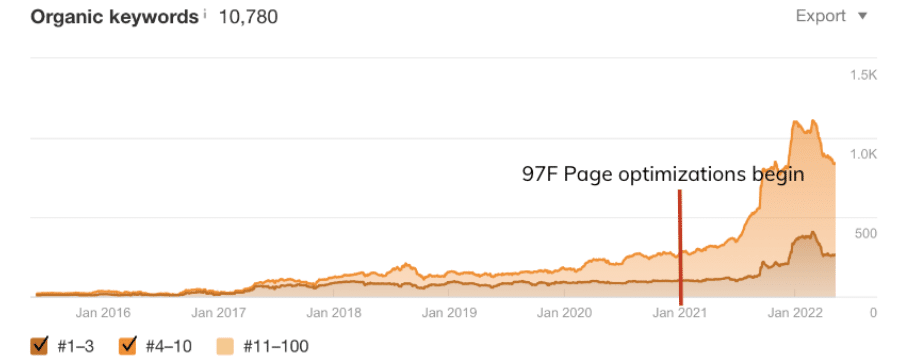
The next step involved optimizing pages targeting keywords with strong baseline rankings and high search volume. Additional audits and keyword research informed content re-optimization, internal linking, and site structure changes.
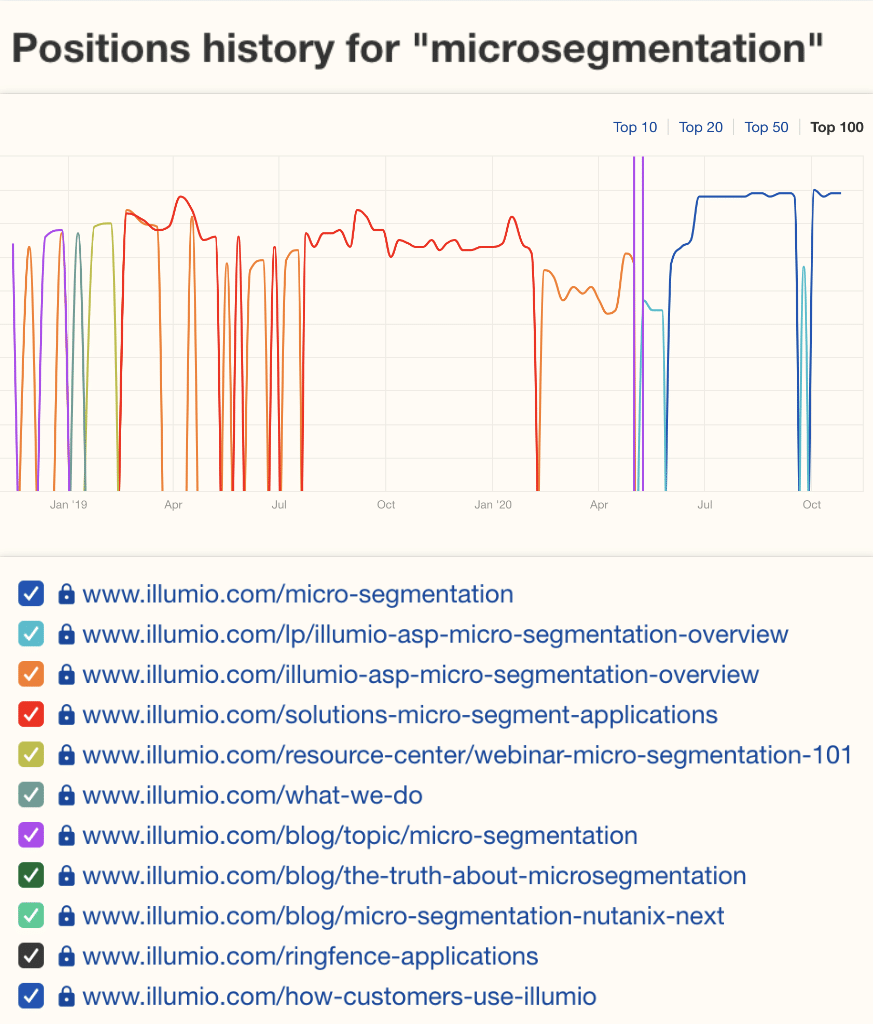
After only one year of working together, Illumio was ranking for 9,671 total keywords, with 812 keywords on the first page.
97th Floor specializes in full-funnel marketing strategy combining SEO, paid media, content marketing and design services. We generate sustainable growth for well-funded startups up to the Fortune 500—including AT&T, LG, Google and Celebrity Cruises.
Operating from the intersection of creative and analytical work, we deliver the results our clients want and need, like...

The award-winning campaign (featuring sledge hammers) that won 100+ closed deals for Revver (formerly eFileCabinet) from one trade show, Increasing new users by 48% with a killer SEO strategy, cutting a 240-day sales cycle to 90 days,
A 371% increase in MoM digital sales for the Utah Jazz, and a 390% increase in referral traffic.

Our ability to generate sustainable growth for our clients is impressive, but the how is quite simple. The 97th Floor advantage all comes down to team structure.
When working with a marketing agency, you almost exclusively interface with an account manager who directs strategy.
We found that this approach leaves too much room for miscommunication and errors.
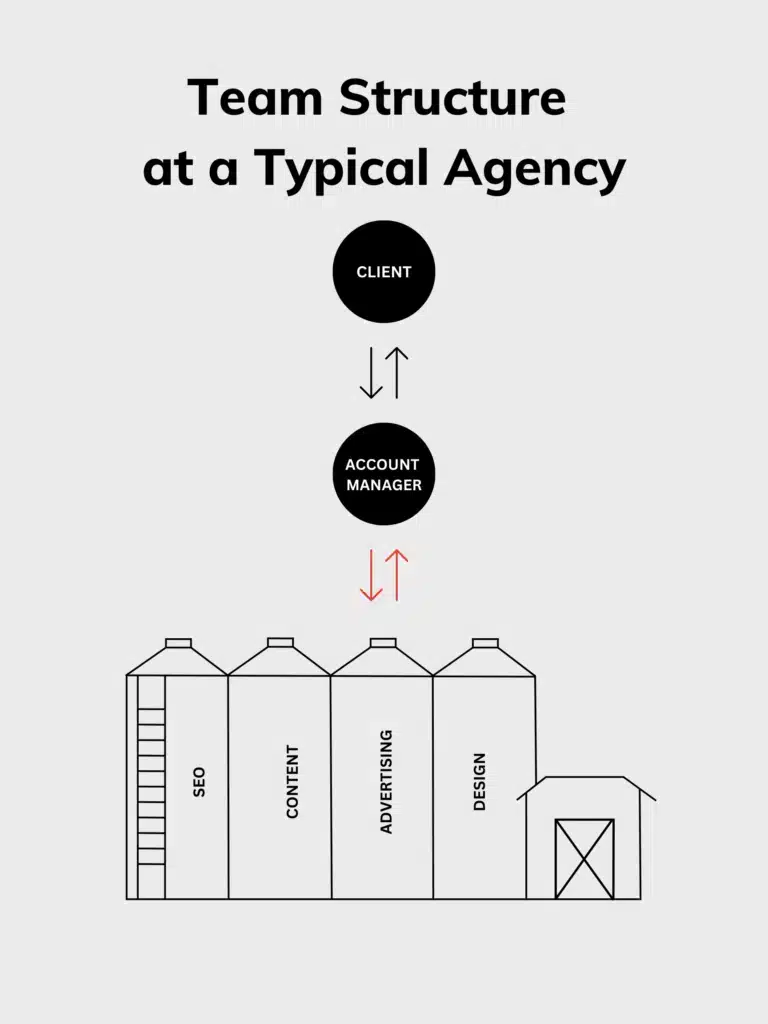
97th Floor’s approach is radically different, yet radically simple: The people who are working on an account are all on the same team, supported by off-team leadership.
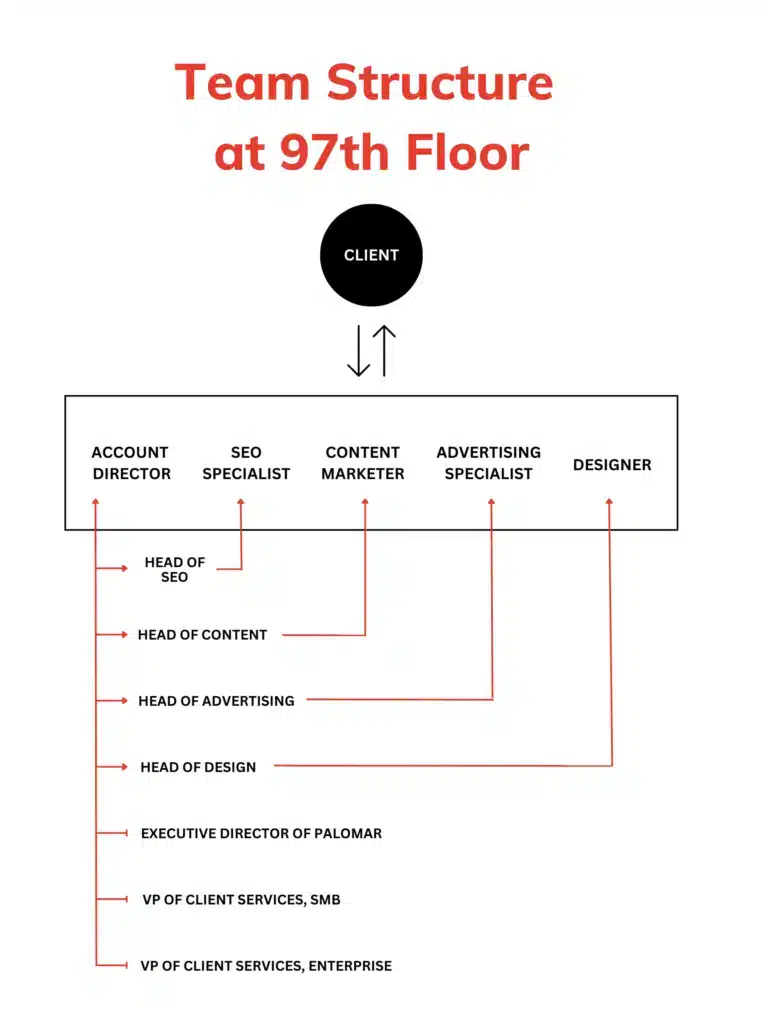
With us, there’s no relay between an account manager and the marketers executing strategy.
Our digital marketing experts have direct contact with our clients—the experts on their customers' needs—empowering our teams to deliver what our clients want and their businesses need.
What matters to you - meeting revenue goals, moving new leads into the pipeline, an upcoming site migration, proving ROI - is never repeated in a haphazard game of telephone throughout the agency.
So what do these teams actually look like? Here are the savvy experts that our clients interact with on each team:
An account director has chiefly three roles:
Because account directors oversee all of our disciplines, they work with their team members to ensure that execution is meeting strategy needs.
Most agencies use an account manager to manage a client-directed strategy. A key difference at 97th Floor is that the account director, leaning on their expertise and insights, forms a strategy and then connects with the client and the team to ensure communication and execution of the strategy is clear.
You’ve heard the phrase, “content is king,” before, right?
While certainly true, this phrase spurred thousands of organizations to produce drivel for over a decade, all to the demise of good user experience online.
Short-term thinking has ruined content marketing.
When every channel has its own specialist, no one owns the strategy. Watch this short clip on why that fragmentation is quietly costing brands more than they realize.
The role of a content marketer at 97th Floor is to help our clients escape this monotony by crafting content based on in-depth persona research and a customer journey.
The content marketer on each team is the “true north” when it comes to the customer’s experience and buyer journey, advocating for them and providing value across every stage.
Our content marketers bring value to our clients because they:
An SEO specialist is responsible for the client’s organic growth. Every initiative an SEO specialist takes on will fall under one of these three categories.
Everything an SEO does, be it an audit, backlink, or optimization, is tied to bottom-line results—brand awareness, traffic, and most importantly, revenue.
SEO specialists who cannot defend their tactics as revenue-generating do not have a place at 97th Floor.
Our advertising specialists are a true blend of creative and analytical, responsible for knowing:
As advertising is a huge investment for both ad creation and management, our promise is to find the best way to spend your money based on who your target audience is (or should be) and what your goals are.
Last year, we ran ads across 23 different platforms based on the custom campaign strategy we crafted for each client.
To name a few, our ad specialists have robust experience in the following areas:
Clear data coupled with responsive and creative optimizations make our advertising specialists ROI machines.
Every member of our client teams is given off-team support and training, all to our client’s benefit.
Head of Content - From buyer personas, semantic research, content production, and strategy development, Rachel Bascom ensures that each content marketer has the know-how and the tools to create winning content strategies for our clients.
Head of Advertising - Haley Riemenschneider helps our ad specialists drive client results with awareness continuums, B2B buyer journeys, and customer funnels to create cutting-edge marketing campaigns across multiple ad platforms.
Head of SEO - Trent Howard keeps our SEO specialists sharp, always exploring the best tools and techniques for uncovering the best practices to bring our clients sustainable organic growth.
Head of Design - Rian Kasner’s design team delivers beautiful and functional designs on time and in a variety of styles. The diversity of 97th Floor designers ensures that each execution team can provide a wide array of design formats and styles.
Executive Director of Palomar - Palomar is a patent-pending software suite for digital marketers developed by 97th Floor. The toolset inside Palomar analyzes large mountains of data in real-time to create a clear-cut digital strategy. Executive Director of Palomar Josh Moody monitors the latest trends in keyword research, SEO analysis, and content marketing to keep building tools that help our teams make the best decisions for our clients.
VP of Client Services - Samantha Brown fills this crucial support role for our marketing teams. She makes it possible for our teams to deliver excellent work by:
Our system follows a pattern of continuous improvement, but at its core, we believe that when our clients interface directly with a team of marketers that work together daily, both 97th Floor and our clients are better for it.
We sat down with Eli Schwartz, Arpana Tiwari, and Todd Friesen to learn about the journey of an SEO through the past decade of search, the essential skills SEOs need to develop at the moment, and what the future of Search could look like.
Danny Allen: [00:00:00] I'm danny. I'm the VP of marketing at 97th floor. We're an enterprise digital marketing agency. We have Eli Schwartz with us, growth advisor and SEO strategic consultant, also author of Product Led SEO, the book. Uh, we have Arpana Tiwari, who is the director of organic growth at Eventbrite. Uh, used to be at Adobe, Google, Facebook, Walmart, Apple, everywhere. I'm sure I missed a couple others. And then we have Todd Friesen as well. Uh, at, uh, well, you're a free agent right now. Formerly at Vimeo and then previously at Salesforce for, for just about 10 years. Correct. Incredible to have all three of you. Thanks for jumping on. I actually gathered all of you together because, uh, we work with a lot of Like top notch SEOs, top notch digital marketing leaders, and a lot of them are kind of coming to us with these questions about the role of organic right now with so much influx.
They're kind of re evaluating where this fits, does it fit? Obviously it still fits, but to what degree? What they should be thinking [00:01:00] about? All that kind of stuff. I just attended MozCon, and there's just a lot of those questions floating around, like, you know, what should we be expecting of ourselves right now?
And, uh, with all the change coming, right? So, with each of you having Uh, over a decade of experience, plus, uh, working at the highest levels of SEO, I think you have a really important perspective that you can share, and I want to kind of pull that out of you. So, uh, just to kind of kick this off, though, maybe kind of for fun, I was thinking about, let's all think back a little about 10 years ago, 10 to 15 years ago, where, where you were, what you were facing, and we're going to bring it up to, to what we're dealing with right now.
But, for fun, I did a couple, like, searches on Google from back in like 2008, 2012. Trying to understand what people were searching for. This was kind of a funny one. Uh, I found a Search Engine Land article that said this. It was citing a study. It said, 64 percent of companies said finding an SEO specialist was more difficult than finding other skilled employees.
The whole point of this article was that there's like a shortage of SEO people. We need more SEO people. This thing is This thing is growing like crazy. Um, in the same study it says, companies with a significant SEM [00:02:00] spend, and then they put in parenthesis, over 25k a month. Which is kind of, which is kind of funny, right?
That 25k a month was a significant SEM spend. But it says, uh, those companies ranked, um, hiring skilled SEO staff on par with other technical or implementation based SEO challenges. Basically just finding people was, was the, the challenge. Another kind of funny nugget was a article from Moz in 2012. And it listed some of the top skills that SEOs needed.
It said, uh, number one, be the best person to work with at the office. Uh, number two, always talk about SEO from the perspective of people, not robots. Number three, don't rely on data to tell your story for you. Number four, help your colleagues meet their goals before asking them to support yours. Number five, go agile from a project management perspective.
I thought some of this stuff was funny, just thinking back, like, and I was really young in my career at that point, but I still remember this feeling of like, no one will give us The, the time of day. How do I get anyone to believe in SEO? And, and even though now SEO and organic as a channel is, is huge everywhere, I still [00:03:00] feel like some of these things still apply.
Some of these challenges are still felt. Everyone kind of still says the same thing. I can't get buy in. I can't. Anyway, I don't want to spend the majority of our time together talking about the past, but I do want to like ask you, feel free to speak when, you know, but what were, what were your, what are your memories from those days?
I don't know if you want to kick it off, Eli.
Eli Schwartz: So we go back like 10, 11, 12 years. There was those. I think that's an SEO change. That's when like smart SEO died because Google took away all the tricks like between Panda and penguin, like Panda was the algo update that got rid of all the thin content and it's, it's baked into the algo today.
So like the whole idea, like we're, it's Panda applies today when we talk about gen AI. So if you think about. There was a plugin, Todd and Arp and I remember this, it was called caffeinated content on WordPress. That was gen AI. What it did was you took RSS feeds and it from different sites and then it used like, I don't know, some sort of synonym matching, but it wasn't that smart because it operated in your own server and your own WordPress instance, [00:04:00] do synonym matching and just replaced words and merged all together and created other crap, like non readable crap, but it had keywords in it.
You even put your keyword in and it sprinkled your keyword in that's. Like 20, that's 2008 version of gen AI and we've gone today. So that whole concept stopped existing after Panda. When like Google looked at the value and quality and quantity of content and penalize sites. Now it doesn't penalize sites for Panda, just penalizes content.
So, you know, the whole gen AI question is like, Oh, can you get away with it? Well, if you figure out how to write a lot of good content at scale that readers like, then yes, but if you create crap, no. And then penguin. I guess in 2012 that like neutralized all the bad shady linking. So there's still a lot of shady linking, but it is, you have to put way more effort and you have to like plant the link and real content and you can't just use plugins and all that.
So that's what I think about like going back to that, like SEO used to be fun and creative and you come up with hacks and like. We had all these secrets and we were talking earlier about like going to conferences. That's when you shared all the secrets. Like someone, I probably learned about caffeinated content at a conference [00:05:00] and then like I couldn't wait to like install it.
I probably did in my hotel room and now you go to conference and like there aren't those secrets. Like there's nothing you'll learn at a conference that you wouldn't read on search engine land or search engine roundtable. So SEO was a lot more fun back then. Uh, I think it's better for users that it's, it's less fun.
More, not as much fun for us,
Danny Allen: not as fun for you on a day to day basis.
Todd Friesen: All right. Yeah, I fully agree with that. It became, you know, much more like, like we were talking earlier, like project management and coming up with the list of the things that need to be done. And then waiting your turn in line with all of the other engineering projects that needed to go to the front end team or to the backend team, if it was a deep enough technical problem.
And you just, and you, and you go, okay, well, let's move to agile and be part of engineering and get in sync with that, uh, and, and get into, and then measurement became a much bigger thing. Like, we actually became much more concerned with the whole funnel than we get with [00:06:00] being number one for the vanity set of key terms that the, that the CEO had.
I mean, when I, 10, you go back to 2012, for example, Eli, as you mentioned, that was, that was when I moved from agency to in house and started at Salesforce. And we spent an inordinate amount of time chasing the number one ranking for CRM, which, I mean, let's be honest, great keyword, tons of traffic, very much vanity.
Like it was, it was so far up the funnel that it produced very little in the way of going down the funnel. But that became a big thing, you know, of course, when, when Google took away the keyword level, uh, referral data. And you're like, so all of a sudden you're like, well. And even to this day, like how, how long ago was that?
Was that 2000, was that eight, eight, nine years? That was almost 10 years ago. Now they took away that referral data. And to this day we still deal with people going, well, Google gives you that. And like, no, they haven't for 10 years. And I think that's the bigger thing that we're still dealing with over the last 10 years is [00:07:00] outside of the SEO world.
It's still this weird black box and it's still this pile of misinformation. It seems to be about 10 years old that, you know, CEOs and CMOs and a lot of the leadership sort of have that, that it never evolved, I think, is where sort of where I'm sitting at this point.
Arpana Tiwari: Yeah, I think from my standpoint, similar to what Eli and Todd have shared, the simplicity is lost.
Uh, if I was to think about 10 or 15 years back, you walk in, you look at a site and immediately things pop out at you in terms of, you know, these are very clear ways you can serve the customer better, you can serve the business, you can bring the two together. And fast forward to today, it's become more of a business of managing SEO, especially at enterprises.
There's so much that comes along with it that is, I think, administrative from the standpoint of, uh, what kind of tools do you want to use? There's, uh, there were probably five really solid, good tools we used to be able to use in the past. And now, you know, every week somebody's [00:08:00] pitching a new tool. And so, like, how do you Can I keep that at bay?
And then, um, the team, um, then all of the work, no site is, I would say, untouched. Uh, and 10, 15 years back, you would come into a site where nobody had touched SEO on it. And now it's probably, you know, you're cycling through, maybe there's a lot of experts prior who've done it, who've tried it. Um, and you're going into a system where you have to pitch a lot more versus in the past, you'd try something, it would work.
Now there's. A lot of tech debt associated with things. Um, so I think all that additional complexity, um, has made it much more rigorous process, um, which takes out some of the creativity in my
Eli Schwartz: view. I think, I think it's good. I mean, I, I think the internet used to be like the wild west where, you know, Let's say, let's say, let's say something standard, like e commerce, you searched an e commerce query in 2005 on one thing, you'd see Amazon and another, you'd see eBay and another, you'd see Walmart, right?
And now [00:09:00] it's very, it's standardized. Like these are the e commerce, these are the commerce players. For apparel, for example, it's it's Macy's. It's Nordstrom. It's, you know, it's those brands. So those brands dominate search. And I know like people will complain. Oh, Google favors brands. And that's because users favor brands.
You don't go into the mall and go to the brand new store that you never heard of and spend all your money. You go to the brands and you trust the brands. We buy clothes that come from brands. So Google is a representation of that. And I think we're living in a world where the algo has figured out how to catch up to that and surface brands because that's what keeps people coming back to Google.
And I think that's where it. Bing maybe suffers a little bit because you don't see being, you see more random sites and that's maybe off putting users like, well, I was just searched like iPhone case and you're, you're showing me something I never heard before. I don't know if I could trust your results and go to Google and like this looks standard.
No matter what query I search, it's standard. These are the brands that trust, you know, some sometimes number one, sometimes number three, but like it looks, it looks the way I expect it to. So I think it's, it's a good industry
Todd Friesen: change. Well, [00:10:00] and that's, I mean, that's a piece that we used to talk about all the time is.
Everybody wants it to be this completely, um, like 100 percent unbiased ranking algorithm that you can tick the boxes and get to be number one or number two on the front page. And it completely leaves out that Google's user experience is a driving force for Google in its entirety. And just to echo exactly what you said, if people show up and they don't like the search results They're going to, you know, either not click an ad or like whatever they're going to not do.
They want to like those search results and that's, we can't as SEOs really approximate that level of user satisfaction with a site that doesn't meet that criteria. Like that, that's outside of what we can do as SEOs or as, as marketers to a large degree.
Arpana Tiwari: And I think what's exciting about now is that SEO seems to be going back full circle into marketing.
I think we started out [00:11:00] with, it's a channel to market where there's value, bring users and businesses together. And then it got into a lot of automation and scaling and you're trying to be everything to everybody. Uh, and you're trying to just maximize the traffic. And I think now it's coming back to where is the value.
And I think SEOs should really think beyond search and they should be thinking of any surface. Where people are looking, so it really goes back into organic. It could be organic search, because people are searching on almost every surface. So you really want to go back into organic. Where are your users, uh, and what are they looking for, versus one search engine.
Yes, it gets most of the traffic, but sometimes you lose the insights if you're just looking at that one. If you split it into more of the niche engines, you're going to start to see insights that can actually help you on the big one too.
Eli Schwartz: Yeah, well that,
Todd Friesen: I mean that was. And that and then things like when you talk about service like the app stores and things like that fall into that bucket.
I was uh, scrolling [00:12:00] job listings on LinkedIn the other day and just, you know, seeing what's out there. And, and I came across one that was a, it was SEO related and digital, I had all this stuff in it. And one of the criteria that it called out, which I hadn't seen in a job description in a long, long time was.
Um, expert knowledge in app stores and app deep linking and like it was very very like somebody had very specifically written out this part and it was a mobile related company, but it was very specific around apps and links to apps and deep linking from apps out to sites and vice versa and stuff like that, which is.
I mean, that's a very specialized part of SEO that very few SEOs have really gotten into.
Eli Schwartz: And I think there's one thing, and I always tell this to potential clients that people don't realize, which is a very, very high percentage of websites in the entire world don't do SEO because they don't know it exists.
I'd put that as high as 90%. Like whatever the IRS of some country, like there's 180 countries in the world. Most of those countries, the governments don't know how to do SEO. So Google [00:13:00] has to compensate for the fact. That 90 percent of the world is not doing SEO. So if you search for the IRS of Congo, how do you find that?
You're looking for the parliament of some small country. How do you find the parliament and make sure you're not finding like some fake website that represents parliament, or if again, like, like, um, if you're in. I don't know, Papua New Guinea and you're searching some health query. How do you find the right health site or like a correct health site in whatever language you need?
So Google has to compensate for all that. And that's what Google is doing. So they're not going to give that like extra advantage to some site that knows SEO and knows how to get links and knows how to optimize content. Google covers that. And I like, I like Arpana's point around other search engines. I always tell any potential client to really think of the user in search and that they're arriving from a search engine at some point in time.
Like I always, I predicted two years ago, I was like, Oh, we'll see another search engine. I didn't think it would be chat GPT, right? Chat GPT is kind of becoming that other search engine and it's rivaling Google, which is why Google is freaking out. But like. One day decide that they no longer want to send spotlight over to Google and they'll do [00:14:00] search.
Like, okay. Search is not that hard, like great search. Like Google is pretty hard, but like, okay. Enough search, like duck, duck, go does okay. Enough search. And like a lot of search engines. So Apple could do it. Facebook could do it. Amazon could do it. You know. There are other products that could just decide that they were Firefox could do it again.
They will not have a huge market share, but they could just do their own search and not send it to Google. So is, uh, is, you know, right now as SEO, we only think of Google with 95 percent plus market share, but there could be a world where like Google has 70 percent market share and you need to figure out that other 30%.
And you do that not by understanding the algo, but by understanding the
Todd Friesen: user. Well, and that's a, I mean, that starts to throw you back to the, you know, the really old days of. You know, Web Crawler, Excite, HotBot, InfoSeek, Lycos, InfoSearch, like just, and that was, I mean, that was a fun world. I would like to go back to that, to a certain extent, just to get some diversity in traffic, to have some opportunity where, if you're not on the first page of Google, it's so business impacting.
And I used to say all the time, like, when [00:15:00] Google would do the updates, back in the days of monthly updates, and you'd get these stories at conferences and stuff like that, or something like that, Google wiped out my entire business and I had to lay four people off because they, they updated and they kicked my site out and I wasn't doing anything black hat and so on and so forth.
And we used to always say, well, you're an absolute, it's foolish to base your entire business and to hire people based on where you rank on Google. But fast forward, you know, 15 years and we're, we're there. Like there is absolutely businesses that exist entirely based on search rankings. I might be overstating that a little bit.
I mean, The Amazons of the world and stuff, they get, you know, a boatload from that, but they're also destination sites. So you have to throw those out of that mix.
Danny Allen: Yeah. Well, and Google's coming for their lunch as well. Um, so yeah, I mean it's as an agency ourselves, right? We, we started an SEO, we started as an SEO agency 18 years ago and that's like, that's all we would think about.
But, but in the last 10 years or so, we had to [00:16:00] realize ourselves that. That's a rough train to hook yourself to, uh, if, if things change, right? And so that's where most of our clients now, we have, we, we try wherever possible to include advertising, to include other forms of content, to include all of it, because we didn't want to be, I think a lot of people are actually just Google specialists.
They're not even SEO specialists, right? They've become so attached to Google, and they're just like, I'm an expert in Google. Uh, and then what you're suggesting, it seems like, all of you, is you SEO specialist anymore. You've got to be. Um, and then you've got to be a marketer really, you've got to be thinking about every other aspect of, of, of how to reach somebody and no searches place in that, but it's not as big as it used to be, um, or at least that that's shifting, right?
So with, with, I know Eli, you've been posting a lot about SGE, about everything that's changing on the SERP and there's some things that would be very concerning to people who are like attached to Google and only Google. Uh, but I mean, I guess what, how are those conversations impacting your. How are those changes impacting your conversations with leadership right now?[00:17:00]
What are, what are you currently hearing? Are people freaking out? Are they kind of pretending it doesn't exist? How's that
Eli Schwartz: going? They're not aware. I mean, we live in, in SEO, we live in a bubble. And we think everyone knows everything. And, and like the word S G E, only we know it. You know, regular people don't watch Google I O.
Regular people don't read search blogs. Regular people don't look at SEO on Twitter. So they have no idea. And it's, it's whoever's looking at SEO. For a company or at an agency, they're the ones that are responsible to be telling leadership there is this nuclear bomb hiding in the corner and it could destroy everything.
And I think the big, a big problem right now in the SEO industry and to call out some people in the SEO industry is that they're trying to pretend it's nothing. And mostly because they're scared of their own jobs and it's, it's scary, but I don't think saying it's nothing is helpful to anybody because when it blows up, like.
Google is huge, right? Like Google could do things and mess everything up and then fix it six months later, not really impact their revenue, but it will mess everything up for SEO, mess everything up for the users there. And you know, [00:18:00] what are you going to do? So they may, I actually think Google is about to launch it very, very soon from what I hear.
The Google may not launch it till the beginning of the year. Whenever they launch it, it will cause a lot of chaos. So pretending it doesn't exist, or I heard someone say, Oh, it's a beta thing. Google's never going to launch it. I mean, you don't know that Google could, it could be a beta thing and they'll still launch it and still ruin everything.
So I think business leaders don't really know what's out there and it's our job to tell them it's out there. The second thing is just to, uh, you know, to anyone's horn that is looking for a job or that isn't consulting, this is going to be the greatest thing ever for the SEO industry because it's going to create so much turmoil.
And for everyone that has not been warned, they're one day going to just watch everything flip and they're going to be desperate. So turmoil is good for us. Uh, turmoil will make, you know, the phones ring off the hook. Let's say the range is, let's say even a company loses 5 percent of their traffic or 10 percent of the traffic.
It's a big deal. I mean, you go to wall street and you say, we lost 5 percent of revenue, 10 percent of revenue. Your stock goes down 30%. I think it's going to be for informational companies. It could be as [00:19:00] close to 50 percent of traffic. So when they lose that, they'll be really desperate to keep the 50 that's left.
I mean, I was at a company that lost 60 percent of the traffic the morning that Panda launched. And there were a lot of tears, right? So, like, this is going to be global, actually, maybe not global, right? I think Google is going to be restricted to launching SGE only in the U. S. first, because the E. U. is very litigious.
Uh, so they'll launch it in, like, the U. S. and Canada and, like, maybe Latin America. But they're not going to do E. U. Whatever it is, it's going to be hugely impactful. And, uh, I, my prediction will be that you will hear references to it in earnings updates from public companies within, you know,
Todd Friesen: three months of when they launch it.
Oh, 100%. Bing's already playing with something similar. Like, I, I, I've got, I've used the Edge browser just out of spite, you know. And, uh, and I, so I have built in Bing search, which for the most part, you know, it works fine. It gets me through anything I want to, I want to find, whether it's shopping or whatever.
Every now and again I'll actually go to Google to, [00:20:00] to get a more refined search. But over the last just couple weeks, I've noticed like I type in my search and I get this full Bing GPT and it's it's awful. It's completely unusable. The UX is terrible and and I can't figure out how to get out of it Which is sort of the biggest thing, but you're trapped You're you're just you're in it and you got a it sits there for a minute and you start scrolling and then eventually scrolls up But it's a full screen takeover And there's nothing there.
There's, there's no results to click on, there's just refinements to come. And, I mean, I find it super annoying, but there's gonna be a whole swath of the world that just rolls with it. And, and then they get those refinements and you wind up with one result at the end. It's gonna be really, really, really interesting to see what happens there.
Arpana Tiwari: I think compared to any other time, this is the time where the group mindset is going to really surface. Because when things change, it's going to go back to me. What do we do now? Like, where do we start? Um, and from the initial labs data that I'm seeing, [00:21:00] um, again, there may not be tools right out the gate where you can look at this at scale, so it is going to go back to the basics of, as a user, for my site, for, you know, the queries that my users are typing in, what am I seeing in, in real time?
So somebody who's willing to, you know, um, Get into the weeds, go and be in the trenches and start to look at the journeys for the users and like, start from scratch. Um, and you had initially brought up, how does that work with connections within the company? I think that credibility, if you've built that initially, which is not just based on tactics or tools, but you're actually thinking about the user and you've built those connections where you can go back now and say, This is what we need to do, and I think for all the teams out there, monitoring right now is going to be so key, because even if it's not live for everybody, there are a lot of signals that you can start seeing, uh, and for somebody who's been in search or has that training to know what to look for, you're going to start to pick up on things, which if you add to your roadmap, [00:22:00] um, can get you, like, will help you, set you up better than, um, others will come out of the gate and then be figuring
Danny Allen: out what to do now.
Yeah, it seems like this is the time to, we're going to see what everyone's really made of. And, and also, it's not to say that it's too late, but everything that you've done, all the goodwill that you've built, is going to be coming, coming to help you or hurt you, uh, depending on where you left off. So, Arpanay, you brought up a couple things that we can do, some, some, a lot more on the monitoring side, a lot more on, on gaining that credibility, and, and Eli, you also talked about bringing it up to leadership, being the ones to introduce it before the bomb drops, right?
Uh, kind of to close this up, what would you say are going to be the skills that SEOs need to be focusing on in the next, I mean, six months, but in the next couple years as well? What should they be, maybe they're listening and they're saying they're kind of freaking out because everyone's freaking out about a thing that could impact our job, right?
And it could take away from maybe our comfort or whatever we're settled into. Uh, so where should they be putting their time? [00:23:00] as far as their skill set.
Arpana Tiwari: I can go. I think, um, know your business, know your user, and then be confident in your search abilities because those are the three that are going to surface.
And don't worry about, you know, what has been taken away, but feel the confidence of where is it going? And if you know your user, and you're looking at the results, you can back into what, um, could be causing that. And I think the last thing is diversification. Uh, think growth and think overall marketing versus just search marketing.
And it's totally okay to be a team player and say for the short term, we might see a dent. And during that time, I want to give you a heads up to go invest in other channels till we can get back up. So it's okay to be, you know, everybody talks about like being vulnerable and being a team player, but this is the time also to do that.
Um, sharing that you don't know what exactly it is going to be because nobody knows [00:24:00] how it is going to impact different businesses. So, prepping the teams, I think, will also increase the credibility.
Todd Friesen: Yeah, I'd agree with that. I mean, it depends a little bit too on where you want to go as an SEO and what you want to do with your career.
Like, if you want to, like, I know some people that want to just, like, they're SEOs and they want to stay, they're happy to be pigeonholed as the SEO guy. Which Personally, I hate being pigeonholed as the SEO guy because they're like, I can do all these other things. They're like, yeah, but you're just, you're the SEO guy.
And they sort of leave you out of those, those higher level conversations. But I mean, if you, if you want to grow your career and you want to move up the ladder and add different titles to your name, director, senior director, VP, and those sorts of things, you have to do the other things. You have to know how to hire and run an engineering team, typically front end when, when it comes to SEO.
You have to understand UX. You have to know user research. You have to know analytics. If you're going to build out a proper SEO team itself, it needs to have engineering resources. It needs to have analytics resources. It needs to [00:25:00] have an operations person. It needs to have a program manager. Like, you need to be almost a mini company within a larger marketing organization to get done what you need to do across that.
So if you want to just stay in SEO, that's great. You're going to need to be You're going to need to know SGE. You're going to need to know all these things. You're going to need to be the clear expert. If you want to climb the ladder in the marketing world, you need to add these other disciplines to what you're doing.
And running an engineering team is a really, really interesting challenge that a lot of people aren't ready to take on. But that will put a massive, that one thing alone is a massive feather in your cap if you want to
Eli Schwartz: grow. And I completely agree with both Arvind and Todd. Those are definitely things you need.
And like Todd said, like, if you want to grow, you've got to learn other things. But I think you can't. Rest on your laurels and SEO anymore because I think the rules are about to change. So I, I think that links don't matter nearly as much as everyone thinks they do. And they're going to matter even less with SG because you don't see them really taken into account.
I think that keywords don't matter. Like keywords hardly matter now, but [00:26:00] they're going to matter so much less rankings of course go away. So the typical SEO skills now completely. Flip and they're gone. So the big thing I think anyone's needs to focus on, of course, like what Todd and Arpana said, really even beyond that to think big picture, like how do you move the ball forward in growing organic traffic?
What do you need to create? So really like some sort of product mindset. And the last thing that I think not enough SEO people really focus on and should learn and like take classes on it or take courses, you know, or get coached is communication. So there's always this natural thing, especially in agencies to do like CYA, like, and avoid the bad news and sell the good news.
Like who you CYA for your CYA for Google. Like you don't work for Google. So like dump on them, like say like Google is about to destroy us blame Google. Cause it's not you and over communicate. And, you know, if the hurricane doesn't happen, great, like at least you warned that it could happen. So I, I'd say like SEO needs to do a way better job of communicating what's happening, what could happen, what will happen, all of those things and learn those, those things.
Like I, [00:27:00] an example I always use on communication, which is like probably one of the best things ever happened in my career is I was being called into a meeting with the CEO. We were about to lose budget for SEO and because they wanted to prove it didn't work. And this CEO was like a huge sports fanatic.
And I explained what SEO was to the CEO. Why? Using a GIF on a PowerPoint of a basketball player doing an assist, like grab, like catching the ball, bouncing it, and then passing it over to someone who dunked. And it just does this one second GIF over and over and over again playing while I explained that SEO was an assist.
And when I walked out of that meeting, I had an extra head count. I was about to lose my team and I got more because. I communicated what I was doing. Like I was being judged like SEO doesn't make us any money. You're failing. There's no revenue. And I explained that I was not failing. I was doing better.
They just were looking in the wrong place. So SEO needs to communicate and over communicate and blame Google, blame whoever you want, but communicate and just say what's happening and like how you'll fix it.
Danny Allen: Wow. Incredible advice, right? We gotta look, we [00:28:00] gotta look at our leaders or those who we're answering to as our peers and say, here's my real advice, like, this is where I'm coming from.
I love what you said, Arpana, about being vulnerable and saying, here's what I don't know, here's what I do, and being really confident in what SEO does do, what organic does do, like you said, Eli. All of you, I feel like I just had an incredible, Out of body experience, no. Having all three of you though in the same room, hearing from your experiences is incredible.
Um, and, uh, I, you know, you can find all three of these incredible people on social media. Reach out to them, ask them questions. Uh, Todd is a catch. Uh, wherever he ends up, it's going to be an incredible, uh, you know, ad to their team. And, um, thank you all for jumping on today. It's been really great. Thank you for having
Eli Schwartz: us.
Arpana Tiwari: I appreciate it.
Eli Schwartz: Thanks.
A canonical URL is the URL of the best representative page from a group of duplicate pages, according to Google. For example, if you have two URLs for the same page (such as example.com? dress=1234 and example.com/dresses/1234 ), Google chooses one as canonical.
Similarly, if you have multiple pages that are nearly identical, Google can group them together (for example, pages that differ only by the sorting or filtering of the contents, such as by price or item color) and choose one as canonical. Google can only index the canonical URL from a set of duplicate pages.” Source
Using canonical URLs is essential for several reasons, primarily related to SEO and content syndication. Here are some of the primary reasons:
Consolidating Link Signals for Similar or Duplicate Pages
Search engines often use the number and quality of backlinks a page has to determine its ranking. When multiple pages with similar content exist, the link signals can get diluted as different backlinks might point to different versions of the same content. By using a canonical URL, you consolidate these link signals, ensuring that the preferred version of the page gets the combined link signals of all its variants.
If you syndicate your content for publication on other websites, you can use canonical URLs to ensure that the search engines understand where the original version resides. This way, the syndicated content won't compete with your original content in search engine results.
Sometimes, you might have slight variations of a page for tracking or A/B testing purposes. By setting a canonical URL, you can specify which version of the page you want to appear in search results.
Using canonical tags correctly is crucial for ensuring that search engines understand your preferred version of a page. Here's a step-by-step guide on how to do it right:
Before implementing a canonical tag, you need to decide which URL is the "canonical" one. This should be the most authoritative version of the page. Consider factors like:
Different platforms have various methods for adding canonical tags. Here's a brief overview of how to do it on some popular platforms:
Magento 1
Product Page Canonicals
Category Canonicals
Magento 2
In Magento 2, the process is streamlined. Simply navigate to Stores > Configuration > Catalog > Catalog > Search Engine Optimization and enable the canonical options for both products and categories.
WordPress
Yoast SEO Plugin
Rank Math SEO Plugin
Wix
In Wix, you can set canonical URLs using the SEO settings for each page. Simply navigate to the page's settings, find the SEO section, and input your preferred canonical URL.
When implementing canonical tags, it's essential to follow best practices to ensure that search engines correctly interpret your intentions. Here are some key guidelines to keep in mind:
A thorough audit can help identify potential issues that might be affecting your site's SEO. Here's what to look for during your audit:
One of the primary reasons for using canonical tags is to address duplicate content issues. Start your audit by identifying pages with similar or identical content. Tools like Screaming Frog or SEMrush can help you spot these duplicates.
Having multiple canonical tags on a single page can confuse search engines. Ensure that each page on your site specifies only one canonical URL. SEO tools like Screaming Frog can help you identify such issues.
A canonical tag that points to a non-existent or broken URL is counterproductive. Ensure that all canonical URLs are accessible and return a 200 OK status. Tools like Ahrefs or Moz can help you identify and fix broken canonical links.
If your site uses Accelerated Mobile Pages (AMP), it's essential to have a canonical tag pointing from the AMP version to the standard version of the page. This ensures that search engines understand the relationship between the two and can consolidate ranking signals.
Auditing canonical tags might seem like a daunting task, but with the right tools and a systematic approach, it becomes manageable. Regular audits ensure that your canonical tags remain effective and continue to support your site's SEO efforts.
Canonical URLs help search engines understand which version of a page is the most authoritative, ensuring that your content gets the visibility it deserves. By following best practices and regularly auditing your canonical tags, you can avoid common pitfalls and ensure that your website remains in good standing with search engines.
A canonical URL is a way of telling search engines that a specific URL represents the master copy of a page. It helps search engines understand which version of a page to index and rank, preventing issues related to duplicate content.
Canonical URLs help prevent duplicate content issues, which can dilute the ranking power of a page. By specifying a canonical URL, you consolidate ranking signals to a single, authoritative version of the page, improving its chances of ranking higher in search results.
By consolidating ranking signals and preventing duplicate content issues, canonical URLs can help improve a page's search ranking. Higher rankings typically lead to increased organic traffic.
No, each page should have only one canonical URL. Having multiple canonical tags can confuse search engines and lead to unpredictable indexing and ranking results.
The canonical URL should be the most authoritative version of the page. Consider factors like user engagement, backlinks, alignment with site structure, and overall importance to your website's goals.
Not necessarily. Canonical URLs are primarily used for pages with duplicate or very similar content. If your website doesn't have such issues, you might not need to use canonical tags extensively.
Regular audits, at least annually or after significant website changes, are recommended. This ensures that your canonical tags remain effective and continue to support your site's SEO efforts.
If the duplicate page serves no SEO or user value on the site, it is best recommended to remove and 301 redirect to an active/similar page with value. In most other cases, a canonical tag will be the ideal choice.

Domain Authority (DA) is a metric pioneered by Moz, and since adapted by many other SEO tools, that estimates the chances of a website's ability to rank on search engine result pages (SERPs).
Domain Authority (also sometimes named Domain Rating) is a composite score, fluctuating between 0 and 100. The number represents the website’s relevance for a specific subject or industry. A higher score represents a stronger likelihood of clinching higher SERP rankings.
Websites boasting higher DA scores are generally perceived as more authoritative, reliable, and are statistically more likely to rank prominently on search engines like Google. Please note that DA is not a metric that Google has created or endorsed, but instead is a rough guide (provided by various SEO tools) to estimate the authority of a website. In fact, some SEOs believe that tracking and analyzing DA can even be detrimental to one’s strategy because it focuses too much on a metric that is not a Google ranking factor and focuses on only a portion of the SEO equation.
Moz didn’t conjure the DA score from thin air. The metric is the culmination of multiple indicators such as the number of linking root domains, the aggregate of inbound and outbound links, the MozRank, and MozTrust, among many others. With the integration of machine learning, Moz continually refines its model to ensure the DA score mirrors the evolving search ranking factors as closely as possible.
While a score north of 50 is generally perceived as robust and anything exceeding 70 is stellar, it's crucial to interpret DA in context. Instead of viewing it in isolation, juxtapose it against competitors or peers in the same industry.
Knowledge is power, especially when it pertains to Domain Authority. Keeping a close eye on your DA score can facilitate strategic decision-making to fine-tune your SEO blueprint.
The digital marketplace boasts a plethora of tools adept at gauging Domain Authority:
Given that DA doesn't experience tumultuous daily upheavals, it's pragmatic to assess it on a quarterly basis. This cadence ensures that one can spot and act upon any pivotal shifts triggered by SEO tactics or external dynamics, while also avoiding the overanalysis of a metric that only shows macro trajectories.
The symbiotic relationship between backlinks and DA is undeniable. Yet, the emphasis should be on quality over sheer volume. A handful of links from credible, high-authority sources outweigh countless subpar links. Quality backlinks come from websites that have a high DA themselves, but SEOs’ quality standards shouldn’t stop at the DA of linking websites. Authority isn’t something that marketers should “hack”. Instead, approach authority from a content, brand, PR, and backlinking perspective. As your brand grows, so will your domain authority.
It's crucial to distinguish between Domain Authority (an entire website's ranking potential) and Page Authority (the ranking potential of individual pages). While they share foundational similarities, they cater to different facets of a website's digital footprint.
In conclusion, Domain Authority stands as a testament to a website's credibility, strength, and ranking potential in the digital arena. It's more than just a metric; it's a compass directing stakeholders to strategic decisions that can enhance their online visibility and reputation.
While slight fluctuations can occur, significant changes in DA typically manifest over more extended periods. It's a compound metric influenced by many factors. Also of note, as a website becomes more authoritative, it enters new realms of competition. It’s possible that quicker fluctuations can take place from, for example, a website with a DA of 20 to a DA of 30. As the DA increases, changes will likely slow down.
Generally, a higher DA indicates better potential for ranking. However, it's crucial to view DA in the context of your niche and relative to competitors.
Directly? No. But by improving your site's overall SEO, creating quality content, and earning high-quality backlinks, you can positively influence your DA over time.
Domain Authority (DA) is a score developed by Moz that predicts how well a website will rank on search engine result pages (SERPs). It ranges from 0 to 100, with higher scores indicating greater potential to rank.
While Domain Authority gauges the ranking potential of an entire website, Page Authority focuses on the ranking potential of individual pages.
A higher DA suggests your website has a better chance of ranking higher on search engines, potentially leading to more traffic and business opportunities.
No, Google does not use Domain Authority in its algorithm. DA is a metric developed by Moz to predict ranking potential based on various factors.
Improving overall SEO practices, earning high-quality backlinks, producing quality content, and ensuring a mobile-responsive design can contribute to a higher DA.
Moz updates Domain Authority on a monthly basis, but individual scores might not change with every update.
While a higher DA is generally favorable, it's essential to compare your DA with competitors in your specific niche. A niche business might have a lower DA than a broader one but still be authoritative in its sector.
Yes, other SEO tools have their own versions of DA. For instance, Ahrefs uses Domain Rating (DR) and SEMrush employs Authority Score.
Typically, newer websites start with a lower DA. However, if they quickly earn high-quality backlinks and produce exceptional content, they can see growth in their DA score.
You can use Moz's Link Explorer or other SEO tools like SEMrush and Ahrefs to check your website's DA.
Keyword research is the process of identifying and analyzing the specific words and phrases (keywords) that people use when searching for information, products, or services on search engines like Google, Bing or Yahoo.
The main objective of this research is to optimize content, advertising campaigns, and overall website performance by aligning with the language and intent of your target audience. By understanding the most popular and relevant keywords related to your niche or industry, you can craft content that caters to the specific needs and inquiries of your audience.
Keyword research isn't just about boosting search engine rankings or website traffic. Here are some of its undeniable benefits:
Seed keywords are the foundational terms that define your niche or industry. They are broad and general, forming the base from which more specific keyword variations emerge. For example, if you run an online shoe store, your seed keywords might include "shoes," "footwear," or "sneakers." By establishing these primary terms, you can branch out to discover more detailed and long-tail keywords relevant to your business.
Observing your competitors can offer a wealth of knowledge. Competitor keyword analysis entails identifying the keywords your competitors rank well for and leveraging that information to find gaps in your own strategy. Tools like Semrush or Ahrefs can help you uncover these terms. This doesn't mean copying their strategy, but rather using their successes and failures as a learning opportunity.
There are various tools available that can help streamline your keyword research process:
Google Keyword Planner
Housed within the Google Ads interface, the Google Keyword Planner is a free tool that offers invaluable insights. Although initially designed for paid advertising campaigns, it provides data like search volume, competition level, and potential ad costs, making it a robust tool for organic search insights as well.
Semrush Keyword Tools
Semrush offers a suite of keyword research tools catering to the process's different aspects. Whether you want to dive deep into competitor keyword analysis with the Organic Research tool or explore new opportunities with the Keyword Magic Tool, Semrush has something for every stage of your keyword journey.
Ahrefs SEO Tools
Ahrefs, while known for its backlink analysis, also boasts a range of SEO tools. Its keyword research tools provide in-depth data on search volume, keyword difficulty, and even how many backlinks you might need to rank for a particular term. The insights gleaned from Ahrefs can significantly impact your SEO strategy.
To effectively select keywords, understanding various metrics is crucial:
Search Volume
This indicates how many times a particular keyword is searched for within a month. Higher search volume signifies higher demand.
Keyword Difficulty
It represents how tough it is to rank for a keyword considering the competition. A higher difficulty score suggests that it might be harder to rank for.
Primarily used for paid advertising, CPC denotes the average amount an advertiser pays for a click on their ad for a particular keyword. Although typically used in advertising, CPC data can provide insights into which keywords are most competitive and, by extension, potentially more valuable to rank for organically.
Identify the Primary Keyword
Your primary keyword is the central term or phrase around which your content is based. For example, if you're writing about "vegetarian pasta recipes," that entire phrase could be your primary keyword. This term should be highly relevant to the content, have a decent search volume, and preferably, lower competition. Once identified, this keyword should be incorporated into key areas like the title, meta description, and throughout the content.
In addition to the primary keyword, you should also identify supportive secondary keywords that are usually longer-tail, similarly-worded keywords to the primary keyword. The inclusion and analysis of these secondary keywords will help you more fully understand the topic and create content to support it.
Understand Search Intent
Search intent refers to the reason a user conducts a particular search. It's crucial to discern why someone might search for a particular keyword and ensure your content meets that need. There are typically four types of search intent:
By aligning your content with the right intent, you increase the likelihood of satisfying the user's query and, consequently, boost your rankings.
Analyze Trends and Seasonality
Using tools like Google Trends, you can track the popularity of keywords over time. This helps in identifying seasonal trends (like "Christmas gifts" spiking in December) and ensuring you're capitalizing on timely opportunities.
Leverage Long-Tail Keywords
Long-tail keywords are longer and more specific keyword phrases. They might have lower search volumes, but they often bring in more targeted traffic. An example would be "best leather boots for winter" instead of just "boots."
Consider Local and Industry-Specific Keywords
For businesses catering to a local audience or those in a specific industry niche, using localized or industry-specific terms can be invaluable. For instance, "dentist in Brooklyn" or "industrial cooling solutions."
By diligently tuning into the language, inquiries, and curiosities of your target audience, you set the stage for organic growth, increased visibility, and a heightened user experience.
However, as with many things in the digital world, keyword research isn't a static process. As trends shift, technologies evolve, and user behaviors change, the importance of regular and meticulous keyword research only grows. It serves as a continuous dialogue between creators and their audience, ensuring content remains relevant, engaging, and effective.
While the fundamentals of your niche might remain the same, online search trends change regularly. It's advisable to revisit keyword research at least quarterly, if not monthly, to stay current.
While it's possible, overusing the same keywords can lead to keyword cannibalization, where your content competes against itself in search rankings. It's better to focus each piece of content on a unique set of keywords while maintaining topical relevance.
Yes! While voice search has led to a rise in conversational queries, understanding and targeting keywords remains crucial. It's just that these keywords now often come in the form of natural language phrases.
No, keyword research applies to any search engine, including Bing, Yahoo, or platforms like YouTube or Amazon. While Google dominates the market, optimizing for other platforms can be beneficial depending on your target audience.
Not necessarily. While high search volume indicates demand, these keywords often have high competition. Sometimes, targeting lower-volume but more specific keywords can yield better results due to their relevance and lower competition.
Short-tail keywords are generally 1-2 words and are broad (e.g., "shoes"). Long-tail keywords are longer phrases that are more specific (e.g., "red leather boots for women").
While it helps, search engines have become smarter at understanding context. It's essential to maintain a natural flow and avoid keyword stuffing. Using synonyms or related terms can also be beneficial.
Keyword research should guide your content strategy. By understanding what your audience searches for, you can tailor your content to address those topics, ensuring it's relevant and valuable.
Yes. While high competition keywords indicate demand, they can be challenging to rank for, especially for newer websites. It's often advised to balance targeting these with low-competition keywords.
Keywords are the backbone of PPC campaigns. They determine when and where your ads appear. Proper keyword research ensures your ads reach the right audience and can lead to better click-through rates and conversions.
An XML Sitemap is a structured document that lists the URLs of a website, making it easier for search engines to discover and index its content.
Think of it as a roadmap for search engines, guiding them to the most important pages on your site. While it's not a guarantee that every page listed will be indexed, it does increase the chances of search engine bots finding them.
Having an XML Sitemap is crucial, especially for sites with a massive number of pages or frequently updated content. The XML sitemap ensures that search engines are aware of all the pages on your site, including those that might not be discovered through the regular crawling process. By providing search engines with this valuable information, you're taking a proactive step in improving your website's visibility and searchability.
Improved SEO Rankings
One of the primary reasons website owners use XML Sitemaps is to boost their SEO rankings. By providing search engines with a clear structure of your website's content, you're ensuring that they can index your pages more efficiently. This, in turn, can lead to higher visibility on search engine results pages (SERPs) and potentially more organic traffic to your site.
Enhanced Website Crawling
Search engines deploy bots to crawl and index the web. However, without a clear roadmap, these bots might miss out on some of your site's pages, especially if they're newly added or not linked from other parts of your website. An XML Sitemap acts as a guide for these bots, ensuring that they can find and index every page you deem important.
Better User Experience
While XML Sitemaps are primarily designed for search engines, they indirectly benefit users as well. When your site's pages are indexed correctly, users are more likely to find the content they're searching for on search engines. This leads to a better user experience, as they can access relevant information quickly and efficiently.
While the primary purpose of all XML Sitemaps is to list the URLs of a website, there are specialized sitemaps tailored for specific types of content. Understanding these can help you optimize your sitemap strategy based on the kind of content your website offers.
An XML Sitemap Index is like a directory of sitemaps. For websites with a vast number of pages or multiple types of content (like images, videos, and articles), managing a single sitemap can be cumbersome. In such cases, you can create multiple sitemaps and then list them all in a Sitemap Index. This way, you provide search engines with a single point of reference that leads them to all your other sitemaps.
If your website is rich in visual content, an XML Image Sitemap is essential. This sitemap lists all the image URLs on your site, ensuring that search engines index them. Properly indexed images can appear in image search results, driving additional traffic to your site.
For websites that host or embed videos, an XML Video Sitemap is a must-have. It provides search engines with metadata about your videos, such as the title, description, and thumbnail. This ensures that your videos are discoverable in video search results, enhancing your site's visibility.
Websites that frequently publish news articles can benefit from a Google News Sitemap. Tailored for the Google News platform, this sitemap ensures that your articles are quickly discovered and indexed by Google, making them available to users searching for the latest news.
Depending on your technical expertise and the specific needs of your website, there are several methods to generate a sitemap.
For those who aren't technically inclined or are looking for a quick solution, using an XML Sitemap generator is the way to go. These are online tools or software that automatically crawl your website and generate a sitemap for you. Here's how to use them:
Those who prefer a hands-on approach or have specific requirements can manually create an XML Sitemap. This method requires a basic understanding of XML syntax. Here's a simple step-by-step guide:
Remember, manually creating a sitemap can be time-consuming for large websites, but it offers the most control over the content you include.
Creating and submitting an XML Sitemap is just the beginning. To maximize its effectiveness, follow certain best practices.
Your XML Sitemap should prioritize pages that are most valuable from an SEO perspective. This means:
To submit your XML Sitemap effectively, follow these step-by-step instructions:
By following these steps, you'll ensure that your XML Sitemap is submitted accurately, helping search engines index and understand the structure of your website for optimal SEO performance.
To make the most of your sitemap, monitor its performance and address any issues:
By adhering to these best practices, you ensure that your XML Sitemap not only serves its primary purpose but also enhances your website's overall SEO strategy.
An XML Sitemap serves as a roadmap for search engines, guiding them to the important pages on your website, ensuring efficient indexing and better visibility in search results.
While not compulsory, it's highly recommended, especially for websites with numerous pages, frequent updates, or those that have pages not easily discoverable through regular site navigation. By providing search engines with a structured list of URLs, an XML Sitemap enhances the chances of your pages being indexed, leading to improved search rankings and organic traffic.
Update your sitemap whenever there are significant changes to your website, such as adding new pages, updating content, or removing outdated pages.
Yes, using the <priority> tag, you can indicate to search engines which pages you deem more important. However, this is just a suggestion, and search engines may not always adhere to it—in fact, Google has stated that they ignore the priority in a sitemap.
An XML Sitemap is designed for search engines, providing a structured list of URLs for indexing. An HTML sitemap, on the other hand, is designed for website visitors, offering a user-friendly overview of the site's content.
Tools like Google Search Console and Bing Webmaster Tools provide feedback on your sitemap's status, including which URLs have been indexed and any potential issues.
Yes, a single XML Sitemap can contain up to 50,000 URLs and be up to 50MB in size. If your website exceeds these limits, you'll need to create multiple sitemaps and list them in a Sitemap Index.
Demand Generation is an umbrella term for any marketing or sales activity intended to create awareness and interest in your company’s product or service.
Demand Generation is a long-term, education-based strategy that targets a broad, and likely out-of-market, audience. The ultimate goal of demand generation is to ensure a future sales pipeline by building a relationship and enhancing your brand reputation with potential buyers.
Demand generation is focused on increasing brand awareness and interest; lead generation identifies and attracts these potential customers. The two also differ in approach and metrics.
| Demand Gen | Lead Gen |
| Long-term, awareness focus | Short-term, sales focus |
| Demand generation strategies encompass a wide range of marketing activities, including content marketing, social media, advertising, public relations, events, and branding efforts. It's about creating a buzz around the brand and educating the market. | Lead generation strategies typically involve tactics like content marketing, email marketing, social media, SEO, pay-per-click advertising, and events. The focus is on capturing contact information, such as email addresses or phone numbers, to nurture and convert leads into customers. |
| Example metrics: brand awarenesswebsite trafficengagement metrics (likes, shares, comments) | Example metrics:number of leads generatedconversion ratecost per lead. |
Understanding the key elements of demand generation is essential for crafting a robust strategy that drives tangible results.
Content is the linchpin of demand generation. Through blog posts, videos, whitepapers, and other mediums, businesses can demonstrate their value proposition, address consumers' pain points, and answer pressing questions.
Creating high-quality, informative content that addresses user queries and is optimized for SEO, businesses can attract organic traffic, position themselves as industry experts, and guide users through the buyer's journey.
The omnipresence of social media platforms has given businesses unique avenues to reach their audience. Platforms like Instagram, LinkedIn, and X (Twitter) allow brands to engage users with interactive content.
Moreover, influencers, with their built-in audiences, can amplify a brand's message, granting access to a wider, yet targeted, demographic.
By collaborating with complementary businesses or influencers, companies can tap into new audiences, enhancing their demand generation efforts. Partner marketing offers mutual benefits, allowing both parties to leverage each other's strengths.
Demand generation can’t stop after one touchpoint. Brands should stay top-of-mind by executing a plan for nurturing and remarketing to their audience.
Remarketing ads target individuals who have previously interacted with a brand, serving them tailored ads to reignite their interest and push them toward conversion.
Email remains one of the most effective channels for personalized communication. By segmenting your email list and sending tailored content, businesses can nurture leads, providing them with relevant information and offers that inch them closer to making a purchase.
Webinars and live events provide a platform for brands to engage with their audience in real time. These platforms allow for direct interaction, answering questions, showcasing products, and building a deeper connection with potential customers.
Above all, businesses must focus on offering genuine value. Whether it's through informative content, responsive customer service, or high-quality products, delivering value fosters trust and loyalty.
In a saturated digital landscape, originality stands out. Crafting unique, engaging content captures attention and differentiates a brand from its competitors.
The digital realm is ever-evolving. For sustained success, businesses should adopt a mindset of continuous testing and optimization, adjusting their strategies based on performance data and emerging trends.
Harmonizing the efforts of sales and marketing teams ensures a seamless transition for leads as they move from awareness to consideration and finally, to the decision phase.
Software and tools designed for demand generation offer scalability, efficiency, and precision. Consider a combination of the following demand gen tools for the most effective execution of your strategies:
CRM Systems: Customer Relationship Management software, like Salesforce or HubSpot, helps businesses manage their interactions with current and potential customers. They offer an organized view of leads, prospects, and customer interactions, ensuring timely and personalized outreach.
Marketing Automation Platforms: Tools like Marketo or Pardot allow businesses to automate repetitive marketing tasks, such as email campaigns or social media postings. They also provide analytics and insights, enabling businesses to refine their strategies.
Analytics and Tracking Platforms: Google Analytics, SEMrush, and similar tools offer insights into website traffic, user behavior, and content performance. By understanding how users interact with their content, businesses can identify what's working and where improvements are needed.
Content Management Systems (CMS): Platforms like WordPress or Drupal assist businesses in creating, publishing, and managing digital content seamlessly, making it easier to keep websites updated with fresh and relevant content.
Engagement and Personalization Tools: Tools like Optimizely or Dynamic Yield allow for the customization of user experiences based on behavior, demographics, or previous interactions. Personalized experiences can significantly boost conversion rates.
Demand generation is a comprehensive marketing approach aimed at building and nurturing interest in a company's products or services. It involves a series of strategies and tactics designed to reach potential customers across different stages of the buyer's journey with a primary focus at the top of the funnel.
While both demand generation and lead generation aim to attract potential customers, there's a distinction. Demand generation focuses on building awareness and interest in a company's offerings without necessarily capturing contact details. Lead generation, on the other hand, specifically targets capturing the contact information of potential customers for future outreach.
Demand generation not only creates a consistent pipeline of potential customers but also positions your brand favorably in the market. By actively engaging with your target audience through various strategies, you enhance brand recognition, credibility, and trust, all of which are crucial for long-term business growth.
A successful demand generation strategy ensures that the sales team has a consistent stream of qualified leads. By aligning marketing efforts with sales objectives, businesses can ensure a seamless transition for leads from awareness to conversion, optimizing the overall customer acquisition process.
Absolutely! In fact, demand generation is particularly effective for B2B businesses. By targeting specific industry segments, creating tailored content, and focusing on long-term relationship building, B2B companies can benefit immensely from demand generation strategies.
Start by understanding your target audience's needs and preferences. Develop a content strategy, optimize your website for conversions, and leverage various channels like social media, email marketing, and paid advertising. Remember, continuous testing and optimization is key.
Focus on delivering consistent value, staying updated with industry trends, and continuously refining your strategies based on performance data. Building strong relationships with your audience and integrating feedback into your campaigns will also ensure sustained success.
Customer Lifetime Value, often referred to as CLV, is the average monetary value received per customer over their lifetime as a customer. It serves as a crucial metric for understanding a customer's long-term value to your business. At its core, CLV encapsulates the entire journey a customer embarks upon with your brand, shedding light on their financial contribution over time.
Customer Lifetime Value enables informed decision-making, judicious resource allocation, and the creation of experiences that resonate with the target audience.
By following these steps, you can calculate your Customer Lifetime Value and gain a deeper understanding of the value each customer brings to your business.
At 97th Floor, we understand that CLV isn't just a metric; it's a strategic compass that can steer your business towards success. Here's how it impacts your operations:
CLV directly affects your bottom line. By identifying high-value customers and nurturing those relationships, you can increase revenue and profitability. It's not just about acquiring new customers; it's about maximizing the value of your existing ones.
When you have a clear understanding of CLV, you can make more accurate forecasts and develop sound business strategies. This helps in resource allocation, product development, and marketing campaigns, ensuring that your efforts are aligned with long-term growth.
Loyal customers are the lifeblood of any business. CLV allows you to identify and appreciate these customers, helping you build stronger, lasting relationships. By recognizing and rewarding their loyalty, you can turn them into brand advocates who drive organic growth through word-of-mouth.
By embracing CLV, you not only boost your financial performance but also cultivate a customer-centric mindset that can be a game-changer for your business.
In the digital marketing realm, where we thrive, knowing the worth of each customer over their entire journey with your brand is invaluable. Here are some advantages of embracing CLV:
At 97th Floor, we're all about elevating your marketing strategies, and improving CLV is no exception. Here are some actionable ways to boost CLV:
Streamline the onboarding experience for new customers. Make it as smooth and delightful as possible. Provide clear guidance and support to help them get the most out of your products or services right from the start.
Leverage data and customer insights to deliver personalized experiences. Tailor your marketing messages, recommendations, and promotions to each customer's preferences and behavior.
Implement strategies to increase sales within your existing customer base. This might involve upselling or cross-selling complementary products or services. Encourage repeat purchases and loyalty.
By putting these strategies into action, you can not only enhance CLV but also create a stronger bond between your brand and your customers.
Understanding CLV is essential, but it's equally important to avoid pitfalls that can lead you astray. Here are some common mistakes to steer clear of:
One of the most prevalent errors is treating all customers as a homogeneous group. Without proper segmentation based on behavior, demographics, or other relevant factors, your CLV calculations may lack accuracy. Segment your customer base to gain deeper insights and tailor your strategies effectively.
While segmentation is crucial, choosing the wrong criteria can be just as detrimental. Using irrelevant or poorly defined segments can lead to misguided marketing efforts. It's essential to carefully select segmentation criteria that align with your business goals.
Setting unrealistic CLV targets can be counterproductive. Expecting all customers to have a high CLV may lead to overinvestment in low-value segments or overaggressive marketing tactics. Balance your expectations with the actual potential of each customer segment.
The market is dynamic, and customer behavior can change. Failing to adapt your CLV analysis and strategies accordingly can be a significant mistake. Keep your CLV models up-to-date and be prepared to pivot when necessary.
By avoiding these common pitfalls, you can ensure that your CLV analysis remains accurate and actionable.
The CLV formula is: CLV = Average Purchase Value x Purchase Frequency x Customer Lifespan.
Increasing CLV involves strategies like improving customer onboarding, personalizing experiences, and focusing on driving additional sales within your existing customer base. It's all about nurturing and retaining loyal customers.
High CLV customers tend to make frequent purchases, spend more per transaction, and stay engaged with your brand for an extended period. They are also more likely to refer others and become brand advocates.
No, CLV focuses on the long-term value of a customer, while ROI measures the profitability of a specific marketing campaign or investment. CLV provides insights into the overall value of a customer relationship.
It's advisable to recalculate CLV regularly, especially when significant changes occur in your business or customer behavior. Quarterly or annually is a good starting point, but more frequent updates may be necessary in dynamic industries.
No, CLV is applicable to a wide range of businesses, including brick-and-mortar stores, service providers, and subscription-based businesses. Any company with customers can benefit from understanding and improving CLV.
Absolutely, CLV is a powerful tool for customer segmentation. It helps you identify and categorize customers based on their value to your business, allowing for targeted marketing efforts.
Yes, CLV can account for customer referrals and word-of-mouth marketing when estimating the value of loyal customers. Loyal customers often bring in new business through recommendations.
CLV is at the core of effective customer retention strategies. It helps you identify which customers are most valuable and guides you in creating retention initiatives that focus on preserving and growing these valuable relationships.
CAC represents the total cost a business incurs to acquire a new customer. This includes all marketing and sales expenses over a specific period divided by the number of new customers gained during that time.
The significance of CAC is intertwined with a company's profitability and growth. If businesses aren't careful, they can end up spending more to acquire customers than those customers can ever bring in as revenue.
A sustainable CAC means a company is on a healthy path of profitability. It ensures that marketing and sales efforts are returning a favorable outcome, setting the stage for long-term growth and stability.
Begin by summing up the total costs associated with customer acquisition over a specific period. This includes marketing expenses, advertising, wages for sales and marketing teams, and any other related costs.
Next, divide this total by the number of new customers acquired during that same period.
The resulting value is your CAC.
CAC= NumberofNewCustomers/TotalAcquisitionCosts
For instance, if a company spends $10,000 on marketing in a month and acquires 100 customers as a result, the CAC would be $100.
The landscape of CAC isn't static. Various elements come into play, shaping and influencing this metric. Marketing strategies, for one, are pivotal. The channels chosen, the effectiveness of campaigns, and the alignment with target audiences can sway the CAC considerably. Additionally, broader industry trends can play a role. During industry booms, customer acquisition might be easier and cheaper, whereas during downtrends, the opposite could hold true.
Furthermore, the behavior and preferences of customers themselves mold the CAC. If a business's value proposition strongly resonates with the target market, the CAC can be much lower, thanks to organic word-of-mouth and referrals.
Improving the efficiency of your CAC is akin to getting more bang for your buck. The lower the CAC, the more profitable each new customer becomes. Here are some actionable strategies:
Optimize Marketing Channels: Not all marketing channels yield the same results. By analyzing which channels bring in the most customers for the least spend, businesses can reallocate resources effectively.
Improve Conversion Rates: The journey from a lead to a customer can often be optimized. By enhancing landing pages, refining sales pitches, or even simplifying the purchase process, the conversion rate can be boosted, thus reducing CAC.
Leverage Customer Referrals: A satisfied customer can be your best marketer. Encourage referrals through incentives or loyalty programs. This organic method of acquisition often has a much lower associated cost.
Retargeting Campaigns: Instead of always chasing new leads, focus on those who've shown interest in the past but haven't converted. Retargeting them can be more cost-effective than acquiring entirely new prospects.
Understanding CLV is important for placing CAC in perspective.
Imagine a scenario where a business has a high CAC. On the surface, it might seem like a red flag. However, if the CLV of the customers being acquired is substantially higher, then the high CAC is justified. Essentially, if the revenue derived from a customer over their lifetime (CLV) surpasses the cost of acquiring them (CAC), the business is on a profitable trajectory.
This underscores the importance of maximizing CLV. If businesses can increase the amount a customer spends, or the frequency of their purchases, the relative weight of the CAC decreases. Strategies like upselling, cross-selling, or loyalty programs come into play here.
By benchmarking CAC effectively, businesses gain a clearer picture of their performance, allowing for informed strategic decisions.
While a lower CAC is generally favorable as it means acquiring customers more efficiently, it's essential to balance it with the quality of acquisitions. If lowering CAC compromises customer quality, leading to decreased CLV, it might not be beneficial in the long run.
Strategies to reduce CAC include refining marketing campaigns, optimizing conversion rates, leveraging customer referrals, using retargeting campaigns, and selecting the most cost-effective marketing channels.
CLV is the projected revenue a customer will generate during their relationship with a business. Ideally, the CLV should be significantly higher than CAC, ensuring that the investment made in acquiring the customer is justified by the revenue they generate.
Multiple factors can affect CAC, including the effectiveness of marketing strategies, industry trends, competition levels, and overall customer behavior or preferences.
Regularly monitoring CAC is crucial. For businesses with rapidly changing marketing budgets or strategies, a monthly assessment might be suitable. For more stable businesses, a quarterly or half-yearly review could suffice.
Absolutely. High-touch industries or those with lengthy sales cycles (like real estate or enterprise software) might naturally have a higher CAC than low-touch, quick conversion industries (like e-commerce).
To benchmark your CAC, consider looking into industry reports, attending webinars or conferences, or consulting with experts in your field. While exact competitor numbers might not be available, industry averages can provide a clear picture of where you stand.
The Click-Through Rate, or CTR, is the number of clicks your ad or link receives divided by the number of times it's viewed, commonly known as impressions.
This metric doesn't just pertain to ads; it applies to any medium where a link is presented and a user has the choice to engage or scroll past—be it a search engine result, a social media post, or an email campaign.
Take the total number of clicks your link or ad has received, divide it by the total number of impressions, and then multiply by 100 to get a percentage.
That's clicks divided by impressions, times 100. A high percentage indicates a compelling narrative, an ad, or a link that resonates. Conversely, a low percentage suggests room for improvement, an opportunity to rewrite that story more engagingly.
CTR = (total number of clicks / total number of impressions) x 100
While marketers may juggle an array of metrics, CTR holds a unique place in this arsenal. Why? Because it's not just a vanity metric, it's a signal of relevance and resonance. A high CTR signifies that your message finds its mark; you're not just casting a wide net but landing quality catches. It's like a round of applause in a theater, discernible and immediate. Not only that, but a robust CTR positively impacts your Quality Score in platforms like Google Ads, lowering your cost per click. In essence, a focus on CTR becomes a self-rewarding endeavor, optimizing both your reach and your budget.
Now that we've explored the strategies for improving your CTR, it's time to put on our data detective hats and dive into the insights that CTR data can offer. Understanding what the numbers are telling you is crucial for making informed decisions. Let's embark on a journey to decode what your CTR data reveals and how to leverage it for better outcomes.
The click-through rate is more than just a number; it's a treasure trove of information about your audience's behavior and your content's effectiveness. A high CTR suggests that your message resonates with your target audience, that your ad or link is both visible and compelling. On the flip side, a low CTR may signal a disconnect between your message and your audience's expectations. It's like a conversation where your audience either eagerly joins in or remains disinterested. Understanding what your CTR indicates helps you fine-tune your strategies and ensures that every click is a step closer to your marketing goals.
Click-Through Rates aren't just confined to the realms of paid ads and search results. They're also a valuable metric in email marketing. When you send out emails, your CTR tells you how effective your email content and calls to action are at getting your recipients to take the desired action, whether it's visiting a landing page, making a purchase, or signing up for a newsletter. By analyzing CTR in your email campaigns, you can refine your messaging and layout to boost engagement and conversions.
The road to a high CTR is paved with various elements, each contributing to the metric in its own unique way. Factors like ad positioning and keyword relevance certainly play their roles, but so do subtler elements like ad copy and visual components. Let's not forget the influence of competition; a saturated market demands an even more finely tuned strategy to stand out. Additionally, user behavior trends shift, necessitating adaptability. It's a confluence of these factors that ultimately dictates your click-through rate, each a chapter in the story of your ad's performance.
Improving Click-Through Rate (CTR) is a key goal for many digital marketing campaigns, whether it's for search engine advertising, email marketing, social media, or other online initiatives. A higher CTR indicates that your content or ads are more engaging and relevant to your target audience. Here are several strategies to help improve your CTR:
Remember that CTR is just one metric, and it should be considered in conjunction with other performance indicators like conversion rates and return on investment (ROI). Focus on providing value to your audience and meeting their needs, and the CTR should naturally improve.
CTR is a metric that measures the ratio of clicks to impressions for an ad, link, or webpage. It tells you how many people who saw your content actually clicked on it.
Answer: CTR is crucial because it reflects the effectiveness of your content and ads in capturing audience interest. It's a key indicator of relevance and can impact Quality Scores, ad positions, and campaign success.
CTR is calculated by dividing the number of clicks by the number of impressions and then multiplying by 100 to get a percentage. CTR = (Clicks / Impressions) * 100.
CTR benchmarks vary by industry and platform. Generally, a good CTR is one that's higher than your historical performance and exceeds industry averages.
You can improve CTR by optimizing ad copy, using relevant keywords, experimenting with ad extensions, and targeting the right audience segments. Regular A/B testing also helps identify winning ad variations.
While CTR itself doesn't directly influence SEO rankings, it indirectly affects them. Higher CTR can lead to improved organic rankings because search engines see it as a sign of user satisfaction and relevance.
CTR is a key component of Google Ads Quality Score. A higher CTR indicates that your ads are relevant and engaging, which can lead to better ad positions and lower costs per click.
Yes, common mistakes include using irrelevant keywords, poor ad copy, an unclear call-to-action, mismatched landing pages, and not regularly reviewing and updating ad campaigns.
Yes, CTR should be interpreted in context. A high CTR doesn't guarantee conversions, and low CTR doesn't necessarily mean failure. It's essential to consider other metrics like conversion rate and ROI.
Use analytics tools like Google Analytics or advertising platforms' built-in analytics. Segment data to analyze CTR by device, location, demographics, and other factors to gain deeper insights.
Cost per Click, abbreviated as CPC, refers to the amount an advertiser pays every time a user clicks on their online advertisement. Unlike other metrics that focus on impressions or conversions, CPC zeroes in on clicks, giving advertisers direct insight into the immediate response of viewers to their ads.
The appeal of CPC lies in its directness. Instead of paying for a banner to be displayed or for a video to be watched, advertisers pay only when a potential customer shows explicit interest by clicking on their ad. This system provides an inherent balance of risk between the publisher (e.g., the website or platform hosting the ad) and the advertiser, making it one of the most popular and widely used advertising models.
CPC Formula:
CPC={Total Ad Spend} / {Total Number of Clicks}
Total Ad Spend:
Begin by determining how much you've spent on a particular advertising campaign. This includes all costs related to the ad, from creation to placement.
Total Number of Clicks:
Next, identify the total number of clicks your ad has received over a specific time period or during its entire run.
Example: If you spent $1000 on an ad campaign and received 500 clicks, your CPC would be: CPC ={$1000}{500} = $2
In this scenario, every time a user clicked on your ad, it cost you $2.
Remember, while a lower CPC is generally preferable as it indicates you're getting more value (clicks) for your money, it's essential to balance this with other metrics like conversion rate to ensure the clicks are translating into desired actions, such as sales or sign-ups.
Cost per Click (CPC) has multiple benefits for advertisers:
Here are strategies and tips to help reduce your CPC and optimize your advertising efforts:
By implementing these techniques, advertisers can not only decrease their CPC but also increase the overall effectiveness and ROI of their campaigns.
While CPC is a foundational metric for many advertisers, it's crucial to understand its role relative to other key advertising metrics.
While CPC provides insight into the immediate cost and user interest, other metrics like CPM, CPA, and CTR offer different perspectives on your ad's performance and reach. Successful advertisers often leverage a combination of these metrics to craft effective ad strategies.
The CPC is influenced by several factors including the competition for keywords, the platform's assessment of the ad's relevance and quality (like Google's Quality Score), and the maximum bid set by the advertiser.
Not necessarily. While a lower CPC means you're paying less for clicks, it's essential to balance this with the quality of those clicks. Sometimes, a slightly higher CPC can yield more qualified leads or better conversions.
Yes, most advertising platforms allow advertisers to set a maximum CPC bid, ensuring you never pay more than a specified amount for a click.
No, while commonly associated with search engine advertising, CPC is a metric used across various platforms including social media, display networks, and more.
Regular monitoring is essential. Depending on the campaign's size and goals, checking weekly or even daily can be beneficial, allowing for real-time adjustments and optimization. Many platforms are favoring automated bid strategies that take the overall budget and automatically vary bids/CPC to achieve higher performance. This could be an option for users who may not be as familiar with ad platforms.
Platforms like Google assess the relevance and quality of ads through metrics like the Quality Score. A higher score indicates that your ad is deemed more relevant to users, often leading to a lower CPC and better ad placements.
Yes, the device type can influence CPC. For example, mobile searches might have different CPCs compared to desktop searches due to variations in user behavior, screen size, and other factors. It's essential to segment and analyze data by device type to understand these differences.
Average CPC is the actual amount you're charged for a click. It's often less than the maximum CPC, which is the highest amount you're willing to pay for a click. The maximum CPC is set by advertisers during the bidding process, while the average CPC is determined by the ad auction and competing bids.
Negative keywords are terms that prevent your ad from being triggered by specific words or phrases. By using negative keywords, advertisers can filter out irrelevant traffic and potentially reduce wasted clicks, leading to a more optimized CPC.
