I recently was scrubbing a client site for some outdated information and kept running into issues. I knew it was on the site way more than my crawls were coming back as having found and yet no matter how I changed the settings or my search queries, it wasn’t coming back quite right. When I talked to my team, one of them asked if I was using Javascript rendering and it was an oh duh, lightbulb moment for me (I’m tired guys). Lo and behold, Javascript rendering made a night and day difference. Dozens of pages were found to have the outdated information. I dug deeper for my own learning and found that quite a few pages in a subfolder were about 90% different from just the HTML rendered version of the page. Mindblowing.
And while in the past, we could get away with that much Javascript, though maybe not ideal, in this AI age, Javascript is something we all need to be paying more attention to.
I recently heard Sam Torres give a talk on Javascript and she has some really amazing insights on JS rendering.
There is a common framework for Javascript. Some elements on your site are critical and must be in the HTML your server sends: the title tag, meta robots, canonical, and structured data. Others, like navigation and headings, should be. And some, including most body copy and the links inside it, are usually fine to render with JavaScript in the browser.
That framework is sound for Google. But the same talk made the case that most AI crawlers never run JavaScript at all. Put those two ideas side by side and something doesn't add up. The content the framework calls "nice to have" is the content AI search can't see, and it's often exactly the content that gets cited.
This post is about closing that gap: why the old priorities made sense, what's changed, and how to re-rank them when AI visibility matters as much as rankings.
Every page has two versions
The single most useful idea in JavaScript SEO is that every URL exists in two forms.
The response HTML is what your server sends back when something requests the page. It's what you see with View Source (Ctrl+U) or a cURL request. Whatever is in it is there before any script runs.
The rendered HTML is the page after the browser executes JavaScript and builds the full DOM. It's what you see with Inspect Element, and it's what a person scrolling your site experiences.
On a well-built site, the two are nearly identical. On a site that builds content in the browser, the response can be a near-empty shell while the rendered page is full of copy, links, and product detail. Every crawler gets the response. Only some of them ever see the render.
Why the old priorities made sense
The critical, important, nice-to-have framework wasn't wrong. It was built for a world where Google was the reader that mattered most.
Googlebot renders JavaScript. It fetches the response first, then queues the page for rendering and processes the full DOM later. That delay is why the critical tier exists: if your canonical or meta robots tag only appears after rendering, Google may act on the wrong version before the render catches up.
Body copy is different. If it's built client-side, Google still sees it once the page is rendered. It might take longer, and it costs rendering resources, but it gets there. So treating body copy as lower risk was a reasonable trade-off when the main reader would eventually run your scripts.
What changed: crawlers that never render
AI search added a set of readers that skip rendering entirely. In December 2024, Vercel and MERJ analyzed AI crawler traffic across Vercel's network and found that none of the major AI crawlers execute JavaScript. That included OpenAI's GPTBot, OAI-SearchBot and ChatGPT-User, Anthropic's ClaudeBot, and PerplexityBot. They do download JavaScript files. They just don't run them.
The exceptions are telling. Gemini relies on Google's rendering infrastructure, and Applebot renders pages with a browser-based crawler. Everyone else reads the response HTML and moves on.
There's a caveat worth being honest about. Some AI answers draw on search indexes that were built after rendering, so client-side content can occasionally surface indirectly. But you can't plan visibility around an occasional, indirect path. For the crawlers feeding ChatGPT, Claude and Perplexity directly, the response HTML is the whole page.
That breaks the assumption behind the nice-to-have tier. Body copy rendered client-side was lower risk because the reader would eventually render it. For these readers, eventually never comes.
Re-ranking the priorities for AI search
When AI visibility matters, the content you'd want cited moves to the top tier. Here's how the familiar framework shifts.
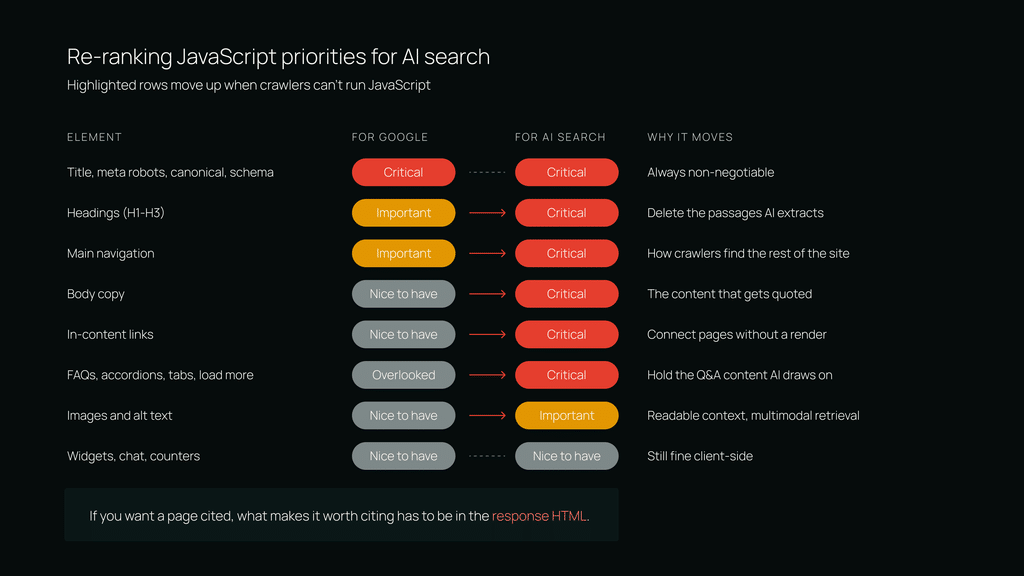
| Element | Priority for Google | Priority for AI Search | Why it moves |
| Title, meta robots, canonical, structured data | Critical | Critical | No change. These were always non-negotiable. |
| Headings (H1, H2, H3) | Important | Critical | Headings define the passages AI systems extract and attribute. |
| Main navigation | Important | Critical | It's how a non-rendering crawler finds the rest of your site. |
| Body copy | Nice to have | Critical | This is the content that gets quoted and cited. |
| In-content links | Nice to have | Critical | They connect related pages for crawlers that never see the render. |
| FAQs, accordions, tabs, "load more" content | Often overlooked | Critical | These often load on interaction and hold the question-and-answer content AI answers draw on. |
| Images and alt text | Nice to have | Important | Alt text is readable context, and multimodal retrieval is growing. |
| Interactive widgets, chat, counters | Nice to have | Nice to have | Still fine to render client-side. |
The short version: if you want a page to be cited, everything that makes it worth citing needs to be in the response HTML.
Audit by template, not by page
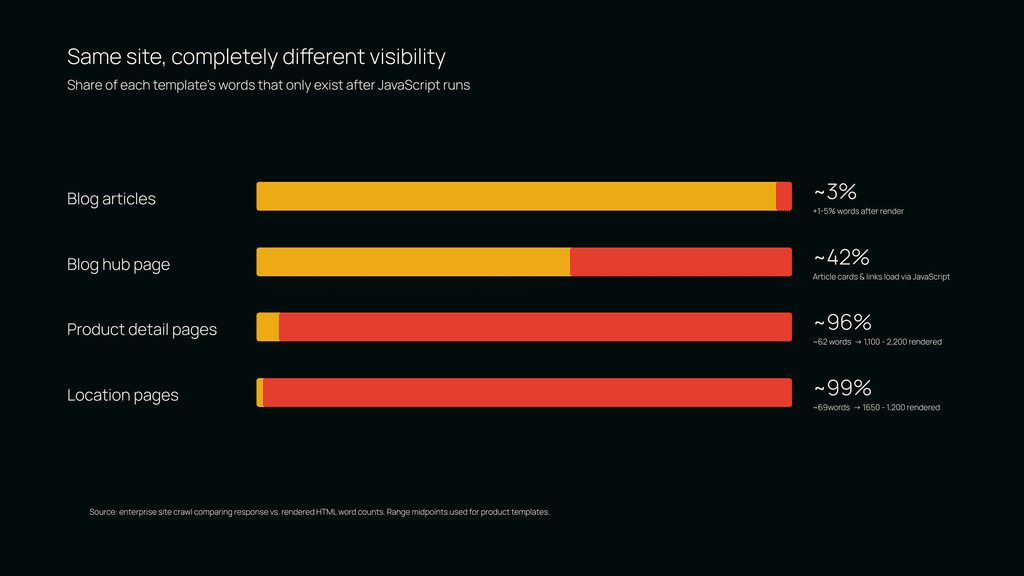
Remember that crawl I mentioned? Where the raw response and the rendered response were completely different? Results like that are a good reminder of why spot-checking a few URLs isn't enough.
The blog was fine. Most articles gained only 1 to 5 percent more words after rendering, and the gain was almost identical across very different posts. That consistency points to template elements loaded by JavaScript, not article content. The body copy was in the response.
The blog's hub page was not. About 42 percent of its words existed only after rendering. On a listing page, that's typically article cards and links, the paths a crawler follows to find everything else.
The product templates were nearly empty. Location-level pages returned about 9 words in the response HTML and 650 to 1,200 words once rendered. Detail pages under them returned about 62 words and 1,100 to 2,200 once rendered. To a crawler that doesn't run JavaScript, these high-intent commercial pages are shells.
Same site, same domain, completely different visibility, decided entirely by how each template renders. If I'd only checked a few blog posts, everything would have looked healthy. The lesson is to group your crawl by template or subfolder, sort by how much content depends on JavaScript, and look at the outliers.
Agents are a third audience
AI agents that browse on a user's behalf do run JavaScript, because they drive real browsers. They can see the rendered page, click, scroll, fill out forms, and complete transactions.
They fail in different ways. Slow pages cost them time and tokens, and they'll abandon a load that takes too long. Single-page apps that use hash-based routing give them no distinct URLs to work with. Modals, cookie banners and popups get in the way. And bot protection can flag them as bad actors and block them outright.
So a site can be readable by Googlebot, invisible to AI crawlers, and frustrating for agents, all at once. Server-rendered content with fast, stable pages serves all three.
How to check your own site
You don't need special access to see what AI crawlers see. Start with one page from each major template.
- Compare View Source with Inspect Element. Search the source for a sentence from the middle of the page. If it's only in Inspect, it's built by JavaScript.
- Fetch the page as an AI crawler. Run curl -A "GPTBot" https://example.com/page in a terminal. What comes back is exactly what a non-rendering crawler receives. It also shows whether a firewall or bot rule treats that user agent differently.
- Turn JavaScript off and reload. Whatever disappears was never in the response.
- Scale it with a crawler. Run a site crawl with JavaScript rendering enabled and compare word counts between the original and rendered HTML. Group the results by subfolder or template and sort by the share of content that depends on JavaScript.
- Read your server logs. Check whether GPTBot, ClaudeBot and PerplexityBot are actually requesting your important pages and getting 200 responses. Being crawlable and being crawled are different things.
What to ask your development team for
"Fix our JavaScript SEO" won't get you far. Specific requests will.
- Serve primary content in the initial HTML. Body copy, headings and FAQs should be in the server response, through server-side rendering, static generation or prerendering.
- Use real links. Navigation and in-content links should be <a href> elements pointing to real URLs, not click handlers on other elements.
- Keep metadata stable. Titles, canonicals and meta robots tags shouldn't change after JavaScript runs. If the response and the render disagree, crawlers and users get different answers.
- Prioritize by template. Start with the templates that carry the most commercial or citable content, and fix the template once rather than page by page.
The response is the page
Sam closed her talk with a line I keep coming back to: JavaScript isn't the problem, but where your content lives might be.
For AI search, I'd take it one step further. The response HTML isn't one version of your page. For most AI crawlers, it's the only version. If your content isn't in the response, it isn't in the answer.
The good news is that you can see exactly what these crawlers see, and the fixes are well understood. Start by auditing your templates, re-rank what has to be in the response, and bring your developers specific asks.
Not sure what AI crawlers see on your site?
We’ll check your key templates the way GPTBot, ClaudeBot and PerplexityBot do, show you which pages are shells in the response HTML, and give you a prioritized list of fixes your developers can act on. Get your free AI audit →