



Content marketing is a long-term marketing strategy for attracting and engaging an audience through the creation, publication, and distribution of relevant, valuable, consistent content. Its primary aim is to attract and retain a specific audience, ultimately driving them to take profitable actions, be it a purchase, sign-up, or any other desired outcome.
Content marketing is useful for building trust and credibility with your audience, enhancing SEO efforts by creating content that ranks and drives organic traffic, positioning your brand as an industry leader, and supporting the buyer’s journey as they move from awareness and consideration into purchasing.
Content marketing caters to both audiences and brands. For one, audiences are often much more receptive to content that provides them with real value (think infographics, videos, and blog posts) than to advertisements, increasing the effectiveness of content marketing versus traditional marketing in promoting action. Some statistics of content marketing benefits include:
Source: https://www.demandmetric.com/content/content-marketing-infographic
Producing high-quality content that addresses the needs and challenges of your target audience helps you increase your brand's visibility in search engines and across various online platforms. Effective content that's optimized for search engines (SEO) can lead to higher search rankings, making it easier for potential customers to discover your brand organically. As your content gets shared and linked to, your brand's reach and recognition can also expand, enhancing overall brand awareness.
Trust isn't just about telling the truth about your service or product. It's about being a reliable, consistent, and valuable resource for your audience. When trust is woven into the fabric of your content marketing strategy, it becomes a powerful tool for long-term success.
Consumers who trust a brand are more likely to stay loyal, even when competitors might offer better prices or promotions.
Trust also plays a pivotal role in recommendations. Satisfied customers who trust a brand are more likely to recommend it to friends and family, expanding your audience organically.
When potential customers trust your content and, by extension, your brand, they are more likely to take desired actions, like signing up for a newsletter or making a purchase.
Content marketing is a powerful tool for generating leads and converting them into customers. For example, many companies use lead magnets (ebooks, product guides, webinars, etc.) to attract traffic and customer’s attention. These lead magnets build a positive brand image, add value to your company, and ideally result in more potential buyers. By creating content that speaks to different stages of the buyer's journey, you can attract prospects at every level of readiness.
Compared to traditional forms of advertising, content marketing often offers a higher return on investment (ROI). While creating high-quality content requires an initial investment of time and resources, once published, evergreen content (content based around evergreen rather than timely topics) can continue to drive traffic, engagement, and conversions over the long term.
Repurposing content is a creative way to cut down costs and continue to receive returns on ideas proven to attract customers. Once a base of quality content to pull from is established, you can easily modify and mold it to fit current needs. For example, think of how this applies in the “hub-and-spoke” model. Your company will always have “hubs”; topics around which they want to establish authority; and “spokes”, supporting content that links back to the “hubs”. Pulling from your content base to fit the trends surrounding your “hubs” allows for the creation of many “spokes”, all leading back to your objective. Repurposing your pre-made content is ideal in its cost-effectiveness as well as labor efficiency.
Furthermore, you can minimize costs by repurposing content in a way that provides even more value to your brand. An example of this would be to structure existing content — supplementing with new content as necessary — using a hub-and-spoke model to build authority in a specific topic. This approach often has a great deal of SEO benefits alongside general authority building.
Content marketing should be guided by a strategy built around the buyer’s journey.
A buyer moves through three stages in the typical marketing or sales funnel: awareness, consideration, and decision. Marketers know these stages as “TOFU” (top of funnel), “MOFU” (middle of funnel), and “BOFU” (bottom of funnel). Each of these stages is an opportunity for content that meets your audience where they are to help them progress towards decision and purchasing.
Here’s what we mean.
At this stage, buyers are experiencing a problem or need but might not yet fully understand it or know the solutions available. Content marketing's role here is to capture their attention and provide valuable, educational content that addresses their pain points. This content should focus on raising awareness and helping buyers define and understand their challenges. Examples of content for this stage include blog posts, articles, infographics, and videos that highlight common problems and challenges within the industry or domain.
Once buyers have identified their problem and are actively seeking solutions, they move into the consideration stage. Here, they are researching different approaches, strategies, and products to solve their problem. Content marketing's role in this stage is to provide in-depth information about potential solutions and guide buyers toward considering your brand as a viable option. Content should highlight your brand's expertise, showcase case studies, and offer detailed comparisons between different solutions. Whitepapers, eBooks, webinars, and product comparison guides are effective content types for this stage.
In the decision stage, buyers have narrowed down their options and are ready to make a purchase decision. Content marketing's role here is to provide the final push needed for them to choose your product or service. Content should focus on the unique value proposition of your offering, addressing any remaining concerns or objections the buyer might have. Testimonials, customer success stories, free trials, and product demonstrations are excellent content types for this stage. These types of content help build trust and confidence in your brand.
Throughout all these stages, the key is to provide relevant, valuable, and personalized content that addresses the specific needs and concerns of the buyers.
Remember that the buyer's journey is not always linear, and buyers might move back and forth between stages. Content marketing should be adaptable and provide support no matter where a buyer is in their decision-making process.
Many types of content can add value for an audience. Consider what information you need to share and where your audience is to determine the best combination of content types. Below is a non-exhaustive list of content types and their benefits and features.
| Content Type | Example | Features and Benefits |
| E-book and Whitepapers | Allow brands to take a deep dive into a specific subjectMay include research and case studiesOften used as a lead magnetPositions brand as an expert | |
| Webinars | Brands engage with audience in real-time, getting immediate feedbackRecorded webinars are easily re-purposed into other content forms Hosting guests can increase the content’s value and increase its reach | |
| Interactive Tools | Require participation, leading to longer engagement and increased website dwell timeOffer users personalized results, increasing perceived valueUsers often share results and tools on social media, inadvertently promoting your brand | |
| User-Generated Content | UGC is perceived as more authentic than brand-produced content, as it comes directly from peers or other consumers.Brands can save on production costs and resources.Fosters a sense of community around a brand, with users feeling more engaged and connected. | |
| Social Media Posts, Stories and Highlights | Stories allow brands to share in-the-moment updates, making content more immediate and authenticThe ephemeral nature of stories (typically disappearing after 24 hours) creates a sense of exclusivity, urging users to view content before it vanishes | |
| Polls and Surveys | Offer a straightforward way for brands to gather feedback on products, services, or content preferencesRequire user interaction, leading to higher engagement ratesResults can provide valuable data on user preferences and behaviors, guiding future marketing strategies | |
| Infographics | Visual data representation is often more engaging than text-heavy content, capturing and retaining audience attentionInfographics are often shared across social media platforms and websites, increasing their reachcan be repurposed for other content forms, like blog posts or videos. A well-designed infographic can remain relevant and shareable for years | |
| Directly reach your audience via their inboxSegmenting an email list based on behaviors and preferences allows you to deliver more relevant and personalized contentEmail is effective for lead nurturingTrackable metrics such as open rates, click-through rates, and conversions help you refine your strategy | ||
| Podcasts | Podcasts attract audiences who prefer auditory learning, expanding your reach to individuals who may not engage with written content or who are multitasking while listening An audio format allows you to convey your brand’s personality and connect on a personal levelRegularly sharing information on a podcast can position your brand as an industry authority | |
| Video | Combining visual and audio makes content more engaging and suitable for conveying complex informationVideos allow you to demonstrate products, services or processesVideos evoke emotions, improving brand recall | |
| Blog Content | Long-form content provides room to dive deep into subjects, offering readers comprehensive insights.Search engines often favor detailed, value-rich content, leading to improved rankingsRegularly publishing in-depth articles showcases a brand's expertise, positioning it as a thought leaderGuest authors bring new insights and expertise, enriching the content offeringComment sections allow readers to share their views, ask questions, or provide feedback, giving brands direct insight into their audienceDiscussions in the comment section can inspire future content topics or address areas of interest or confusion |
Creating content is only one part - and a small part - of your content marketing strategy. Follow these steps to build an informed strategy that will guide your audience to purchase.
First things first, you need to know who you are talking to.
Deep dive into demographics, including age, gender, and location. Understand what your audience loves, and hates, what they are motivated by, and understand their online behavior patterns. Are they avid readers? Do they prefer video content?
Even if you have personas built out for your customers, take this as an opportunity to refresh what you know - or think you know.
Platforms like Google Analytics or Facebook Insights can provide data about your audience’s behavior, preferences, and demographics. You can also jump into a more advanced tool like Sparktoro, or conduct customer surveys and customer research interviews.
Finally, be sure to group your audience into distinct categories based on their shared characteristics and behaviors. One content strategy will not fit all. Design content that speaks directly to each persona, addressing their specific needs and pain points.
Once you know your audience, set goals and KPIs to guide the rest of your strategy build-out.
SMART goals are specific, measurable, achievable, relevant and time-bound.
You will know whether your content strategy is successful or not by tracking key performance indicators established before the campaign launches.
Quantitative metrics may include traffic data about the number of visitors to your site, and engagement rates such as likes, shares, comments, and overall interaction with your content.
Qualitative metrics for your content plan can come through feedback and reviews from your audience. Before and after surveys can help you gauge how your content is influencing the overall perception and image of your brand.
SEO Performance goals can also be a strong indicator of content strategy success. Monitor where your content ranks for targeted keywords, and watch for backlinks. A high number of quality backlinks can improve your SEO and suggest that your content is deemed valuable by others.
Conversion metrics are perhaps the most important. Ensure that your content strategy is contributing to the overall growth and revenue goals of your company. You may want to track the number of leads generated from a content piece or the number of direct sales or other conversion types.
The content type that you choose to use will be largely dependent on where in the buyer’s journey that content will appear for your audience.
If you’ve considered your audience’s needs and questions at each of the stages of the buyer’s journey, you can then consider what content format is best to answer those questions and communicate what your audience needs to move down the pipeline.
Consider which content formats resonate most with your audience. Perhaps you learned in your audience research that your audience has a strong preference for videos as opposed to long-form blog content. Lean into any of these insights.
Investigate what content types your competitors are using to identify any gaps or opportunities for differentiation. As you move along to implementing your strategy, don’t be afraid to try out different formats. Monitor the response and be ready to adapt based on feedback and results.
Once you know what content you will create, decide how you will distribute it. Will content go out in an email? Do you need brochures or posters for an event? Prioritize channels where you know your audience spends their time. If your target demographic frequents Instagram, it makes sense to prioritize that platform.
Note that different platforms have unique nuances. Tailor your content to fit the specific channel’s audience and format. Regularly posting and engaging on your chosen channels helps maintain visibility and fosters trust with your audience.
Put all of your content creation and distribution plans into one content calendar. Make a short-term strategy spanning 3-6 months.
Organizing topics and post dates in advance ensures you maintain a consistent posting schedule. Be mindful of your own budget and resources to build a calendar that is realistic and effective.
This is also a great time to consider who will be in charge of creating what content. Perhaps you have a large content team that can fulfill your strategy. But maybe you need to hire an external videographer to help with other content. Make these plans now so that every detail of execution is accounted for.
And you’re off! Get creating, sharing and analyzing. As your content strategy begins to reveal its strengths and weaknesses, adapt and stretch yourself to experiment with new ideas.
Build times for a regular analytics review of your content strategy’s performance. Evaluate success based on your established KPIs, and make adjustments as needed.
Here are ways to build upon your content strategy to win loyalty from your audience and get the most out of your resources:
With this framework, you're well-equipped to create, distribute, and measure content that truly resonates with your audience.
To maximize your reach and effectiveness, it's crucial to integrate content marketing with other marketing efforts.
Keyword-Driven Content:
High-Quality Backlinks:
Enhanced User Experience (UX):
Sharing and Amplification:
Influencer Collaborations:
Trending Content:
Content is the backbone of successful digital marketing. It's the medium through which brands can inform, inspire, entertain, and connect with their audience.
Content marketing is a strategic approach focused on creating, publishing, and distributing valuable, relevant, and consistent content to attract and retain a clearly defined audience, ultimately driving profitable customer action.
Unlike traditional marketing, which often focuses on promoting products or services directly, content marketing emphasizes providing valuable information or entertainment to the audience. It builds trust and positions the brand as an industry expert.
SEO (Search Engine Optimization) ensures that your content is visible to search engines and ranks well for relevant search terms. Good SEO practices drive organic traffic to your content, increasing its reach and effectiveness.
The frequency depends on your brand’s goals, resources, and audience’s needs. However, consistency is crucial. Whether it’s once a week or once a month, ensure you maintain a regular schedule.
It varies by industry and target audience. Blog posts, videos, infographics, podcasts, and eBooks are all popular. The key is to understand your audience’s preferences and provide content that meets their needs.
Measure metrics such as website traffic, social media engagement, lead generation, and sales conversions. Tools like Google Analytics can offer invaluable insights. Regularly reviewing these metrics will indicate the effectiveness of your strategy.
Ensure your content is authentic, transparent, and consistently valuable. Avoid clickbait, address audience concerns proactively, and engage responsively. Building trust is a long-term process but is vital for sustainable success.
While the strategies and platforms might vary, content marketing is adaptable to almost all industries. It’s all about finding the right voice, medium, and message for your specific audience.
Content marketing is versatile. Start with what you can manage, like writing your own blogs or creating simple videos. As you gain traction, you can consider reinvesting in higher-quality content or diverse formats.
A value proposition is a clear, concise statement that explains how a product or service solves a problem, delivers specific benefits, and tells the ideal customer why they should choose it over competitors. This statement should be easily understood and clearly communicate what makes the business unique and valuable.
A well-crafted value proposition speaks directly to the target customer's needs and desires, setting the tone for everything the company does. A few of its characteristic benefits include the following:
Crafting an outstanding value proposition involves a series of steps that focus on understanding the customer, highlighting the benefits of your product or service, and differentiating your brand from competitors.
Start by identifying the primary problem or need your target customer faces. This involves thorough market research and customer insights. Understanding the problem in depth allows you to tailor your value proposition to address these specific pain points.
Once you understand the customer's problem, articulate how your product or service provides a solution. Focus on the benefits rather than just the features. (A feature is a key aspect of a product or service, while a benefit is how those features can improve a consumer's life by making things easier or more enjoyable.) Benefits are what truly resonate with customers, as they explain how your offering improves their lives or businesses.
Clarify the value that these benefits bring to the customer. This could be in terms of time saved, costs reduced, increased efficiency, or improved quality of life. The goal is to make the customer see the tangible impact of your offering on their daily lives or operations.
Draw a clear connection between the value your product or service provides and the customer’s initial problem. This linkage ensures that the customer understands how choosing your offering directly addresses their needs.
For example, imagine you offer a meal kit delivery service. Your customer's initial problem is finding it challenging to prepare healthy meals at home due to a busy lifestyle. To connect value to your product, emphasize how your service provides pre-portioned ingredients with easy-to-follow recipes, addressing their need for convenient and nutritious meals without the hassle of meal planning and grocery shopping.
Explain why your solution is better than the competition. This could be due to superior quality, unique features, better pricing, or an exceptional customer experience. It’s about positioning your brand as the preferred choice in the market.
Consider using proven templates and methodologies to structure your value proposition. These tools can help ensure that your value proposition is clear, concise, and compelling.
Crafting a powerful value proposition is a strategic process that requires deep understanding, clarity, and an emphasis on differentiation. When done correctly, it becomes a powerful tool for attracting and retaining customers.
When developing a value proposition, there are special considerations to keep in mind to be sure it resonates effectively with the target audience and aligns with the brand’s overall strategy.
Value propositions can vary significantly depending on their target audience and the specific goals they aim to achieve. Here are a few you’ll frequently come across.
Customer value propositions focus on the benefits a product or service offers to its buyers. It highlights what sets these offerings apart from competitors, emphasizing aspects like quality, price, convenience, or the customer experience. The goal is to clearly articulate why a customer should choose a particular brand.
Employee value propositions are aimed at current and prospective employees. They outline the unique benefits and opportunities provided by an employer, such as career development, work-life balance, company culture, and compensation. This type of proposition is key in attracting and retaining top talent.
These propositions relate to a company's mission and vision, describing the broader impact of the organization on its community or the world. They often focus on values like sustainability, social responsibility, or innovation, appealing to stakeholders who share similar ideals.
Each type of value proposition serves a distinct purpose and targets different audiences, but all play an important role in conveying the unique value and identity of your brand.
The consequences of a poorly defined or executed value proposition can be significant for businesses. Understanding these impacts is crucial for organizations to prioritize crafting and maintaining an effective value proposition.
Understanding and mitigating these risks is essential for businesses aiming to maintain a strong market presence and achieve long-term success.
Exploring examples of effective value propositions provides valuable insights into how successful companies communicate the value of their products or services. These examples serve as inspiration and guidance for crafting your own compelling value proposition.
Apple’s value proposition focuses on innovation, quality, and a seamless user experience. They emphasize the elegance and simplicity of their products, appealing to consumers who value design and functionality.
Lyft presents itself as a friendly, accessible alternative to traditional taxi services. Their value proposition highlights convenience, competitive pricing, and a commitment to a positive community impact, attracting customers looking for more than just a ride.
Nike's value proposition centers on inspiration and innovation in the world of sports and fitness. They offer high-quality athletic products and inspire their customers to achieve greatness, appealing to athletes and fitness enthusiasts.
WordPress communicates the ease and flexibility of creating a website or blog. Their value proposition caters to users seeking a user-friendly, customizable, and scalable platform for their online presence.
Grammarly’s value proposition is about helping users improve their writing. They offer an easy-to-use tool that ensures clarity, effectiveness, and mistake-free writing, appealing to a wide range of users from students to professionals.
Visa emphasizes security, convenience, and global acceptance. Their value proposition appeals to consumers and businesses looking for reliable and widespread payment solutions.
Stripe positions itself as the developer-friendly online payment platform, highlighting features like easy integration, global payments, and powerful APIs, appealing to online businesses and e-commerce platforms.
These examples demonstrate how a well-crafted value proposition can succinctly convey the unique value and appeal of a brand, setting the stage for successful marketing and customer engagement.
Once a value proposition is developed, it's crucial to test and refine it to ensure it effectively resonates with the target audience. This iterative process helps in fine-tuning the message for maximum impact.
Message testing involves presenting the value proposition to a segment of the target audience to gather feedback. This can be done through surveys, focus groups, or one-on-one interviews. The goal is to understand how the message is perceived and whether it successfully communicates the intended value.
A/B testing is a powerful tool for testing value propositions, especially in digital marketing. By creating two versions of a webpage, email, or advertisement, each with a different value proposition, you can measure which one performs better in terms of customer engagement and conversion rates.
Pay-per-click (PPC) advertising campaigns can also be used to test value propositions. By creating different ads with varying messages, you can analyze which proposition drives more clicks and conversions. This method provides real-time feedback and allows for rapid iteration.
Value propositions encapsulate the unique value a company offers to its customers, differentiating it from competitors and driving customer engagement and loyalty. Crafting an effective value proposition requires a deep understanding of the target audience, clear communication of benefits, and continuous testing and refinement.
Whether addressing customers, employees, or other stakeholders, a well-defined value proposition serves as a guiding light for all organizational activities, ensuring consistency and alignment with the brand’s core values and objectives.
The primary purpose of a value proposition is to communicate the unique value and benefits of a product or service to the target audience, convincing them to choose it over alternatives.
An effective value proposition resonates with your target audience, drives customer engagement, and leads to increased sales or conversions. Testing and feedback are key indicators of its effectiveness.
Yes, a value proposition should evolve to stay relevant to changing market conditions and customer preferences. Regular assessment and updates are essential.
A value proposition should be customer-centric, focusing on how the product or service benefits the customer. It should address their specific needs and pain points.
No, a value proposition is different from a brand slogan. A slogan is a catchy phrase used for branding, while a value proposition is a strategic statement explaining the unique value of a product or service.
To ensure alignment, your value proposition should reflect your brand's core values, voice, and personality. It should be consistent with the overall brand messaging.
Yes, businesses can have multiple value propositions if they serve different market segments or offer a range of products and services. Each value proposition should be tailored to its specific audience.
A value proposition guides content marketing efforts by defining the topics, tone, and approach of content. It ensures that content aligns with the brand's offerings and customer values.
Your value proposition should be updated whenever there are significant changes in the market, customer preferences, or your product or service offerings. Regular assessments are essential.
Above-the-fold in marketing signifies the portion of a webpage that is visible without scrolling.
The term hails from the day of Sunday newspapers. When you’re reading a paper, the term "above-the-fold" refers to the upper half of the front page of a newspaper. This space is highly prized and contains the most critical headlines and stories. As the first thing readers see when glancing at a newsstand, it has to be compelling enough to encourage a purchase.
In marketing, this segment of the website's design must be carefully crafted, containing elements that engage, inform, and prompt the users to take action. The term "fold" here refers to the digital line dividing what's immediately visible on a web page from the content below.
On average, site visitors decide whether to stay on a page after only 10 seconds, and these visitors aren’t generous about second chances. A well-designed above-the-fold section sets the tone for the entire site and can keep visitors engaged, leading to site exploration and conversion.
While this may not be a definitive list of every element that should appear above-the-fold, these five things must appear for your site to have a fighting chance for audience attention.
Each of the following images are great examples of Above-the-Fold homepages. Note the simple designs, carefully placed CTAs, engaging images, and brand positioning techniques.


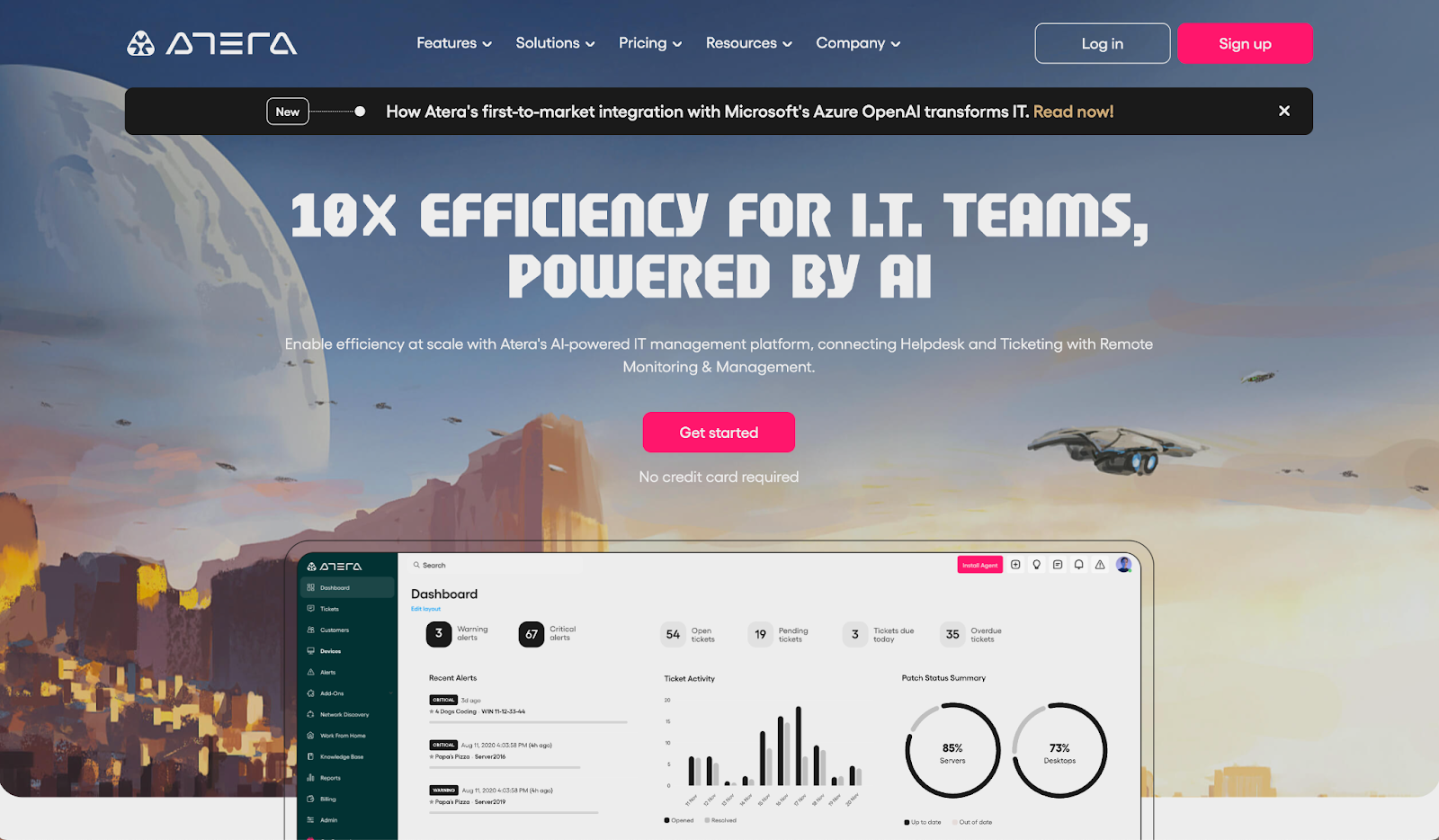
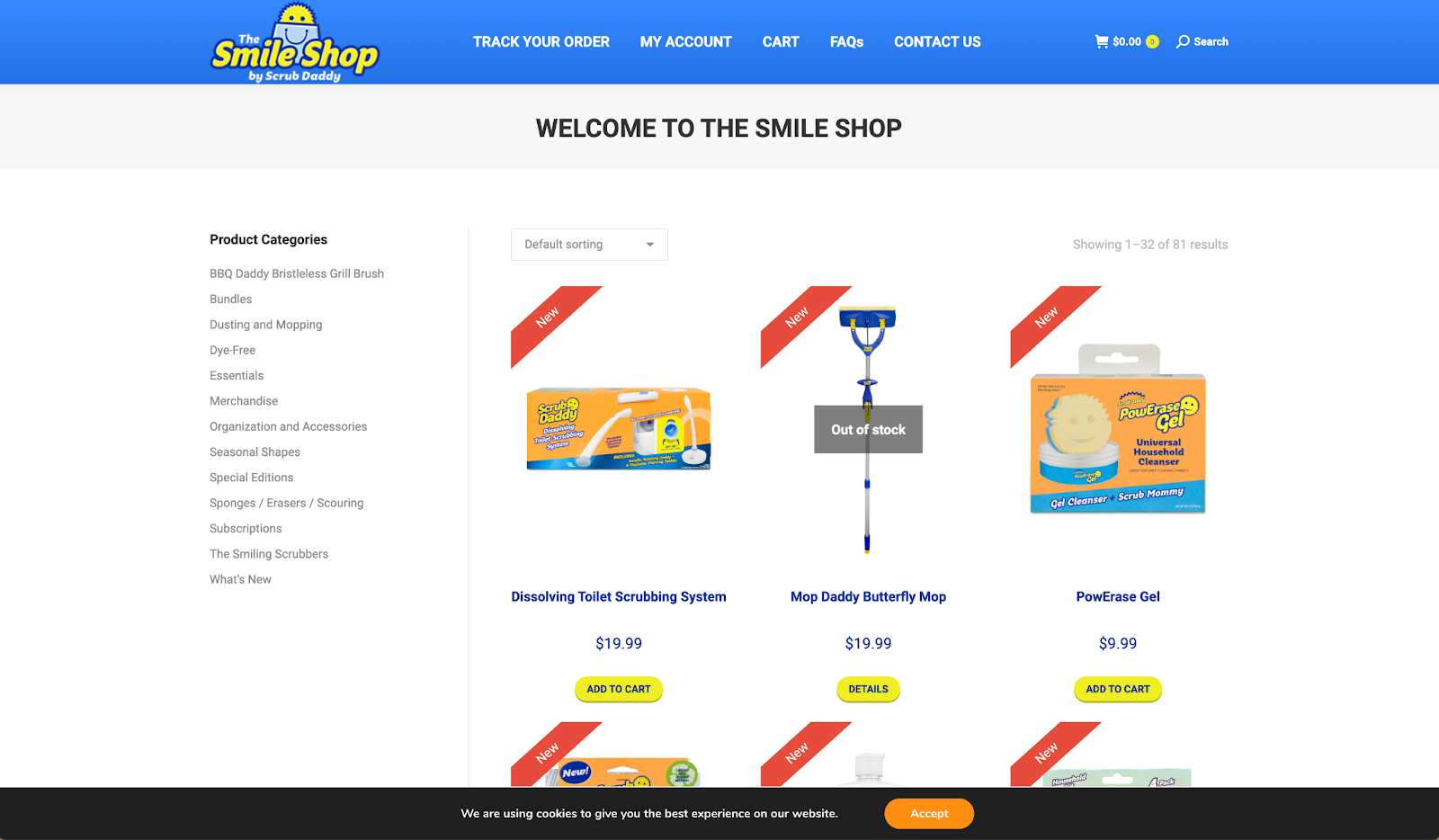
Regularly analyze site performance and optimize your above-the-fold content to increase engagement. There are many ways to find out what is working and what isn’t.
The concept of "above-the-fold" is an enduring principle that's evolved from print to digital.
Through strategic design, engaging content, responsiveness, and ongoing optimization, the above-the-fold section can become a powerful tool for enhancing user experience and boosting conversions on your website.
It refers to the area of a web page visible without scrolling, holding key elements like headlines, images, and CTAs.
It's crucial for immediate engagement, setting first impressions, and influencing user behavior.
Benefits include immediate user engagement, higher conversion rates, and improved user experience.
Focus on simplicity, engage your audience with visuals and compelling copy, ensure usability across devices, and provide immediate solutions to user challenges.
A/B testing, heatmaps, user surveys, and analytics tools like Google Analytics are valuable for testing and measuring performance.
Regular and continual testing is recommended to stay current with user needs and trends.
Yes, responsive design ensures that Above-the-Fold principles are effective across all devices, including mobile.
The term originates from newspaper design, where the top half of the front page was prime real estate for engaging readers. The principle remains the same in digital media.
While not directly an SEO factor, a well-designed above-the-fold area can reduce bounce rates and increase user engagement, indirectly improving SEO.
Simplicity is usually favored, as it promotes clarity and helps users quickly grasp the main message. Complex designs may confuse or overwhelm visitors.
Call to Action (CTA), Value Proposition, User Experience (UX)
Google Search Console, formerly known as Google Webmaster Tools, is a free service provided by Google to help website owners monitor, maintain, and troubleshoot their site's presence in Google Search results. It offers tools and reports that provide insights into how Google's search engine views your website, allowing you to make data-driven decisions to improve your site's search performance.
There are plentiful advantages to using Google Search Console, including:
Embarking on your Google Search Console journey is simple and streamlined. Here's a brief breakdown of the steps:
Ensuring the rightful owner has access to sensitive data is paramount for Google. There are several methods to verify your site:
A sitemap aids Google in understanding your website's structure. To add one:
With the sitemap submitted, Google can more efficiently crawl and index your site.
One of the standout features of Google Search Console is its Performance Report. This report provides a wealth of information on how your website performs in Google Search. Key insights include:
By analyzing these metrics, webmasters can optimize their content to enhance visibility and user engagement.
This tool serves as a diagnostic center for individual URLs, allowing you to:
By using the URL Inspection Tool, you can ensure each page on your site is accessible and optimized for Google Search.
The Index Coverage Report provides a comprehensive view of the indexing status of your site's URLs. It highlights:
It’s a crucial tool for identifying and fixing issues that might be preventing Google from indexing your pages.
Google Search Console's Enhancements Report provides insights into specific features and enhancements, such as:
Using the Enhancements Report, webmasters can improve the overall user experience of their sites.
This report notifies site owners if there are any manual actions taken against their site due to violations of Google's Webmaster Guidelines. Such actions could be a result of:
It's imperative to address these issues promptly to restore your site's standing in Google Search.
The Links Report provides insights into:
Link data can be invaluable for both understanding your site's authority and refining your link-building strategy.
Google Search Console isn't just about monitoring; it's about action. Armed with the data from GSC, you can embark on various technical SEO optimizations:
Introduced by Google, Core Web Vitals are crucial performance metrics that impact user experience:
Google Search Console's dedicated report on Core Web Vitals helps site owners understand and improve these vital metrics.
Your visibility on search engines hinges largely on your site's indexability:
Leveraging GSC’s Performance Report allows for an in-depth understanding of:
By regularly analyzing and optimizing for search queries, you can better align with searcher intent and drive organic traffic.
Google Search Console’s Index Coverage Report is instrumental in highlighting any crawl errors or warnings affecting your site. Addressing these promptly can enhance your site's visibility and user experience. Here’s how you can resolve common issues:
Regularly monitoring and addressing these errors ensures Googlebot can efficiently index your site.
Security issues can harm both your site’s users and your standing in search results. GSC’s Security & Manual Actions report lists potential security threats, such as:
Upon identifying any security threats, act swiftly to rectify them and then request a review via GSC to confirm the issue's resolution.
Sometimes, even without crawl errors, certain pages might not be indexed. To address this:
Regular monitoring and swift action can help maintain your site's optimal presence in search results.
As your familiarity with Google Search Console deepens, you can leverage more nuanced data to analyze performance:
Gaining these insights helps shape your ongoing SEO strategy to align with evolving trends and user behaviors.
Given the mobile-first indexing approach of Google, ensuring both mobile and desktop versions of your site are optimized is crucial:
By catering to both mobile and desktop users, you ensure a seamless experience, irrespective of how they access your site.
In addition to the plethora of reports and tools, Google Search Console also offers insights, which delve deeper into user behavior and content performance:
Harnessing these insights can refine your content strategy, aligning more closely with your audience's preferences and needs.
To fully harness the potential of Google Search Console, it's essential to stay updated with the platform's latest changes:
Google offers a plethora of resources to help users make the most of GSC:
Leveraging these resources can significantly enhance your proficiency with Google Search Console.
Should you encounter challenges or have specific questions, reaching out to Google's support is an option:
While Google Search Console is user-friendly, don't hesitate to seek assistance when needed. It ensures you utilize the platform to its full potential.
Google Search Console is a free tool provided by Google that helps website owners monitor, maintain, and troubleshoot their site's presence in Google Search results. It provides insights into website performance, indexing status, and optimization opportunities, making it essential for businesses aiming for visibility in search results.
While both tools provide insights into website performance, they serve different purposes. Google Analytics focuses on website traffic, user behavior, and conversions, whereas GSC offers insights into how Google views your site, such as indexing status, search queries driving traffic, and potential issues affecting search presence.
No, GSC is designed for website owners to monitor and optimize their own sites. You'd need to verify ownership of a website to access its data in GSC, so competitor monitoring directly through the platform isn't possible.
Setting up GSC is straightforward. It involves adding your website, verifying ownership (using various methods like adding a meta tag or uploading a file), and then you can start accessing the data. While the setup is simple, maximizing its utility might require a deeper understanding.
After initial setup, it might take some time for GSC to gather and display data about your website. However, once it's been running for a while, you should have continuous access to updated insights.
GSC provides valuable insights like which search queries bring users to your site, pages with indexing issues, mobile usability concerns, and more. By addressing these insights, you can improve your site's visibility and performance in search results.
Core Web Vitals are a set of performance metrics introduced by Google to measure user experience on web pages, focusing on loading performance, interactivity, and visual stability.
Manual actions are instances where Google's human reviewers determine that parts of your site don't comply with Google's webmaster quality guidelines. To address them, you'd first need to identify the issue, make necessary corrections, and then request a review via GSC.
Absolutely. GSC has a "Mobile Usability" report that highlights issues affecting mobile users. As mobile search grows increasingly important, understanding and optimizing for mobile users is crucial for businesses.
Google places a high priority on data security. Only verified owners and designated users of a website can access its GSC data. It's always a good practice to limit access to essential personnel and use strong, unique passwords for accounts.
An editorial calendar serves as the backbone of successful content marketing campaigns. The significance of an editorial calendar lies in its ability to streamline content creation processes, ensuring that all marketing efforts are aligned with the company's overall goals and messaging. It aids in planning out content topics, publishing schedules, and distribution channels, making it easier to maintain a steady flow of content. This planning tool also enhances team collaboration and communication, as it provides a clear roadmap of what needs to be created, by whom, and when. By having a visual overview of all planned and published content, businesses can avoid duplication of efforts and ensure that their content strategy remains focused and coherent.
An editorial calendar is crucial for tracking the performance of different content pieces. It allows marketers to analyze which topics and types of content are performing best and adjust their strategy accordingly.
An effective editorial calendar is more than a simple schedule of blog posts; it's a comprehensive framework that encompasses various elements essential for successful content planning and execution. Understanding these key components can significantly enhance the utility of an editorial calendar.
By incorporating these components, an editorial calendar becomes a dynamic tool that not only organizes content but also assures alignment with the strategic objectives of the business.
Creating an editorial calendar may seem daunting at first, but with a structured approach, it can be broken down into 7 manageable steps. Here’s a guide to help you craft an effective editorial calendar:
Start by clarifying what you want to achieve with your content. This could include increasing brand awareness, generating leads, or boosting customer engagement. Your goals will guide the type of content you produce.
Know who you’re creating content for. What are their interests, pain points, and preferred content formats? This understanding will help you create relevant and engaging content.
Gather your team for a brainstorming session to come up with content ideas that align with your goals and audience interests. Think about themes, topics, and the types of content that will best convey your message.
Select the tools or software you’ll use to create and manage your editorial calendar. This could be a simple spreadsheet or a sophisticated content management system, depending on your needs.
Decide on the frequency of your content publication. This will depend on your resources and the capacity to produce quality content consistently. Balance is key; too much content can overwhelm your audience, and too little can allow them to forget about you.
Assign who is responsible for creating, editing, and publishing each content piece. This ensures accountability and smooth workflow.
Your editorial calendar should be a living document. Regularly update statuses and due dates to ensure that your calendar remains a valuable source of truth. Then review and adjust it based on content performance, team feedback, and changes in your marketing strategy.
Selecting the right format for your editorial calendar is pivotal in ensuring its effectiveness and usability. The format should match your team's workflow and the complexity of your content strategy. Here are some considerations to guide you:
The key is to choose a format that aligns with your team’s size, the complexity of your content strategy, and the resources available. A well-chosen format will not only keep your content strategy organized but also enhance your team's productivity and collaboration.
Implementing an editorial calendar successfully requires more than just selecting the right tool and populating it with content ideas. Here are some tips to ensure your editorial calendar is effective and truly beneficial for your content strategy:
By following these tips, you can ensure that your editorial calendar is not just a scheduling tool, but a strategic asset that contributes significantly to the success of your content marketing efforts.
This is a basic example of a content calendar spreadsheet. Pay attention to the various columns and how they are organized. Each marketing team’s calendar will vary, so keep in mind the ability to customize your calendar to your own needs.
| Content Theme/Topic | Content Type (e.g., Blog Post, Video) | Publication Date and Time | Content Description | Assigned Team Member | Status (Planning, In Progress, Completed, Published) | Performance Metrics (e.g., Views, Engagement, Conversions) |
| SEO Best Practices | Blog Post | 2023-12-15 10:00 AM | Tips for optimizing website SEO | John Smith | Completed | Views: 500, Engagement: 30, Conversions: 5 |
| Social Media Strategy | Video | 2023-12-20 3:00 PM | Explainer video on social media | Sarah Johnson | In Progress | - |
| Email Marketing Tips | Blog Post | 2023-12-25 9:30 AM | Email marketing strategies for 2024 | Emma Davis | Planning | - |
| Product Demo | Video | 2024-01-05 2:15 PM | Demonstration of our latest product | Mark Anderson | Planning | - |
| Year-End Recap | Blog Post | 2023-12-31 11:45 PM | Review of our achievements in 2023 | Mia Brown | Published | Views: 1000, Engagement: 50, Conversions: 10 |
Here are two templates for editorial calendars you can use to begin organizing your creation process. Both are easy to use and accessible online.
An editorial calendar is more than just a content scheduling tool; it's a strategic asset that can significantly enhance the effectiveness of your marketing efforts. Providing a structured approach to content planning ensures that your marketing activities are aligned with your business goals and resonate with your target audience.
The key to a successful editorial calendar lies in its ability to balance structure with flexibility, allowing for creativity and responsiveness to market trends. Whether you opt for a simple spreadsheet or a sophisticated content management tool, the most important aspect is that it fits your team's workflow and meets your strategic objectives.
An editorial calendar is a schedule that outlines when and where your company plans to publish upcoming content. It typically includes publication dates, content descriptions, assigned writers or creators, and the channels through which the content will be shared.
It helps in organizing content creation processes, aligning content with marketing goals, ensuring consistent content delivery, and enhancing team collaboration.
By providing a clear framework and schedule, it ensures that content is strategically planned, relevant, and aligned with audience interests and business objectives.
Key components include content themes and topics, publishing schedules, content formats and channels, assignments and deadlines, status tracking, and performance metrics.
Regularly, ideally weekly or monthly, to adjust to new insights, changes in strategy, and emerging trends.
Yes, by ensuring regular and strategic publication of content, which is key for SEO. It also helps in planning around keywords and important events or dates.
The format, whether a spreadsheet, digital calendar, or a specialized tool, should match your team's size and the complexity of your content strategy.
Provide training, emphasize its benefits, and integrate it into your regular workflow. Encourage feedback and make adjustments as needed.
Yes, various tools like Trello, Asana, CoSchedule, and dedicated editorial calendar software offer enhanced features for managing content.
Track the performance of your content against set goals, analyze the effectiveness of your scheduling, and assess team productivity and content quality.
A Demand-Side Platform, commonly referred to as a DSP, is an advanced technological platform that allows advertisers and agencies to buy digital advertising inventory from a multitude of publisher sites and mobile apps through one integrated interface. The primary functionality of a DSP is to facilitate the process of purchasing display, video, and mobile ads using automated processes and algorithms. Beyond mere ad buying, DSPs provide tools for tracking, reporting, targeting, and optimizing digital advertising campaigns in real-time, thus streamlining the traditionally complex manual processes.
DSPs have emerged as an indispensable tool for modern advertisers—they provide advertisers with unparalleled reach. Through DSPs, advertisers can access vast inventories from numerous publishers, ensuring their ads are seen by their target audience. Moreover, DSPs bring efficiency to the ad-buying process. Advertisers no longer need to negotiate individually with each publisher; DSPs offer a centralized platform for purchasing ad spaces across multiple sites. Additionally, the real-time data analytics tools within DSPs allow advertisers to monitor and adjust their campaigns instantly, ensuring optimal performance. In essence, DSPs bring precision, efficiency, and scalability to digital advertising, making them invaluable assets for businesses seeking a robust online presence.
At the heart of the DSP's functioning lies the concept of programmatic advertising. This is an automated, technology-driven method of buying and selling ad inventory. Instead of manual negotiations and purchases, programmatic advertising relies on algorithms and real-time data to make decisions. One of the most popular methods within programmatic advertising is real-time bidding (RTB). Here, when a user visits a webpage that has ad space, an auction takes place in mere milliseconds. Advertisers bid for that ad space, and the highest bidder gets to display their ad to the user. This whole process is facilitated by the DSP, which assesses the value of the impression based on the data available about the user, decides on a bid, and serves the ad—all in real time.
The world of digital advertising can sometimes feel like a maze of acronyms, with DSPs and Supply-Side Platforms (SSPs) being two of the most frequently mentioned. While they might seem similar, their roles in the advertising ecosystem are distinct. An SSP is essentially the counterpart to the DSP but for publishers. While DSPs allow advertisers to buy ads, SSPs enable digital media owners, like publishers, to sell their ad space. In simple terms, the DSP represents the demand (from advertisers) and the SSP represents the supply (from publishers). When a DSP sends out a bid for an ad space, it's typically an SSP that receives and manages that bid on the publisher's end. This interaction ensures that both advertisers and publishers get the best possible deal in real time, making the process efficient and beneficial for all parties involved.
Choosing the right DSP can be the defining factor in the success of an advertising campaign. It's imperative to consider several critical factors:
Begin by clearly defining your advertising goals. Whether you're aiming for brand awareness, lead generation, or conversions, this will help narrow down DSPs tailored to your objectives. Engage in demos and trial periods. Before fully committing to a DSP, experiencing its interface, tools, and customer support firsthand can give invaluable insights. It's also wise to seek feedback from peers and industry experts. Their experiences can guide you toward platforms that consistently deliver results. Additionally, always prioritize transparency. A DSP that is forthright about its costs, data sources, and partnerships will ensure there are no unpleasant surprises down the line. Lastly, evaluate the scalability of the DSP. As your business grows, you'd want a platform that can efficiently handle increased demands and diversifying requirements.
As the significance of digital advertising has grown, so has the number of DSP companies. Here are some of the most popular DSPs:
Stepping into the DSP realm can feel like learning a new language due to its unique terminologies. To help, here are a few key terms:
While both DSPs and Ad Networks facilitate the purchase of ad inventory, DSPs offer a broader scope, allowing advertisers to buy from multiple sources through real-time auctions. In contrast, Ad Networks typically aggregate inventory from various publishers and sell it to advertisers at a markup.
While both DSPs and Ad Networks facilitate the purchase of ad inventory, DSPs offer a broader scope, allowing advertisers to buy from multiple sources through real-time auctions. In contrast, Ad Networks typically aggregate inventory from various publishers and sell it to advertisers at a markup.
Most top-tier DSPs integrate with third-party verification tools that assess the quality of the ad placements and ensure they're in brand-safe environments. They also offer features like blacklists and whitelists to give advertisers control over where their ads appear.
No, while DSPs initially focused on display advertising, their capabilities have expanded. Today, many DSPs can handle various formats, including video, mobile, native, audio, CTV, and even digital out-of-home ads.
With increasing concerns about user privacy, DSPs have adapted by ensuring compliance with global privacy regulations, like GDPR and CCPA. They employ anonymized data and maintain transparent data practices to prioritize user privacy while still offering targeted advertising solutions.
Most DSPs operate on a Cost-Per-Thousand (CPM) basis, where advertisers are charged for every thousand impressions their ad receives. Some DSPs may also charge platform or service fees. It's vital to discuss pricing structures upfront to avoid any unexpected costs. Transparency is key.
Absolutely. Many DSPs offer integration capabilities with other marketing tools such as Customer Relationship Management (CRM) systems, Data Management Platforms (DMPs), and analytics tools. This helps in creating a unified and more efficient marketing ecosystem.
While some DSPs might have minimum spending requirements, others cater to a range of budgets, including smaller ones. It's always advisable to check with individual platforms about their spending thresholds and policies.
DSPs leverage vast amounts of data, allowing advertisers to segment and target specific audiences based on demographics, interests, online behavior, geography, and more. Advanced algorithms analyze this data to ensure ads reach the most relevant and potential customers. DSPs also allow you to use industry/job functions, retargeting abilities, amb lists, and 3rd party lists, which makes it easier and cheaper to target your audience.
The beauty of DSPs lies in real-time analytics and optimization. If an ad isn't performing as expected, advertisers can instantly adjust targeting, bid strategies, or even creative elements. Many DSPs also offer algorithmic optimization, which auto-adjusts campaigns based on performance metrics.
Ad fraud is a legitimate concern in digital advertising. To combat this, leading DSPs incorporate sophisticated fraud detection tools and work with third-party verification services. They constantly monitor for suspicious activities and ensure that advertisers' budgets are spent on genuine, high-quality impressions.
Programmatic ads through DSPs allow you to track the conversion paths of your customers through multiple touch points (known as cross-device tracking). For example, Stackadapt, a prominent DSP platform, uses IP addresses to do this. This gives a unique advantage that other platforms don’t have. Consider the abilities of various DSPs when selecting what will best serve your needs.
Cost per Thousand, abbreviated as CPM (from the Latin 'Mille' for thousand), is a frequently used term within digital advertising. It serves as a benchmark for measuring the cost-effectiveness and efficiency of a digital advertising campaign. At its core, CPM represents the cost an advertiser is willing to pay for one thousand impressions or views of their advertisement on a web page. This metric provides a glimpse into the cost involved in reaching a potential audience, making it an important tool for marketers aiming to keep their advertising budgets within a certain threshold.
Unlike other metrics that focus on user engagement or clicks, CPM keeps its eye solely on visibility, offering a straightforward gauge of how much brand exposure a campaign is garnering.
The formula is straightforward: divide the total cost of the campaign by the total number of impressions, then multiply the result by 1,000. This presents the cost to generate 1,000 impressions within the targeted audience.
In the narrative of an advertising campaign, imagine a playwright purchasing space on a digital billboard to promote their upcoming theater production. They decide to invest $2,000 in a campaign that remarkably garners one million views. To find the CPM, the playwright would divide $2,000 by 1,000,000 impressions, resulting in a value of 0.002. Multiplying this by 1,000 gives a CPM of $2. This means that for every thousand times this advertisement is seen, a sum of $2 is spent.
The ease of calculating CPM opens up a realm of possibilities for advertisers to compare campaigns, adjust budgets, and set realistic expectations on the cost of visibility. It's a tale of numbers, narrated simply and effectively through the CPM metric.
Different platforms have different user bases and engagement levels, which can affect the CPM rates. For instance, a platform with a broad and active user base like Facebook (where advertising competition is higher) might have higher CPM rates compared to a niche or less popular platform.
A well-designed and engaging ad is likely to have a lower CPM as it can generate more impressions, which in turn, may improve the ad’s relevance score and potentially lower the cost.
These parameters, chosen by advertisers, also impact CPM rates. More granular targeting, aimed at reaching a specific demographic or psychographic audience, may result in higher CPM rates. This is because narrower targeting can reduce the overall audience size, and the higher relevance may demand a premium price.
Pay attention to when your product is most popular, and when your customers are most active. For instance, advertising during peak shopping seasons like Black Friday or Christmas might see higher CPM rates due to increased competition for ad spaces.
Certain regions or industries might have higher competition and, therefore, higher CPM rates.
One of the primary benefits of the CPM metric is its straightforwardness. CPM provides a clear, upfront understanding of the cost involved in generating one thousand impressions within the target audience. This clarity aids advertisers in budgeting their campaigns effectively before they even launch.
CPM is particularly beneficial when the goal is to enhance brand awareness and visibility. Unlike other metrics that focus on direct engagement or actions, CPM is all about exposure. It's a valuable metric when the primary objective is to get the brand or message in front of as many eyes as possible, making it a preferred choice for brand-centric campaigns.
In addition, CPM allows for an easy comparison across different advertising platforms or campaigns. By evaluating the CPM rates, advertisers can make more informed decisions on which platforms or campaigns offer better value for money in terms of visibility. This comparability is crucial in a digital advertising landscape that's bustling with myriad platforms and campaign options.
The wide reach facilitated by CPM campaigns can also contribute to other objectives such as increasing site traffic or fostering community engagement. Even though these may not be the primary goals, the broad exposure garnered through CPM advertising can set a solid foundation for achieving these secondary objectives.
Metrics like Cost per Thousand (CPM), Cost Per Click (CPC), and Cost Per Acquisition (CPA) are each measured differently according to their importance within your marketing campaigns.
While CPM focuses on the cost incurred for every one thousand impressions, irrespective of whether they lead to clicks or not, CPC is solely concerned with the cost paid for each click received on the ad. The decision between CPM and CPC often hinges on the overarching objectives of the advertising campaign.
Diving deeper into the funnel, Cost Per Acquisition (CPA) is a metric that measures the cost paid for each conversion or acquisition achieved through the advertising campaign. CPA is often seen in performance-driven campaigns where the focus is on initiating specific user actions rather than merely gaining impressions. It's a more narrowed-down approach compared to the broad scope of CPM.
The choice between CPM, CPC, and CPA often mirrors the advertising goals. Each metric offers a different perspective, and choosing the right one can significantly impact the campaign's effectiveness and ROI.
Optimizing CPM campaigns is crucial for advertisers aiming to get the most value out of their advertising budget. Here are the most important elements of your campaign to audit:
Creating compelling headlines, clear call-to-actions, and relatable content can significantly enhance engagement rates, which in turn, impact quality scores and lead to a better chance of lower CPM rates. Moreover, maintaining consistency in messaging across different touchpoints helps in building a stronger brand image, which can positively impact the campaign's performance.
Precise audience targeting ensures that your ads are seen by individuals who are most likely to convert. Utilizing demographic, psychographic, and behavioral data can help define the right audience segments. While broad targeting can help in achieving lower CPM rates, it's essential to find a balance to ensure that the ad reaches a relevant audience, which could lead to better engagement and ultimately, a more favorable CPM.
Experimenting with different ad formats like images, videos, carousels, or slideshows can provide insights into what resonates best with the audience. Different platforms offer various ad formats, and testing them can help in identifying the most cost-effective format for your campaigns.
As advertisers strive for more sophisticated strategies, the way CPM is perceived and used is likely to morph. Here are a few trends that might shape the future of CPM in marketing.
With the advent of big data and advanced analytics, the contextual analysis surrounding CPM is bound to get more nuanced. Advertisers will have the tools to dissect the data behind the impressions, leading to a more profound understanding of the CPM value in relation to other metrics and campaign objectives.
The rise of programmatic advertising, which entails the automated buying and selling of online ad inventory, will likely affect CPM rates and strategies. Real-time bidding and programmatic platforms can provide dynamic pricing, which may lead to more competitive CPM rates and efficient spending.
As marketing campaigns become more integrated across various platforms, the demand for cross-platform measurement tools that include CPM will grow. This will help advertisers in evaluating the effectiveness and cost-efficiency of campaigns across different media channels.
The tightening of data privacy regulations might impact the way advertisers target and measure their campaigns, which in turn, could affect CPM rates and strategies. Advertisers might need to adapt their CPM-based campaigns to comply with these regulations while still reaching their desired audience effectively.
Advances in AI and machine learning are continually improving targeting capabilities. Enhanced targeting can lead to more relevant impressions, potentially making CPM a more valuable metric, especially when combined with other performance metrics.
Cost per Thousand (CPM) is but one of many metrics and Key Performance Indicators (KPIs) that advertisers utilize to gauge the success and efficiency of their campaigns. Here are a few related metrics that often come into play alongside CPM in this endeavor.
The Conversion Rate is a metric that measures the percentage of users who take a desired action after interacting with an advertisement. This could be anything from making a purchase, signing up for a newsletter, or another predefined goal. The Conversion Rate offers insights into the effectiveness of advertising in driving specific user actions, providing a complementary perspective to the impression-focused CPM.
Engagement Rate measures the level of interaction users have with an advertisement. This could include clicks, likes, shares, comments, or any other form of engagement that the platform allows. Understanding the Engagement Rate in conjunction with CPM can provide a more holistic view of how well an advertisement not only reaches its audience but also engages them.
This is a metric only related to Google and Microsoft Ads, but a great tool to keep in mind as you plan for the optimization of your CPM. It is a measure of how often your ads are serving your target audience vs how often they COULD be serving. Unlike other metrics, this percentage has a direct impact on the volume of impressions an advertiser is eligible to receive.
CPM stands for Cost per Thousand, where "M" denotes the Roman numeral for one thousand. It represents the cost an advertiser would incur for 1,000 impressions or views of their advertisement.
CPM is calculated by dividing the total cost of the advertising campaign by the total number of impressions (views) the ad receives, then multiplying the result by 1,000.
CPM is a crucial metric as it helps advertisers understand the cost-efficiency of their campaigns in terms of visibility. It's especially important for brand awareness campaigns where the goal is to receive as many views as possible.
CPM focuses on impressions, CPC on clicks, and CPA on conversions (like sales or sign-ups). CPM is ideal for brand awareness, CPC for driving traffic, and CPA for encouraging specific actions.
Improving ad quality, optimizing targeting parameters, experimenting with ad formats, and analyzing performance data to make informed adjustments can help in lowering CPM rates.
Not necessarily. A lower CPM is generally good as it indicates cost efficiency, but it's essential to ensure that the campaign is still meeting its objectives in terms of engagement and conversions.
CPM rates can vary significantly across platforms due to differences in user base, engagement levels, and competition among advertisers.
Yes, CPM rates can fluctuate based on the season, holidays, or weekends due to changes in user behavior and competition for ad space.
Tighter privacy regulations can affect targeting capabilities and data measurement, potentially impacting CPM strategies and rates.
There are many resources available online including tutorials, blogs, and forums. Additionally, platforms like Google and Facebook offer guides and help centers to assist advertisers in optimizing their CPM campaigns.
Cost per Lead is a metric representing the amount an organization spends to acquire a single lead.
A lead, in this context, typically refers to a potential customer who has shown interest in a product or service by performing actions such as filling out a contact form, subscribing to a newsletter, or downloading an eBook.
CPL helps advertisers measure how cost-effective their marketing campaigns are when it comes to generating potential customers or leads.
Calculating Cost per Lead (CPL) is straightforward, but it requires meticulous record-keeping and awareness of your marketing expenses.
The formula for calculating CPL is
CPL= Total Marketing Cost Total Leads Acquired
For example, if you spent $1,000 on a campaign and acquired 200 leads, the CPL would be:
CPL = \frac{$1,000}{200} = $5
Thus, each lead costs you $5 in this scenario.
Calculating CPL regularly can provide dynamic insights into how campaign performance varies over time or under different conditions, allowing for timely adjustments and optimizations.
CPL is a vital sign of the health and efficiency of a marketing strategy. Here's why CPL is considered crucial:
By prioritizing the monitoring and analysis of CPL, businesses position themselves for more strategic and data-driven decision-making and better overall outcomes.
A plethora of internal and external factors can influence the CPL of your campaigns.
Proactive monitoring and adapting to these factors can increase cost-effective lead acquisition.
CPL varies greatly by platform, as well as by what the 'lead' being measured is (i.e., a demo request is going to cost a lot more than a content download). Be mindful of where you choose to invest! Use data to determine which platforms will best serve your end goals, and which leads will provide you with the best picture of your customer’s preferences.
While CPL gives an insight into the cost of gaining a potential customer, the Customer Acquisition Cost (CAC) delves deeper, showcasing the total cost to convert that lead into a paying customer. The distinction is vital:
For optimal profitability, businesses should aim to keep the CAC low relative to the lifetime value (LTV) of a customer. Monitoring the CPL alongside CAC can give a more holistic view of the efficiency of an organization’s marketing and sales processes.
Achieving a cost-effective CPL is the aspiration of every marketer. Strategic decision making and execution can reduce CPL without compromising the quality of leads.
The more tailored your marketing message is to the audience, the better the response. Leveraging data analytics to understand audience preferences and behavior can enable more personalized campaigns. Here are some examples: :
A/B testing, or split testing, can significantly improve CPL by determining which campaign elements resonate best with the audience. By testing different messaging, visuals, or call-to-action prompts, marketers can discern what leads to better conversions and optimize accordingly.
Especially relevant for search engine marketing, keyword optimization is paramount. Steps include:
Retargeting focuses on individuals who've already shown interest in your brand, leading to higher engagement and conversion rates. By serving ads to these warm audiences, you can often acquire them at a lower CPL compared to targeting cold audiences.
Break down your campaign analytics to understand when, where, and how your audience engages. For instance, if mobile leads have a lower CPL, consider allocating more budget to mobile advertising. Similarly, if certain geographical areas or times of day yield more cost-effective results, adjust campaigns to capitalize on these trends.
In today's fast-paced digital landscape, waiting for an end-of-month report isn't enough. Real-time monitoring of CPL can offer actionable insights for timely optimizations. Here are the best practices to make the most of real-time CPL tracking:
While CPL is an important metric, understanding it requires context. There are specific indicators associated with CPL that show the overall efficacy of your marketing efforts:
Understanding and optimizing Cost per Lead (CPL) is foundational for businesses aiming to maximize their marketing return on investment. By gaining a comprehensive view of CPL—from its basic definition to strategies for improvement and the tools and resources available—organizations can make informed decisions that drive growth.
A lead typically refers to an individual or entity that shows interest in your product or service, often through actions like filling out a form, signing up for a newsletter, or initiating contact.
Not necessarily. A very low CPL might indicate low-quality leads, while a higher CPL could mean you're targeting a more qualified audience. The balance between CPL and lead quality is essential.
Regular monitoring is recommended. Depending on the scale and duration of your campaigns, this could be daily, weekly, or even real-time.
Regular industry benchmarking, as well as consulting industry reports and studies, can offer insights into the average CPL for your sector.
Refining your targeting strategy, A/B testing ads, and optimizing your landing pages are just a few methods. It's also essential to continually educate and adapt to market changes.
Yes, different platforms cater to different audiences and have unique advertising ecosystems. As a result, the average CPL can vary based on where you're advertising.
Absolutely. Economic downturns, industry trends, and even global events can influence user behavior and, consequently, CPL.
Not always. A low CPL might bring in a large number of leads, but if they aren't qualified, your conversion rates might still be low. Conversely, a higher CPL targeting a specific niche might result in better conversions.
Core Web Vitals are a set of metrics proposed by Google to measure how users experience the speed, responsiveness, and visual stability of a page. Essentially, they reflect the real-world experience of a user interacting with a web page. They represent a subsection of Web Vitals, which, in total, encapsulates a broader spectrum of user experiences.
User experience is paramount. With an overwhelming number of websites vying for attention, delivering a smooth and fast user experience can set a website apart from its competitors. Google has emphasized the importance of Core Web Vitals by incorporating them into its ranking criteria. This means that websites optimized with these metrics in mind can expect improved visibility in search results, potentially leading to increased traffic and conversions.
Google has distilled the user experience into three primary metrics that matter the most to users when navigating websites. Let's break down each one:
Largest Contentful Paint measures the time it takes for the largest content element on a webpage to be visible to users upon entering that page. Google specifies that this metric considers only above-the-fold content.
Typically, this content might be an image, video, or a block of text. A good LCP is crucial as it indicates that the webpage is loading quickly for a positive user experience.
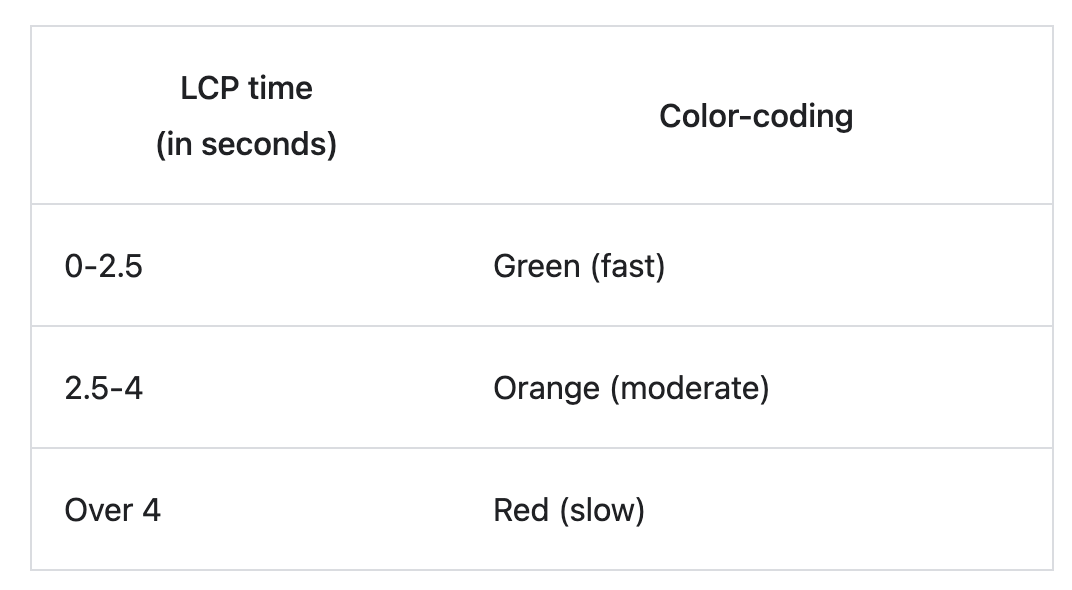
LCP is represented as a time in seconds. Ideally, the LCP should occur within the first 2.5 seconds of the page starting to load.
Google offers this scale for interpreting your LCP score:
Cumulative Layout Shift addresses the visual stability of a webpage. CLS quantifies how often users experience unexpected shifts in content layout while navigating a webpage.
This can occur when a visible element suddenly changes position or size, causing a "jump" on the page. Such disruptions can be frustrating and might lead to users accidentally clicking on unintended elements.
Google indicates a CLS score below 0.1 is considered good.
First Input Delay gauges the time it takes for a webpage to respond after a user first interacts with it, such as clicking on a link or pressing a button.
This metric is crucial as it sheds light on the user's first impression of a site's interactivity and responsiveness.
FID is represented as time in milliseconds. For an optimal user experience, FID should be less than 100 milliseconds.
Google has provided a range of tools for webmasters, developers, and even business owners to track and improve their website's vitals.
Gauging the performance of Core Web Vitals requires a combination of field and lab tools, along with some JavaScript solutions for those inclined to measure manually.
Field tools capture real-world user experience data. Some of the prominent field tools include:
Lab tools are designed for pre-release testing, allowing developers to diagnose issues during the build or optimization phase. Notable tools include:
Using a combination of field and lab tools provides the most holistic view of how a site performs both in real-world conditions and in controlled testing environments.
Once you've measured and understood your site's performance concerning Core Web Vitals, the next step is optimization. Improving these metrics often leads to a better user experience and potentially better search ranking.
For best results, integrate the optimization of Core Web Vitals into your regular web development and maintenance routine.
While Core Web Vitals are essential for understanding user experience, they are just the tip of the iceberg. Several other performance metrics can elevate the overall experience on your website.
FCP measures the time it takes from when the page starts loading to when any part of the page's content is rendered on the screen. It's an important metric to understand how quickly users perceive your site as being loaded. A faster FCP generally leads to a better user experience.
The Speed Index metric reflects how quickly content is visually displayed during page load. Sites with a lower Speed Index will have content that appears faster, offering a more engaging experience for users.
TTI gauges the time it takes for a page to become fully interactive, where elements respond to user interactions promptly. It's critical because a page that looks interactive should also function as such.
TBT quantifies the total time between First Contentful Paint (FCP) and Time to Interactive (TTI) where the main thread was blocked for long enough to prevent input responsiveness. Lower TBT values indicate that the page is more responsive to user inputs.
Often found in tools like Lighthouse, these scores give an aggregate view of your page's performance, accounting for various metrics. Improving individual metrics will typically lead to a higher overall score.
Regularly monitoring website performance is crucial for maintaining optimal user experience. Tools like Google Analytics, Google Search Console, and specialized monitoring solutions can provide insights into how your site is performing over time, enabling you to spot and resolve issues before they escalate.
Core Web Vitals are a set of specific metrics introduced by Google to measure the quality of user experience on web pages, focusing on loading performance, interactivity, and visual stability.
Google has incorporated Core Web Vitals into its ranking algorithm, meaning web pages optimized for these metrics could experience improved search visibility and potentially higher organic traffic.
A positive user experience, represented by good Core Web Vitals scores, can lead to increased user retention, lower bounce rates, and higher conversion rates, directly influencing a business's revenue.
Tools like Google's PageSpeed Insights, Lighthouse, and Chrome DevTools can provide insights into how a website performs concerning these vitals.
While the metrics themselves are universal, the impact and importance might vary by industry. However, for any industry relying on web traffic, optimizing for these metrics can enhance user experience.
Regular checks, at least quarterly, are advisable. However, after significant website changes or updates, an immediate audit can be beneficial.
Yes, third-party content can impact the loading times and visual stability of a page, potentially affecting metrics like LCP and CLS.
Optimization strategies include image and font optimization, reducing third-party script impacts, improving server response times, and addressing layout shifts.
While the metrics apply to both mobile and desktop, Google has emphasized the mobile experience, making it crucial for sites to optimize for mobile users especially.
Conversion rate is a measure of success for any campaign or website. It's the percentage of visitors who take a desired action. This action can vary depending on the goals of a website or campaign, from making a purchase, signing up for a newsletter, to downloading a white paper. Conversion rate serves as a key indicator of how well a website or campaign resonates with its target audience.
Conversion rates are more than just numbers; they're the heartbeat of our marketing efforts. Understanding their importance is crucial for several reasons. Firstly, they help in measuring the effectiveness of our marketing strategies. A high conversion rate indicates that our marketing messages are resonating well with our audience, leading them to take the desired action.
Conversion rates are vital in optimizing marketing budgets. By focusing on converting existing traffic efficiently, we can ensure a better return on investment (ROI). This approach is often more cost-effective than simply increasing traffic.
Analyzing conversion rates assists us in understanding our customers' needs and preferences, enabling us to tailor our offerings and communication more effectively. It's a tool for continuous improvement, allowing us to refine our marketing tactics to better serve our audience and achieve our business objectives.
Calculating the conversion rate is straightforward, yet it's a fundamental skill in our marketing toolbox. The formula is simple:
Conversion Rate=(Number of Conversions/Total Number of Visitors)×100
In this equation, a 'conversion' is defined as any desired action taken by a visitor, be it a purchase, a sign-up, or another key performance indicator relevant to our campaign.
For instance, if our website receives 1,000 visitors in a month and 50 of them make a purchase, our conversion rate is 5%.
Conversion Rate = (1000/50) × 100 = 5%.
This percentage is a crucial metric, providing a clear, quantifiable measure of how effectively our site turns visitors into customers or leads.
To enhance conversion rates, we need to focus on several key areas.
A website that's easy to navigate and enjoyable to use is more likely to convert visitors. This includes fast loading times, a clean design, and a mobile-responsive layout.
Content
Your content should be compelling, relevant, and targeted to our audience's interests and needs. Clear calls-to-action (CTAs) that guide users toward conversion points are crucial. These CTAs should stand out and be placed strategically throughout the website.
Trust signals
Customer testimonials, certifications, secure payment options, and other ways to build trust can also significantly impact conversion rates. They build confidence in our brand and assure visitors of their decision to engage with us.
Continuous testing and optimization
A/B testing different elements of our website, from headlines to button colors, can reveal what resonates best with our audience and lead to higher conversion rates.
Several factors can significantly impact conversion rates, and it's crucial to be aware of them to optimize our strategies effectively. These factors include:
Understanding these factors helps us to tailor our strategies more effectively, leading to improved conversion rates.
Conversion rates can vary significantly depending on the type of action and the context. Some common types include:
Each type of conversion rate offers unique insights and helps tailor strategies to specific goals and audience behaviors.
Measuring your conversion rate effectively requires the right tools and methods. Here are some essential ones:
Utilizing these tools and methods enables a data-driven approach to understanding and improving conversion rates.
In conclusion, understanding and optimizing conversion rates is essential for the success of any digital marketing strategy. It's not just about attracting visitors to a website but more importantly, about converting them into customers or leads. This requires a deep understanding of our audience, a user-friendly website, compelling content, and a continuous process of testing and optimization.
Conversion rates are a reflection of how well our marketing resonates with our audience. By focusing on these metrics, we can make more informed decisions, allocate our resources more effectively, and ultimately drive better results. The strategies and tools discussed are not one-time fixes but part of an ongoing process of refinement and improvement.
As we navigate the challenges and opportunities in digital marketing, the focus on conversion rates will remain a cornerstone of success, guiding us toward more effective and impactful marketing strategies.
What is a good conversion rate for my industry?
Good conversion rates can vary widely depending on the industry and the specific type of conversion. Typically, an average rate is around 2-5%, but it's essential to benchmark against industry-specific data.
How can I improve my website's conversion rate?
Focus on enhancing user experience, creating compelling and relevant content, optimizing your CTAs, and using A/B testing to fine-tune elements of your website.
Does website speed affect conversion rates?
Absolutely. Faster loading times improve user experience, which can significantly boost conversion rates.
How often should I analyze my conversion rates?
Regular analysis is key. Monthly reviews are standard, but for more dynamic campaigns, a bi-weekly or even weekly analysis might be necessary.
Can small changes really make a big difference in conversion rates?
Yes, even minor adjustments, like changing the color of a CTA button or tweaking headline copy, can lead to noticeable improvements in conversion rates.
What role does mobile optimization play in conversion rates?
With the increasing use of mobile devices, having a mobile-optimized website is crucial. It can significantly enhance user experience and thus positively impact conversion rates.
How important is A/B testing in improving conversion rates?
A/B testing is vital as it allows you to compare different versions of your web pages to determine which elements are most effective in driving conversions.
What is the best way to measure conversion rate success?
Use web analytics tools to track conversion rates over time, ensuring to consider external factors like seasonality or market trends that might impact results.
How can customer feedback be used to improve conversion rates?
Customer feedback helps in understanding user experience issues and preferences, which can inform website improvements and marketing strategies to boost conversions.
Is there a point where I should stop focusing on improving conversion rates?
Conversion rate optimization is an ongoing process. While there may be diminishing returns at some point, there's always room for testing and refinement.
In digital marketing, a 'conversion' is defined as any desired action taken by a visitor, be it a purchase, a sign-up, or another key performance indicator relevant to our campaign. This action varies depending on the objectives of a specific campaign or the overall business strategy. It could range from a user making a purchase, signing up for a newsletter, downloading a whitepaper, to even simply engaging with a piece of content.
At its core, conversion means the transition of potential customers into actual customers or taking one-time customers to repeated interactions. It's about creating an engaging journey for the user that leads them to a point where they take the desired action. This process directly impacts the return on investment (ROI) and overall growth of your business.
Conversions are tangible indicators of how well your marketing efforts are both resonating with the target audience and driving them toward the desired action. High conversion rates often signal that the marketing strategy aligns well with the audience's needs and interests, while lower rates might indicate a need for strategy revision.
With that in mind, here are a few ideas to take into consideration:
A Call to Action (CTA) is one of the first steps in driving conversions. It's the linchpin that prompts the user to take the next step, whether it's to buy, subscribe, download, or learn more. Crafting a compelling CTA involves clear, action-oriented language that resonates with the target audience, creating, for example, a sense of urgency or excitement. The key is to make it as easy and enticing as possible for users to take the next step.
Pop-ups, when used wisely, can be a powerful tool to boost conversions. The trick lies in timing and relevance. Pop-ups should appear at a moment when users are most likely to engage, such as after spending a certain amount of time on a page or when they exhibit exit intent. Careful customization of pop-ups to match user behavior and preferences can significantly enhance their effectiveness.
Content that establishes authority and trust in your brand involves creating high-quality, informative, relevant content that positions your brand as a thought leader in its field. This kind of content not only educates your audience but also builds trust, which users must feel before they decide to convert.
Long-form content (any written content over 1000 words) allows for in-depth exploration of topics, offering more value to the audience, which in turn can foster a stronger connection with your brand and lead to higher conversion rates. This type of content should be organized, engaging, and to the point to keep the audience’s attention. A well-written piece of long-form content can go a long way towards creating customer conversion.
Video content, dynamic and visually engaging, can convey complex messages simply and memorably, making it an excellent tool for conversion-focused campaigns.
Refining your email strategy to include personalized, targeted content can significantly increase conversion rates. This involves segmenting your audience and tailoring the emails to meet their specific interests and needs.
Creating a sense of urgency or FOMO can motivate users to convert. This can be achieved through time-sensitive offers, limited availability of products, or exclusive deals. The key is to make users feel they might miss out on a great opportunity if they don't act fast.
Encouraging brand loyalty and advocacy through rewards, exclusive content, or community engagement can lead to higher conversion rates. Loyal customers not only convert themselves but also act as brand ambassadors, bringing in new customers.
A fast, user-friendly website is fundamental for conversions. Users are more likely to convert if they have an easy experience, free of any technical glitches or navigational hurdles.
Abandoned carts are a missed conversion opportunity. Follow-up emails, personalized offers, or reminders are great strategies to help reclaim these potentially lost conversions.
To understand how to measure conversion from social media and advertising platforms, we’ll take a look at tracking pixels. These tiny pieces of code, when embedded on key pages of a website, provide invaluable insights into the effectiveness of your advertising campaigns.
Here's how it works: When a user clicks on an ad on a social media platform or a digital ad and then lands on your website, the pixel tracks their journey. If they complete a desired action, like making a purchase or signing up for a newsletter, the pixel triggers and records this as a conversion. This data is then sent back to the social media or advertising platform, allowing marketers like us to see which ads are driving conversions and understand the ROI (return on investment) for each campaign.
By analyzing conversion data through this tracking mechanism, marketers can adjust targeting, creative elements, and budget allocation to improve campaign performance. It also lends a hand in retargeting strategies, where ads are specifically shown to users who have interacted with the website but did not complete a conversion action.
Conversion rate measures the percentage of visitors who take the desired action out of the total number of visitors. This metric provides insight into the effectiveness of your marketing efforts and helps identify areas for improvement. A higher conversion rate typically indicates successful marketing strategies and user engagement.
Click-through rate (CTR) gauges the effectiveness of your online advertising campaigns or email blasts. It's calculated by dividing the number of clicks on a specific link by the number of times that link was shown (impressions), expressed as a percentage. A high CTR suggests that your ads or emails are relevant and appealing to your audience.
Cost per Conversion (CPC) is a metric that helps determine the cost-effectiveness of your digital marketing campaigns. It's calculated by dividing the total cost of the campaign by the number of conversions. CPC is especially helpful for budgeting and understanding the financial efficiency of different marketing strategies.
Cost per Acquisition (CPA) measures the total cost of acquiring a customer through a specific channel or campaign. This includes all campaign costs divided by the number of acquisitions. A lower CPA indicates that your strategy is more cost-effective for acquiring new customers.
Return on Investment (ROI) measures the profitability of your marketing efforts. It's calculated by subtracting the cost of the marketing activity from the revenue generated by that activity, and then dividing this amount by the cost of the marketing activity. A positive ROI is good news, indicating that the marketing efforts are generating more revenue than they are costing.
This metric differentiates between new and returning visitors in terms of their conversion rates. Good marketersto track both, as they offer insights into the effectiveness of your marketing strategies for attracting new customers and retaining existing ones.
The average time spent on the site by visitors can be a strong indicator of user engagement. A longer average visit duration often suggests that the content is relevant and engaging, which can positively influence the likelihood of conversion.
Bounce rate measures the percentage of visitors who leave the site after viewing only one page. A high bounce rate might indicate that the site is not meeting the expectations of the visitors, which could be due to various factors like poor user experience, irrelevant content, or slow loading times.
Google Analytics is an indispensable tool for understanding website traffic and user behavior. It provides a wealth of data on various aspects such as the source of the traffic, the behavior of users on the site, conversion rates, and much more. This kind of information makes optimization of your website and strategies a much simpler process.
Visual Website Optimizer (VWO) is a powerful tool for conducting A/B testing. It allows marketers to create different versions of their website or specific pages to determine which version performs better in terms of conversions. This data-driven approach helps in making informed decisions to optimize the website for a better user experience
Unbounce is a platform designed for creating, publishing, and testing landing pages. Its drag-and-drop interface makes it easy to build custom landing pages. Unbounce also offers a range of features like A/B testing and dynamic text replacement to enhance the effectiveness of your landing pages.
GTmetrix analyzes the loading speed of your website and provides actionable recommendations to improve it. Since website speed is a significant factor in user experience and search engine ranking, this tool is perfect for identifying and fixing issues that could be hindering your site's performance.
Crazyegg offers heat mapping tools that provide visual insights into where users are clicking, scrolling, and spending time on your website. This information is invaluable for understanding user behavior and preferences.
Kissmetrics specializes in tracking the customer journey on your website. It helps in understanding how users interact with your site, what paths they take, and what actions lead to conversions.
Clicktale provides detailed insights into how users interact with your website. It tracks mouse movements, clicks, scrolls, and more, offering a deep understanding of the user experience.
Optimizely is a platform for experimentation and personalization. It allows businesses to test different variations of their websites or apps to find out what works best for their audience.
Respecting user privacy is not just a legal requirement, but an easy way to build buyer trust. Effective consent preference management involves transparently collecting and handling user data. This means providing clear options for users to opt in or opt out of data collection, ensuring them that their preferences are respected throughout their interaction with your digital presence.
Cookies play a significant role in tracking user behavior and personalizing experiences. However, it's important to understand the different types of cookies - such as session cookies, persistent cookies, and third-party cookies - and their respective privacy implications. Clear communication about the use of these cookies to users helps maintain transparency and trust.
Comprehensive cookie management is a legal requirement with regulations like GDPR or CCPA, but also fosters respectful relationships with users regarding their data.
Implementing a robust cookie management strategy that includes user-friendly cookie consent banners, clear privacy policies, and options for cookie preferences can significantly enhance user trust, indirectly contributing to higher conversion rates.
In conclusion, conversion optimization is a multifaceted and ongoing process. It involves understanding and implementing various strategies, measuring their success through key metrics, utilizing essential tools for optimization, and navigating the complexities of user privacy. By focusing on these areas, businesses can create a more effective digital marketing strategy that not only drives conversions but also builds lasting relationships with their customers.
A conversion in digital marketing is when a user completes a desired action, such as making a purchase, signing up for a newsletter, downloading a guide, or any other measurable action that aligns with business objectives.
Conversion rate is calculated by dividing the number of conversions by the total number of visitors and multiplying by 100 to get a percentage. For example, if your site had 100 conversions from 2,000 visitors, your conversion rate would be 5%.
A good conversion rate varies by industry and business model. However, a rate between 2% and 5% is generally considered average for e-commerce.
Improving conversion rates can be achieved through various strategies such as optimizing website speed, ensuring mobile-friendliness, creating compelling CTAs, and providing an easy user experience.
A/B testing allows you to compare two versions of a webpage or element to see which performs better. It's essential for making data-driven decisions that can improve conversion rates.
User experience (UX) greatly impacts conversions. A positive UX, characterized by easy navigation, fast loading times, and appealing design, encourages users to complete the desired action.
Analytics provide insights into user behavior, traffic sources, bounce rates, and more, helping you understand what works and what doesn’t in your strategy, thereby guiding optimization efforts.
With the increasing use of mobile devices, mobile users are crucial for conversion rates. Websites and campaigns must be optimized for mobile to cater to this significant user base.
Absolutely. Social media can drive traffic to your website and influence conversions through targeted content, ads, and engagement strategies.
Key privacy considerations include obtaining user consent for data collection, transparently communicating data usage, and adhering to privacy laws like GDPR and CCPA.
Bounce rate is the percentage of visitors who land on a webpage and then leave without navigating to any other pages on the same website or initiating any other event on the page. In simpler terms, it indicates how many users "bounce" off a site after viewing only one page. High bounce rates can signal a disconnect between what users expect to see and what they actually encounter on a website, leading to lost opportunities and potentially decreased sales or conversions.
Bounce rate is calculated by dividing the total number of single-page sessions (where the visitor viewed only one page and then left) by the total number of sessions. This is then multiplied by 100 to give a percentage. The formula looks like this:
Bounce Rate= (Number of Single-Page Sessions Total Sessions) 100
For example, if your site receives 1000 sessions in a day, and 300 of those sessions are single-page visits, then your bounce rate would be 30%.
While often confused, bounce rate and exit rate are distinct metrics. The bounce rate, as explained, represents the percentage of visitors who navigate away after viewing only one page. On the other hand, the exit rate indicates the percentage of users who exit from a particular page, regardless of how many pages they've viewed on your site.
To elaborate, if a visitor browses three pages on your site and then leaves from the third page, that counts towards the exit rate of the third page but doesn't impact the site's bounce rate.
Bounce rate can vary based on industry, type of website, and the intent of the visitor. However, as a general guideline:
It's essential to understand the context behind your bounce rate. For example, news websites or blogs might naturally have a higher bounce rate as visitors come to read a specific article and then leave.
The time a webpage takes to load is a significant determinant of user experience. Visitors are likely to abandon a site that takes too long to load, contributing to a higher bounce rate. According to research, even a two-second delay in page load time can increase the bounce rate by up to 103%.
With a vast majority of users accessing the web through mobile devices, ensuring your website is mobile-friendly is paramount. A non-optimized mobile experience can lead to users leaving prematurely, pushing up your bounce rate. Features like responsive design, easy navigation, and quick load times on mobile are crucial.
Incorporating internal links encourages visitors to explore more of your website. An effective internal linking strategy provides users with additional relevant content, potentially reducing the likelihood of them bouncing off after reading just one page. A great place to include this strategy is within your blog pages.
Your website's content should not only be valuable but also easy to read and understand. Using shorter paragraphs, clear headings, and bullet points can enhance readability. Additionally, choosing the right font size, style, and color contrast can make a substantial difference in keeping users engaged. Even the use of images and videos in your content can really add to the overall value of the page, keeping the user engaged and more likely to explore more.
When users visit a page, they come with a particular intent, usually based on their search query. If your page content doesn't align with this intent, visitors are likely to leave quickly. It's crucial to ensure your content matches the expectations of your visitors and answers their queries effectively.
For lengthier content, incorporating a table of contents can be beneficial. It allows users to navigate to the sections most relevant to them easily. By providing this ease of navigation, visitors are more likely to spend more time on your site, thereby reducing the bounce rate.
At the core of any website lies its content. Ensure that your content is relevant, updated, and valuable to your target audience. Outdated information or irrelevant content can turn visitors away, leading to a higher bounce rate. Regularly revisiting and updating your content can keep it fresh and engaging.
The positioning of key elements on your website, such as call-to-action buttons, subscription forms, or contact information, plays a significant role. Ensure these elements are prominently placed and easily accessible. This will prompt users to interact more with your site rather than leaving after viewing just one page.
A fast-loading website is not just good for SEO; it's crucial for user experience. Implement strategies like browser caching, image optimization, and using Content Delivery Networks (CDNs) to speed up your website. A quicker website ensures users stay engaged and reduces the chance of them bouncing off.
While it might be tempting to include numerous pop-ups, ads, or auto-play videos, they can be off-putting to many visitors. Strive for a clean and straightforward design, minimizing distractions, and focusing on user experience.
A clear and intuitive navigation structure can guide visitors to the information they're seeking. Incorporate a user-friendly menu, breadcrumb navigation, and a robust search function to help users find their way around your site seamlessly.
Including multimedia elements like images, videos, and infographics can make your content more engaging and shareable. However, ensure that they are optimized for speed and are relevant to the content.
Live chat support can be a game-changer, especially for e-commerce websites or service providers. By addressing visitor queries in real time, you can significantly reduce bounce rates, converting potential exits into sales or leads.
Not all traffic is equal. Focus on attracting visitors who are more likely to engage with your content or services. This can be achieved through targeted advertising, SEO for specific keywords, and crafting valuable content that appeals to your target audience.
Utilize accurate keyword strategies and high-quality backlinks to ensure you're drawing in visitors genuinely interested in your content. Misleading titles or meta descriptions can bring in the wrong audience, leading to a higher bounce rate.
Meta descriptions play a pivotal role in setting user expectations. An accurately crafted meta description can give potential visitors a clear idea of what to expect from your page, ensuring that the content meets their search intent.
Broken pages are essentially like dead ends for the user journey on a website. When landing on a broken page, users start off with a poor experience and almost immediately bounce off the site. Whether that’s through a 404, 500, or any other kind of status code error page, it is best to clean up the site of these broken pages to reduce their influence on the overall bounce rate.
Segmentation allows you to view and analyze subsets of your Google Analytics data. By segmenting bounce rates, you can gain more in-depth insights into which specific groups of users are bouncing more frequently.
Different age groups may interact with your website differently. By analyzing bounce rates by age, you can tailor your content and design to better appeal to different age demographics.
Understanding how different genders interact with your site can offer insights into optimizing user experience and content relevance for both male and female visitors.
Google Analytics offers an "Affinity Category" which provides insights into visitors' lifestyle interests. Knowing which categories have higher bounce rates can guide your content creation and marketing efforts.
Geographical data can show how users from different regions or countries interact with your site. This information can be invaluable, especially if you're targeting a global audience.
Comparing bounce rates between new and returning visitors can offer insights into the effectiveness of your user retention strategies and the initial impression your site provides.
Different browsers might display your website differently. If a particular browser has a significantly higher bounce rate, it might indicate compatibility or display issues that need addressing.
In today's multi-device world, it's vital to understand how users on desktops, tablets, and mobile phones interact with your site. A high bounce rate on mobile, for instance, could indicate the need for better mobile optimization.
Understanding which traffic sources (e.g., organic search, social media, direct traffic) have the highest bounce rates can guide your marketing strategies and efforts.
Standard bounce rate metrics in Google Analytics don't account for time spent on a page. A user might spend several minutes on a single-page article, absorb all its content, and then leave, which would be counted as a bounce. By adjusting bounce rates using timer events (like triggering an event if a user stays more than a set amount of time), you can get a more accurate picture of user engagement.
As technology and user behavior evolve, so do metrics and interpretations in digital analytics. Understanding future trends can help website owners and marketers stay ahead of the curve. Here are some anticipated developments in the realm of bounce rates:
Bounce rate remains one of the most vital metrics for gauging visitor engagement on a website. While it can provide essential insights into user behavior, it's crucial to interpret this metric in context, considering the specific goals and nature of your website.
However, remember that a bounce rate, high or low, is just one piece of the puzzle. It's the holistic approach to user experience, content quality, technical optimization, and consistent monitoring that sets successful websites apart. By understanding and effectively addressing the factors that influence bounce rates, website owners can craft experiences that not only retain visitors but also convert them into loyal customers or subscribers.
Bounce rate is the percentage of visitors who navigate away from your website after viewing only one page. It provides an indication of the effectiveness of your landing page in keeping visitors engaged.
Not necessarily. For some websites, especially single-page sites or blogs, a higher bounce rate might be expected as users can find the information they need on one page. It's essential to interpret bounce rate in the context of the website's goals and nature.
While Google has not explicitly stated that bounce rate is a direct ranking factor, it can indirectly affect your rankings. A high bounce rate may indicate that your page is not satisfying users, which can impact your site's perceived quality and relevance.
There are several strategies, including improving page load speed, enhancing content quality and relevance, optimizing for mobile use, and providing clear call-to-action prompts. Tailoring strategies based on specific audience needs and behaviors is crucial.
Bounce rate refers to the percentage of visitors who leave after viewing only one page. In contrast, exit rate indicates the percentage of users who exit from a specific page, regardless of how many pages they viewed during their session.
Yes. For instance, e-commerce sites might be more concerned about high bounce rates because it could indicate lost sales opportunities. In contrast, a blog post might naturally have a higher bounce rate if readers find what they're looking for in one article.
Page speed is a critical factor in user experience. If a page takes too long to load, visitors may become impatient and leave before it fully renders. A study revealed that even a two-second delay in load time can increase bounce rates significantly.
With a significant proportion of users accessing websites via mobile devices, a site that isn't mobile-optimized can experience higher bounce rates. Mobile users expect a seamless experience tailored to their device's screen size and capabilities.
Yes, they can. While pop-ups and ads can be effective marketing tools, if overused or implemented poorly, they can be intrusive and drive visitors away, leading to a higher bounce rate.
Regularly analyzing bounce rate metrics is crucial. However, the frequency might vary based on your website's size, nature, and traffic volume. For active sites with frequent content updates or campaigns, a weekly or bi-weekly analysis might be appropriate. For more static sites, a monthly review could suffice.
